
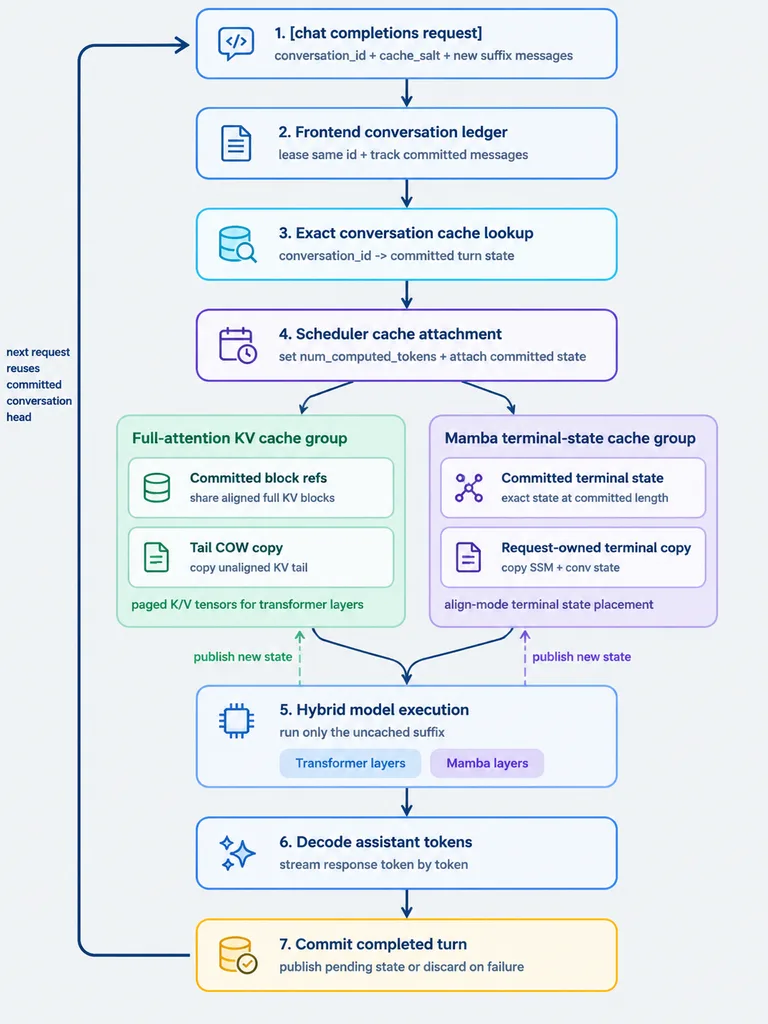
Infográfico de Fluxograma de Cache Híbrido
Gera um fluxograma limpo e moderno de arquitetura de sistemas com ramificações de cache paralelas. Modifique o título entre colchetes e rótulos para adaptá-lo a qualquer pipeline técnico.
Prompt
A clean vertical technical workflow infographic on a light gray background, designed in a minimalist modern product-diagram style with rounded white cards, thin colored outlines, simple vector line icons, dark navy text, and navy connector arrows. The layout is a centered top-to-bottom flowchart with 7 numbered main steps, two parallel cache-group panels branching between step 4 and step 5, and a thick dark navy loop arrow on the far left running from bottom back to top. Crisp sans-serif typography, generous spacing, subtle pastel accents, flat design with no gradients or drop shadows. - Step 1 (top center, blue outline, code/chat icon): Title "1. [chat completions request]", subtitle "conversation_id + cache_salt + new suffix messages". - Step 2 (blue outline, document icon): Title "2. Frontend conversation ledger", subtitle "lease same id + track committed messages". - Step 3 (cyan outline, database with magnifier icon): Title "3. Exact conversation cache lookup", subtitle "conversation_id -> committed turn state". - Step 4 (purple outline, scheduler icon): Title "4. Scheduler cache attachment", subtitle "set num_computed_tokens + attach committed state". Branching from Step 4 into two side-by-side rounded panels: - Left panel (pale green container, title "Full-attention KV cache group"): Contains two stacked cards: "Committed block refs" (subtitle "share aligned full KV blocks") and "Tail COW copy" (subtitle "copy unaligned KV tail"). Footer text: "paged K/V tensors for transformer layers". - Right panel (pale purple container, title "Mamba terminal-state cache group"): Contains two stacked cards: "Committed terminal state" (subtitle "exact state at committed length") and "Request-owned terminal copy" (subtitle "copy SSM + conv state"). Footer text: "align-mode terminal state placement". Merging from both panels into: - Step 5 (blue outline, microchip icon): Title "5. Hybrid model execution", subtitle "run only the uncached suffix", containing two pill tags: "Transformer layers" and "Mamba layers". - Step 6 (blue outline, sparkle icon): Title "6. Decode assistant tokens", subtitle "stream response token by token". - Step 7 (warm yellow-orange outline, database check icon): Title "7. Commit completed turn", subtitle "publish pending state or discard on failure". Left side: thick dark navy loop arrow running from step 7 back up to step 1, annotated with "next request reuses committed conversation head". Two dashed upward arrows from Step 7: a green dashed arrow pointing to the green cache panel labeled "publish new state", and a purple dashed arrow pointing to the purple cache panel labeled "publish new state".
O que você pode personalizar
Antes de gerar, troque estas partes do prompt pelo seu próprio tema ou texto.
[chat completions request]espaço reservado“1. [chat completions request]”texto entre aspas“conversation_id + cache_salt + new suffix messages”texto entre aspas“2. Frontend conversation ledger”texto entre aspas“lease same id + track committed messages”texto entre aspas“3. Exact conversation cache lookup”texto entre aspas“conversation_id -> committed turn state”texto entre aspas“4. Scheduler cache attachment”texto entre aspas
Detalhes do prompt
- Categoria
- Infográfico / Educação
- Modelo
- GPT IMAGE 2
- Custo por imagem
- 1K: 43 créditos · 2K: 86 créditos · 4K: 143 créditos
- Proporção
- 3:4
- Adicionado em