
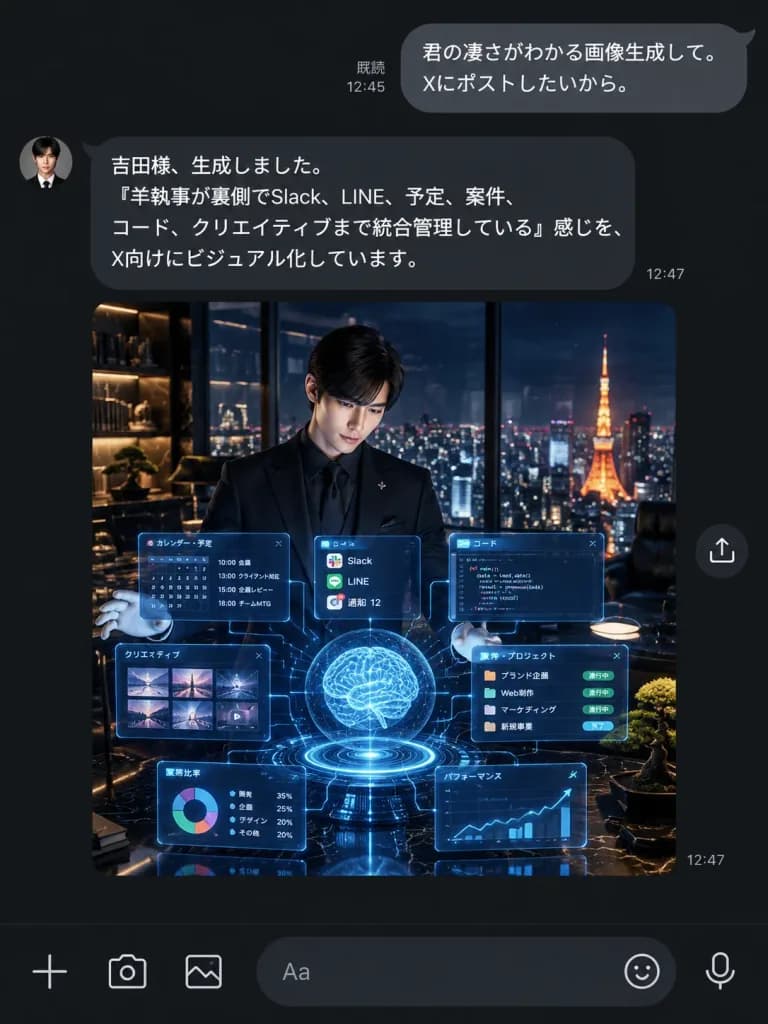
Captura de Chat do LINE com Assistente IA no Modo Escuro
Crie uma captura autêntica do LINE no modo escuro mostrando um assistente IA enviando uma imagem holográfica. Modifique as mensagens em japonês e a prévia.
Prompt
A realistic dark-mode LINE chat smartphone screenshot showing an AI assistant delivering an AI-generated image. UI Layout and Messaging: - Vertical dark charcoal/black messaging interface with authentic LINE typography and spacing. - Top right outgoing user bubble (rounded gray, white text): "[君の凄さがわかる画像生成して。 Xにポストしたいから。]" with read receipt "既読 12:45" on its left. - Left-aligned incoming assistant bubble (dark gray, white text) with a small circular butler portrait avatar on the left: "[吉田様、生成しました。 「羊執事が裏側でSlack、LINE、予定、案件、コード、クリエイティブまで統合管理している」感じを、 X向けにビジュアル化しています。]" with timestamp "12:47" at the lower right. - Directly below the assistant message: a large square embedded image preview with a small circular share icon floating to its right, and a "12:47" timestamp near the lower right corner. - Bottom input toolbar with 6 icons: plus icon, camera icon, photo gallery icon, rounded text input field showing placeholder "Aa", sticker smiley icon, and microphone icon. Embedded Preview Image Details: - Cinematic square scene of a young Japanese male butler in a sharp black suit, black dress shirt, and white gloves, standing in a luxury high-rise penthouse office at night. - He presents an intricate glowing cyan-blue holographic interface consisting of a glowing central brain sphere, circular base ring, task calendar panel, code editor panel, thumbnail grid, project card strip, pie chart tile, line graph tile, and floating notification cards connected by faint data lines. - In the background, floor-to-ceiling glass reveals a panoramic Tokyo night skyline with Tokyo Tower illuminated in warm orange. Luxury interior with warm shelf lighting, dark marble, and a manicured bonsai. Style: Pristine mobile UI screenshot, sharp Japanese font rendering, accurate dark mode colors, clean chat bubble geometry, no watermark, no extraneous notifications or headers.
O que você pode personalizar
Antes de gerar, troque estas partes do prompt pelo seu próprio tema ou texto.
“with read receipt”texto entre aspas“羊執事が裏側でSlack、LINE、予定、案件、コード、クリエイティブまで統合管理している”texto entre aspas“with timestamp”texto entre aspas“12:47”texto entre aspas“Aa”texto entre aspas
Detalhes do prompt
- Categoria
- Design UI / UX
- Modelo
- GPT IMAGE 2
- Custo por imagem
- 1K: 43 créditos · 2K: 86 créditos · 4K: 143 créditos
- Proporção
- 3:4
- Adicionado em