
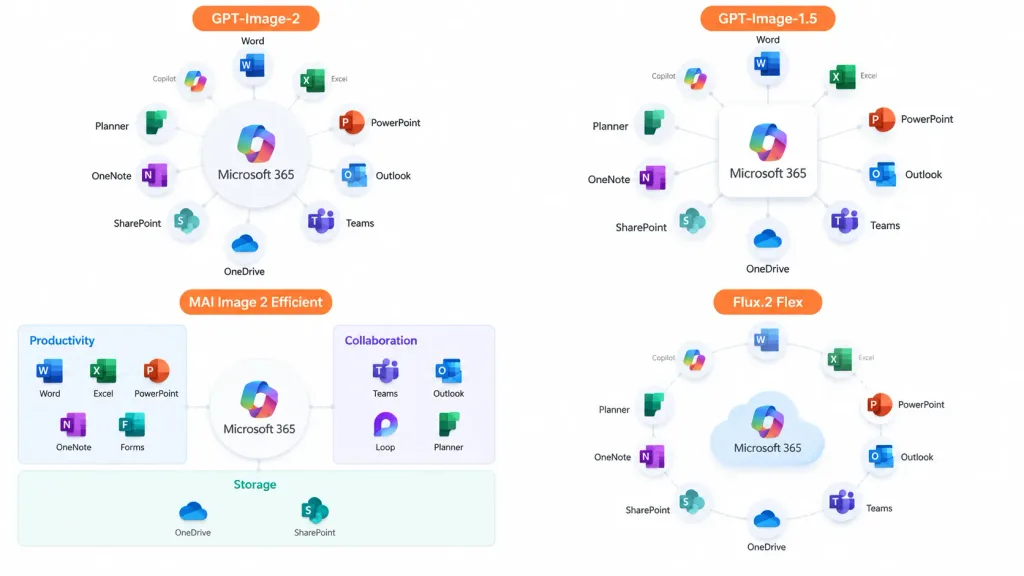
Infografika Porównawcza Ekosystemu Oprogramowania
Generuje slajd prezentacji w czterech ćwiartkach porównujący diagramy ekosystemu w różnych stylach. Zmień nazwy produktów i aplikacji wedle uznania.
Prompt
A clean 16:9 presentation comparison infographic showing the [Microsoft 365] ecosystem concept displayed across four quadrants in a 2×2 grid with generous whitespace and no hard divider lines, on a solid white background. Each quadrant displays an app ecosystem diagram centered on [Microsoft 365], surrounded by recognizable colored Microsoft app icons (Word, Excel, PowerPoint, Outlook, Teams, OneDrive, SharePoint, OneNote, Planner, Forms, Loop, Copilot) with crisp English labels and light gray connector lines. Each quadrant includes an orange label tag at the top: 1. Top-left: "[GPT-Image-2]" — polished circular hub diagram with app cards arranged radially around the central hub. 2. Top-right: "[GPT-Image-1.5]" — simplified radial hub diagram with icons orbiting a central square box. 3. Bottom-left: "[MAI Image 2 Efficient]" — structured dashboard-style diagram organized into labeled categories such as Productivity, Collaboration, and Storage. 4. Bottom-right: "[Flux.2 Flex]" — soft circular diagram with floating app icons orbiting a stylized cloud icon. Style: Modern corporate slide design, crisp vector icons, subtle drop shadows, clean typography, official Microsoft blue, green, orange, and purple color palette.
Co możesz dostosować
Przed generowaniem zamień te części promptu na własny temat lub tekst.
[Microsoft 365]symbol zastępczy[GPT-Image-2]symbol zastępczy[GPT-Image-1.5]symbol zastępczy[MAI Image 2 Efficient]symbol zastępczy[Flux.2 Flex]symbol zastępczy
Szczegóły promptu
- Kategoria
- Infografika / Edukacja
- Model
- GPT IMAGE 2
- Koszt za obraz
- 1K: 43 kredytów · 2K: 86 kredytów · 4K: 143 kredytów
- Proporcje
- 16:9
- Dodano