
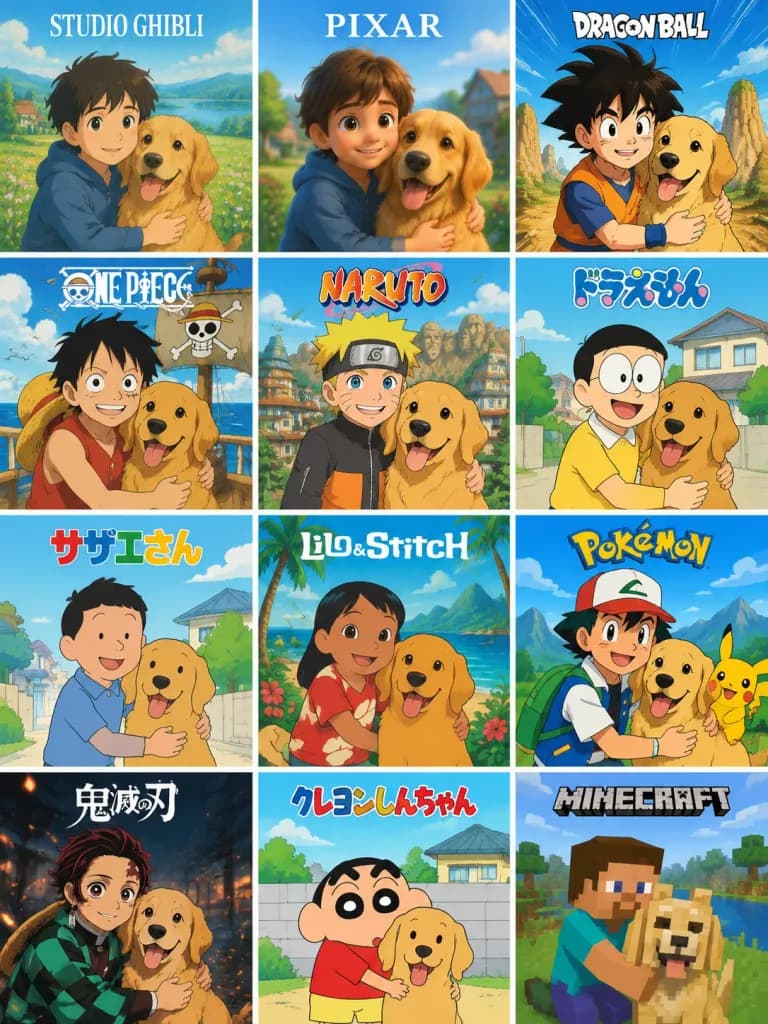
12가지 애니메이션 스타일 변환 그리드
소년과 반려견 사진을 12가지 유명 애니메이션 및 게임 화풍의 세로 그리드 비교 시트로 변환합니다. 대괄호 안의 라벨을 수정하여 원하는 스타일로 변경할 수 있습니다.
프롬프트
Using the provided reference photo, create a single vertical comparison sheet transforming the boy-and-dog photo into a 3-column by 4-row grid of exactly 12 square panels, separated by thin white gutters. Each panel depicts the same composition, preserving the boy and dog, their closeness, and their relative pose from the reference photo, reimagined in a distinct animation or gaming art style with matching linework, palette, character proportions, and themed backgrounds. At the top of each panel, include a bold, centered franchise style label: 1. Studio Ghibli style, soft hand-painted pastoral anime look; labeled "[STUDIO GHIBLI]". 2. Pixar style, polished 3D family animation look; labeled "[PIXAR]". 3. Dragon Ball style, dynamic shonen action look with speed lines and rocky landscape; labeled "[DRAGON BALL]". 4. One Piece style, nautical pirate adventure look with ship details; labeled "ONE PIECE". 5. Naruto style, ninja anime aesthetic with village rooftops and leaf headband styling; labeled "NARUTO". 6. Doraemon style, bright suburban retro children's anime look; labeled "ドラえもん". 7. Sazae-san style, classic retro Japanese family cartoon aesthetic; labeled "サザエさん". 8. Lilo & Stitch style, tropical island 2D animation look; labeled "Lilo & Stitch". 9. Pokémon style, vibrant creature companion trainer adventure look; labeled "[POKÉMON]". 10. Demon Slayer style, dramatic dark fantasy anime with traditional linework and glowing breathing particles; labeled "鬼滅の刃". 11. Crayon Shin-chan style, whimsical minimalist curved line art look; labeled "クレヨンしんちゃん". 12. Minecraft style, blocky 3D voxel pixelated sandbox look; labeled "[MINECRAFT]". Constraints: Maintain exactly 12 panels arranged left-to-right, top-to-bottom. Do not add extra panels, borders, or text outside the specified style labels. Clean poster presentation.
바꿔 쓸 수 있는 부분
생성하기 전에 프롬프트의 이 부분을 원하는 주제나 문구로 바꿔 보세요.
[STUDIO GHIBLI]자리 표시자[PIXAR]자리 표시자[DRAGON BALL]자리 표시자[POKÉMON]자리 표시자[MINECRAFT]자리 표시자“ONE PIECE”따옴표 안 문구“NARUTO”따옴표 안 문구“ドラえもん”따옴표 안 문구
프롬프트 정보
- 카테고리
- 애니메이션 / 만화
- 모델
- GPT IMAGE 2
- 이미지당 비용
- 1K: 43 크레딧 · 2K: 86 크레딧 · 4K: 143 크레딧
- 화면 비율
- 3:4
- 추가일