
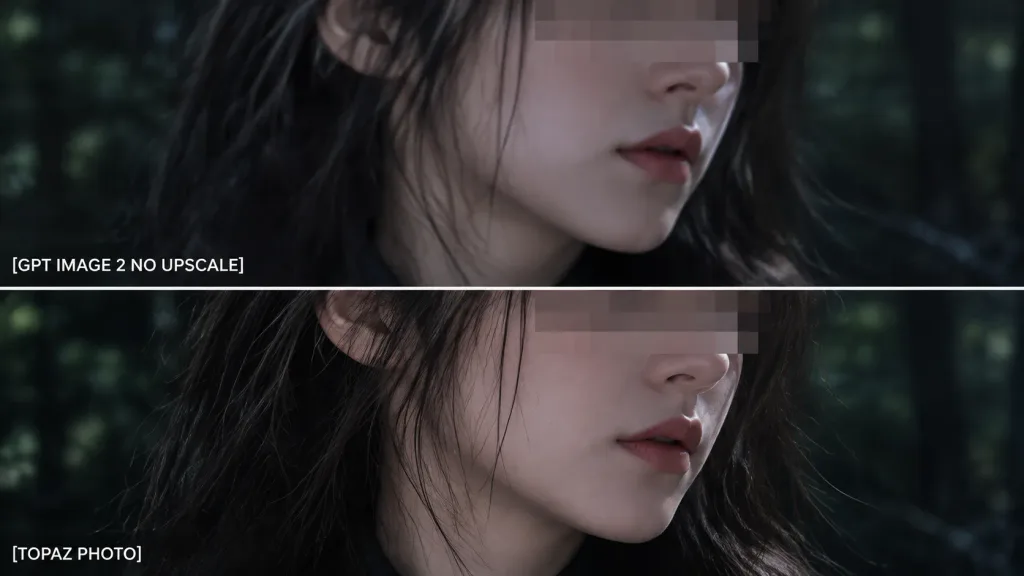
Zweiteiliger Zoom-Vergleichsausschnitt
Erzeugt eine Detail-Vergleichsansicht aus zwei übereinanderliegenden Panels mit Beschriftungen. Text und Hintergrund lassen sich für Tests anpassen.
Prompt
Using the reference photo as the source image, create an extreme zoom-in crop for a detail-comparison view: - Composition: Two stacked horizontal comparison panels separated by a clean divider line. Crop tightly around the subject's face, hair, jawline, and neck so the facial area occupies most of the frame, showing only slivers of the [forest background] along the edges. - Elements & Text: Preserve the existing anonymizing face blocks. Display exactly two white text labels on the left: "[GPT IMAGE 2 NO UPSCALE]" in the upper panel and "[TOPAZ PHOTO]" in the lower panel. - Lighting & Style: Retain the dark cinematic lighting, authentic colors, and side-by-side sharpness differences. - Constraints: Do not add new objects, modify the subject, or add extra text.
Was Sie anpassen können
Ersetzen Sie diese Teile des Prompts vor dem Generieren durch Ihr eigenes Motiv oder Ihren eigenen Text.
[forest background]Platzhalter[GPT IMAGE 2 NO UPSCALE]Platzhalter[TOPAZ PHOTO]Platzhalter
Prompt-Details
- Kategorie
- Infografik / Bildung
- Modell
- GPT IMAGE 2
- Kosten pro Bild
- 1K: 43 Credits · 2K: 86 Credits · 4K: 143 Credits
- Seitenverhältnis
- 16:9
- Hinzugefügt