
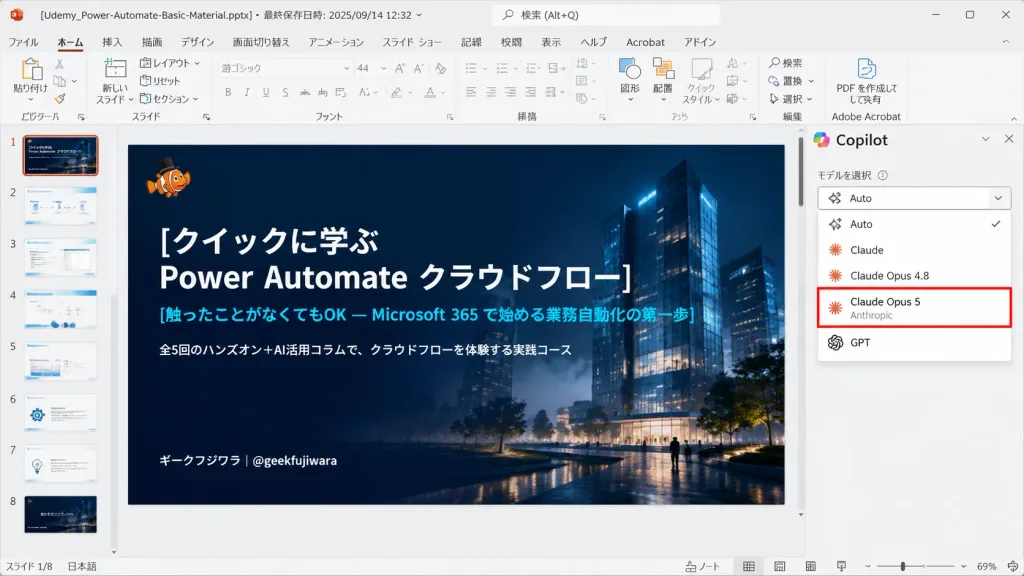
PowerPoint-Screenshot mit KI-Modell-Auswahl
Erzeugt einen realistischen japanischen PowerPoint-Screenshot mit dunkler Titelfolie und KI-Seitenleiste. Texte, Autor und hervorgehobenes Modell anpassbar.
Prompt
Realistic 16:9 desktop screenshot of Microsoft PowerPoint running on Windows in Japanese, capturing an active slide editing session. The PowerPoint interface features a light gray chrome, Japanese ribbon tabs (File, Home, Insert, Draw, Design, Transitions, Animations, Slide Show, Record, Review, View, Help), and add-in icons. Top title bar displays the file name "[Udemy_Power-Automate-Basic-Material.pptx]" alongside last-saved metadata. The left thumbnail panel displays exactly 8 slide thumbnails numbered 1 to 8; Slide 1 is highlighted with an orange selection border. The central slide canvas features a dark, cinematic title slide with a deep navy gradient overlay atop a night architectural render of glowing glass towers, subtle mist, and small walking silhouettes. In the top-left of the slide sits a tiny orange clownfish mascot wearing a black top hat. The slide text is left-aligned in crisp Japanese typography: large bold white title "[クイックに学ぶ\nPower Automate クラウドフロー]", cyan subtitle "[触ったことがなくてもOK — Microsoft 365 で始める業務自動化の第一歩]", smaller white description "[全5回のハンズオン+AI活用コラムで、クラウドフローを体験する実践コース]", and bottom-left author tag "[ギークフジワラ|@geekfujiwara]". On the right side, an open AI assistant sidebar showcases a model selection dropdown menu listing exactly five options: "Auto" with a checkmark, "Claude", "Claude Opus 4.8", "Claude Opus 5" highlighted by a prominent red rectangular outline with small gray "Anthropic" subtext, and "GPT". Authentic UI elements including status bar, scrollbars, zoom slider, and clean vector icons, with no browser chrome.
Was Sie anpassen können
Ersetzen Sie diese Teile des Prompts vor dem Generieren durch Ihr eigenes Motiv oder Ihren eigenen Text.
[Udemy_Power-Automate-Basic-Material.pptx]Platzhalter[クイックに学ぶ\nPower Automate クラウドフロー]Platzhalter[触ったことがなくてもOK — Microsoft 365 で始める業務自動化の第一歩]Platzhalter[全5回のハンズオン+AI活用コラムで、クラウドフローを体験する実践コース]Platzhalter[ギークフジワラ|@geekfujiwara]Platzhalter“Auto”Text in Anführungszeichen“Claude”Text in Anführungszeichen“Claude Opus 4.8”Text in Anführungszeichen
Prompt-Details
- Kategorie
- UI-/UX-Design
- Modell
- GPT IMAGE 2
- Kosten pro Bild
- 1K: 43 Credits · 2K: 86 Credits · 4K: 143 Credits
- Seitenverhältnis
- 16:9
- Hinzugefügt