
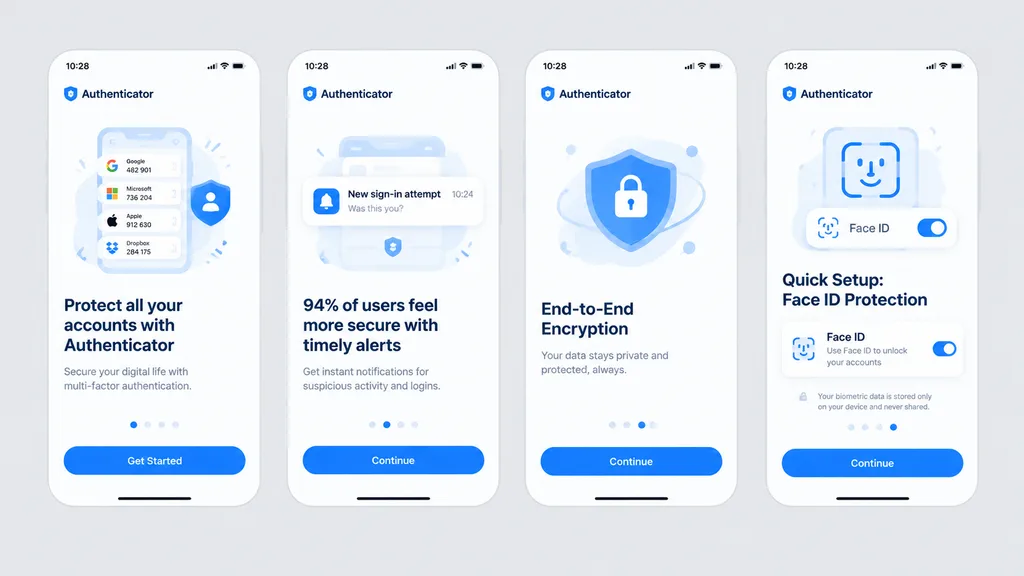
Onboarding-Flow für Authentifikator-App
Erstellt ein klares Vier-Bildschirm-Onboarding-Mockup für eine Sicherheits-App auf grauem Hintergrund. Akzentfarbe und Texte flexibel anpassen.
Prompt
Clean front-facing design mockup of a mobile onboarding flow, recreating the UI from the reference photo. Display exactly four iPhone-style screens arranged horizontally and evenly spaced across a solid light gray background, completely flat with no perspective distortion, glare, browser chrome, or laptop borders, appearing as a crisp Figma export. Consistent white light theme with [bright blue] as the primary accent color, rounded card frames, modern typography hierarchy, vector icons, and clean UI illustrations. App name is [Authenticator], status bar time displays [10:28]. Four screens from left to right: 1) Authenticator accounts list with headline “Protect all your accounts with Authenticator” and CTA button “Get Started”. 2) Security alert notifications with headline “94% of users feel more secure with timely alerts” and CTA button “Continue”. 3) Shield and lock illustration with headline “End-to-End Encryption” and CTA button “Continue”. 4) Face ID setup with biometric scanning graphic, headline “Quick Setup: Face ID Protection”, Face ID toggle card, privacy note, and CTA button “Continue”.
Was Sie anpassen können
Ersetzen Sie diese Teile des Prompts vor dem Generieren durch Ihr eigenes Motiv oder Ihren eigenen Text.
[bright blue]Platzhalter[Authenticator]Platzhalter“Protect all your accounts with Authenticator”Text in Anführungszeichen“Get Started”Text in Anführungszeichen“94% of users feel more secure with timely alerts”Text in Anführungszeichen“Continue”Text in Anführungszeichen“End-to-End Encryption”Text in Anführungszeichen“Quick Setup: Face ID Protection”Text in Anführungszeichen
Prompt-Details
- Kategorie
- UI-/UX-Design
- Modell
- GPT IMAGE 2
- Kosten pro Bild
- 1K: 43 Credits · 2K: 86 Credits · 4K: 143 Credits
- Seitenverhältnis
- 16:9
- Hinzugefügt