
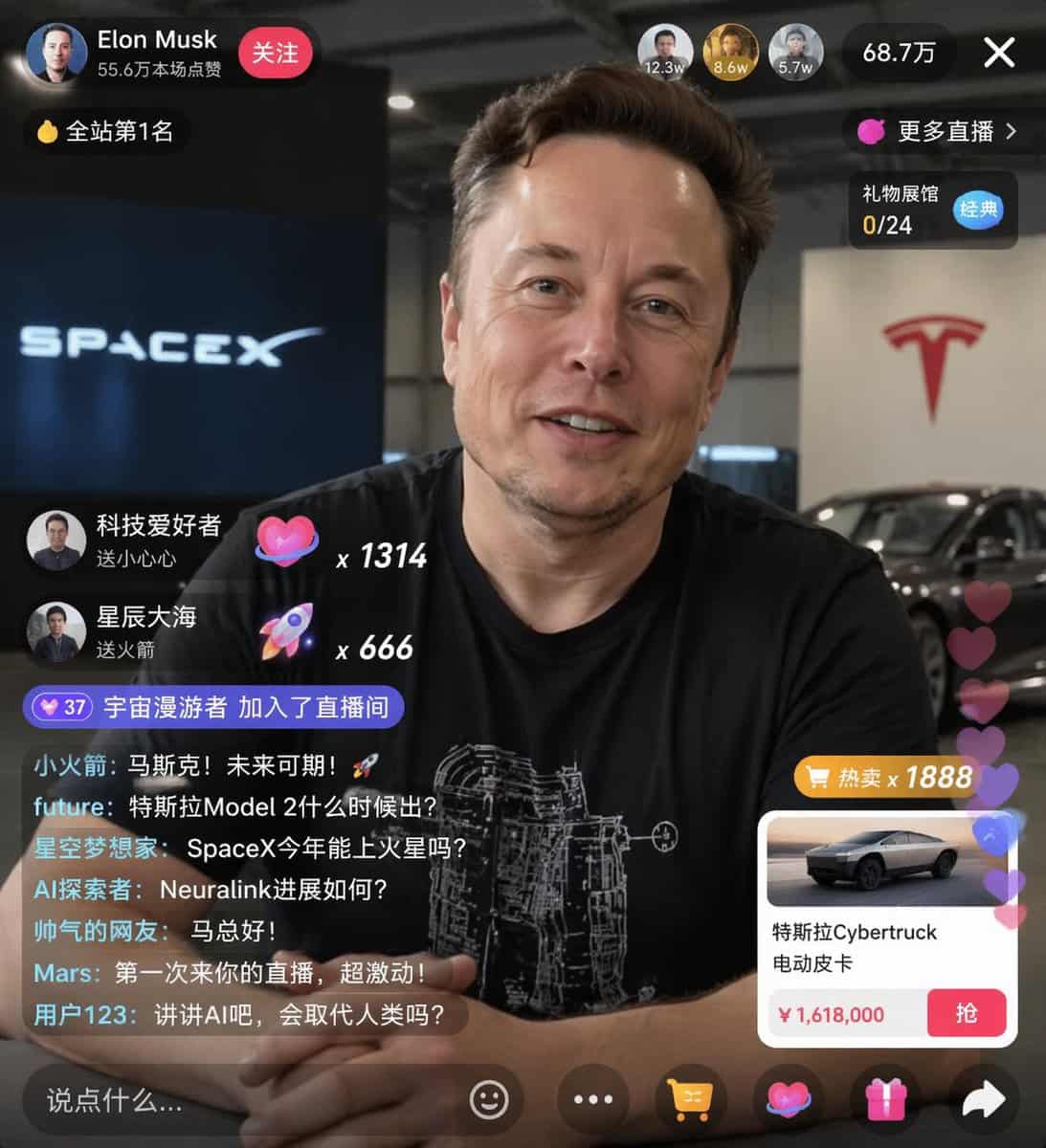
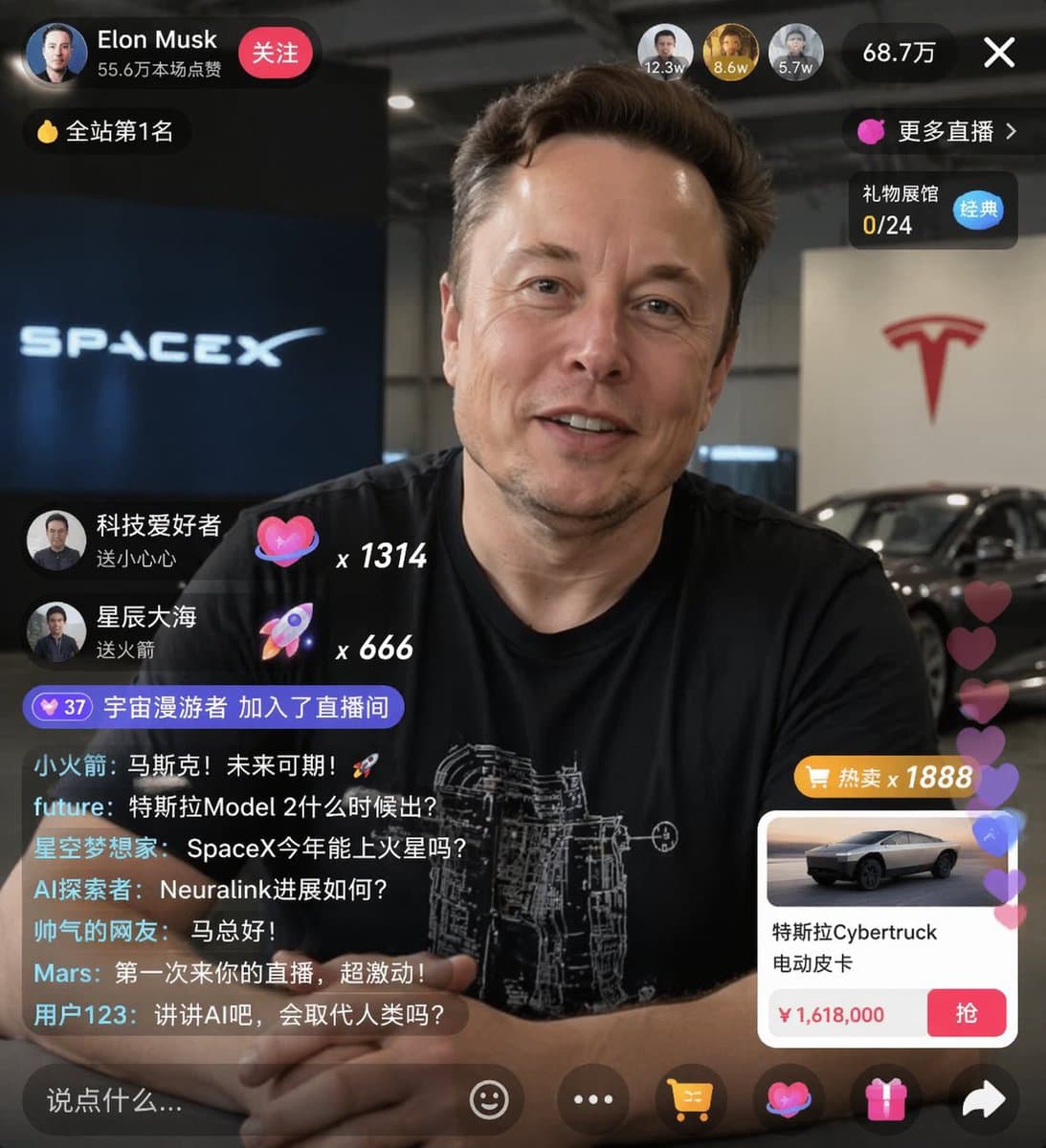
E-Commerce-Livestream UI-Mockup
{ „type“: „Livestream-UI-Mockup“, „Betreff“: { „Beschreibung“: „Porträt von {argument name=\"host name\" default=\"Elon Musk\"}, lächelnd, trägt ein schwarzes T-Shirt mit einer weißen technischen schematischen Grafik“,…
Prompt
{ „type“: „Livestream-UI-Mockup“, „Betreff“: { „Beschreibung“: „Porträt von {argument name=\"host name\" default=\"Elon Musk\"}, lächelnd, trägt ein schwarzes T-Shirt mit einer weißen technischen schematischen Grafik“, „Hintergrund“: „Die linke Seite zeigt einen Bildschirm mit dem Text „{argument name=\"left background logo\" default=\"SPACEX\"}“, die rechte Seite zeigt einen roten „{argument name=\"right background logo\" default=\"Tesla T logo\"}“ und ein dunkles Auto.“ }, „ui_overlay“: { „top_header“: { „host_info“: „Avatar, Name ‚{argument name=\"host name\" default=\"Elon Musk\"}‘, Subtext ‚556.000 Likes‘, roter ‚Folgen‘-Button“, „rank_badge“: „Goldmünzensymbol mit ‚Nr. 1 auf der Website‘“, „viewer_stats“: „3 Top-Zuschauer-Avatare mit ‚12.3w‘, ‚8.6w‘, ‚5.7w‘, insgesamt ‚687.000‘, ‚X‘-Schließen-Button“, „right_links“: „‚Mehr Live-Übertragung >‘, ‚Gift Exhibition Hall 0/24‘ mit blauem ‚Classic‘-Tag“ }, „mid_left_gifts“: { "Anzahl": 2, „Artikel“: [ „Avatar ‚Technikbegeisterter‘, ‚Sende ein kleines Herz‘, Herzsymbol x 1314“, „Avatar ‚Sternenmeer‘, ‚Rakete senden‘, Raketensymbol x 666“ ] }, "bottom_left_chat": { „system_message“: „Level-37-Abzeichen ‚Space Wanderer ist dem Live-Übertragungsraum beigetreten‘“, „message_count“: 7, „Nachrichten“: [ „Kleine Rakete: Musk! Die Zukunft ist vielversprechend! 🚀“, „Zukunft: Wann erscheint das Tesla Model 2?“, „Star Dreamers: Kann SpaceX dieses Jahr zum Mars fliegen?“, „AI Explorer: Wie ist der Fortschritt von Neuralink?“, „Hübscher Internetnutzer: Hallo Herr Ma!“, „Mars: Es ist das erste Mal, dass ich zu Ihrer Live-Übertragung komme, ich bin so aufgeregt!“, „Benutzer 123: Reden wir über KI. Wird sie den Menschen ersetzen?“ ] }, "bottom_right_product_card": { „hot_tag“: „orange ‚Hot Sale x 1888‘“, „Bild“: „Tesla Cybertruck“, „title“: „{argument name=\"product name\" default=\"特斯拉Cybertruck 电动皮卡\"}“, „price“: „{argument name=\"product price\" default=\"¥ 1,618,000\"}“, „button“: „roter ‚Greif‘-Knopf“, „floating_animation“: „Durchscheinende Herzen schweben am rechten Rand hoch“ }, "bottom_bar": { "input_field": "'Sag etwas...'", „icons“: [„Smiley“, „drei Punkte“, „Warenkorb“, „Geschenkbox“, „Teilen“] } } }
So verwenden Sie diese Eingabeaufforderung
Lesen Sie die vollständige E-Commerce-Livestream UI-Mockup-Eingabeaufforderung und ermitteln Sie die Anforderungen an Thema, Stil, Kamera, Beleuchtung und Komposition, bevor Sie sie erstellen.
Ersetzen Sie Platzhalter in Klammern oder im Argumentstil durch Ihre Anforderungen an Produkt, Charakter, Marke, Szene, Farbpalette oder Seitenverhältnis.
Öffnen Sie https://www.gptimagehub.com/de/generate?promptId=cmogwxwj3009hzpdyjdxym0wy, generieren Sie das Bild und verfeinern Sie die Eingabeaufforderung bei Bedarf mit spezifischeren Betreff-, Text-, Layout- oder negativen Einschränkungen.
Schnelle FAQ
Wofür eignet sich die Eingabeaufforderung E-Commerce-Livestream UI-Mockup am besten?
Diese Eingabeaufforderung eignet sich am besten für ui-/ux-design-Bilder, bei denen Sie eine wiederverwendbare Struktur, eine detaillierte visuelle Ausrichtung und eine konsistente Ausgabequalität wünschen.
Kann ich die Eingabeaufforderung vor dem Generieren bearbeiten?
Ja. Der vollständige Aufforderungstext ist auf dieser Seite sichtbar, sodass Sie Betreff, Produktnamen, Farben, Komposition, Kamerabegriffe, Seitenverhältnis und Stilhinweise vor der Generierung ändern können.
Welches Modell soll ich mit dieser Aufforderung verwenden?
Verwenden Sie das in den Metadaten der Eingabeaufforderung angezeigte Modell als Standardstartpunkt. Wenn ein anderes Bildmodell dasselbe Seitenverhältnis und denselben Anweisungsstil unterstützt, können Sie die Eingabeaufforderung anpassen und die Ergebnisse vergleichen.