
Bóc Tách Trang Phục Y2K Trên Windows Paint
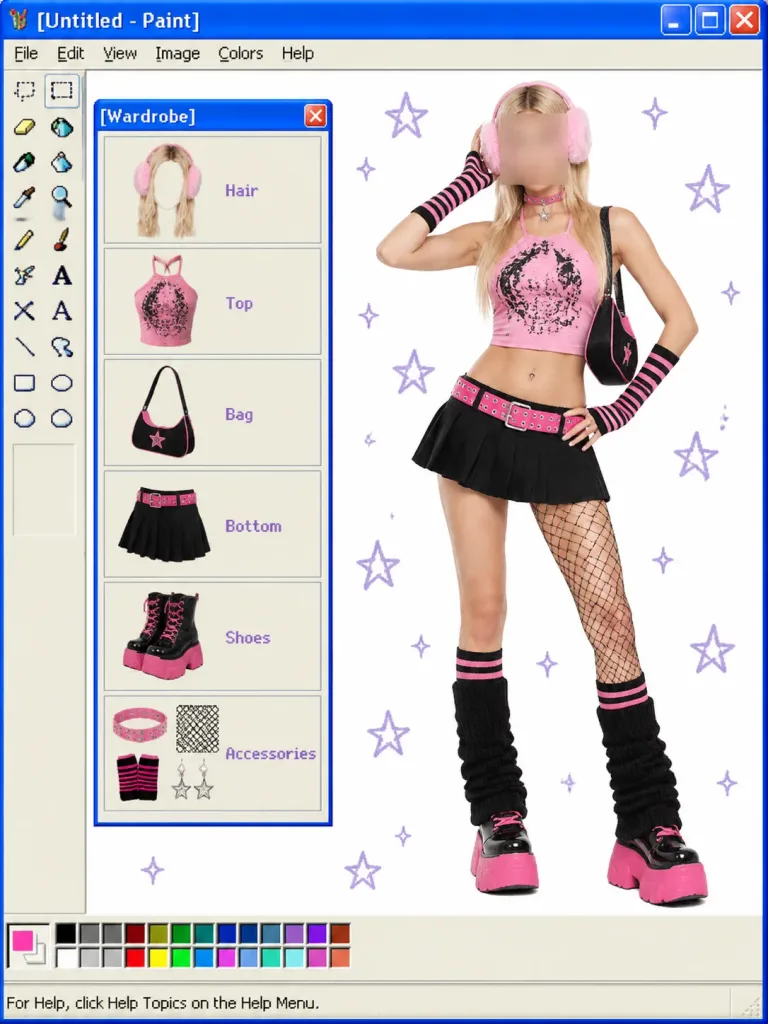
Tạo ảnh ghép phong cách Windows XP Paint retro hiển thị bóc tách chi tiết outfit OOTD chuẩn Y2K. Dễ dàng đổi phong cách trang phục, tiêu đề và danh mục.
Prompt
A digital collage set inside a retro Windows XP Microsoft Paint application interface, presenting a modular Y2K OOTD wardrobe breakdown. Interface Details: - Top blue Windows XP title bar reading "[Untitled - Paint]" with minimize, maximize, and red close buttons. - Classic menu bar showing File, Edit, View, Image, Colors, Help. - Left vertical tool palette containing the classic 16 Paint tool icons (selection, eraser, fill bucket, pencil, brush, airbrush, text, line, shapes). - Bottom color swatch palette with an active bright pink swatch, and status bar reading "For Help, click Help Topics on the Help Menu." Canvas Layout: - Center-Right: Full-body studio fashion photo of a young woman posing against the white canvas in a [pink-and-black Y2K cyber mall-goth] outfit, with one hand near her head and one on her hip. Her face is obscured by a soft square blur. She wears long blonde hair with fluffy pink earmuffs, a cropped pink graphic halter top, black pleated mini skirt with a hot-pink studded belt, black-and-pink shoulder bag, one-leg fishnet detail, striped socks, black leg warmers, and chunky pink platform shoes. - Left Panel: A floating Windows XP mini-window titled "[Wardrobe]" with a blue title bar and red close button. Inside are exactly 6 vertically stacked beige item cards with purple text labels and illustrated cutouts: 1) Hair — blonde hair with pink earmuffs 2) Top — pink graphic crop top 3) Bag — black and pink shoulder bag 4) Bottom — black pleated mini skirt with pink belt 5) Shoes — chunky black boots with pink soles 6) Accessories — grouped pink choker, fishnet swatch, wrist warmers, and star charms - Canvas Background: Pure white digital canvas dotted with scattered hand-drawn pale purple star and sparkle doodles. Style: Blend of clean studio portrait photography and 2000s pixel-accurate operating system UI elements.
Những phần bạn có thể tùy chỉnh
Trước khi tạo ảnh, hãy thay các phần này của prompt bằng chủ đề hoặc nội dung của bạn.
[Untitled - Paint]chỗ giữ chỗ[pink-and-black Y2K cyber mall-goth]chỗ giữ chỗ[Wardrobe]chỗ giữ chỗ“For Help, click Help Topics on the Help Menu.”văn bản trong ngoặc kép
Chi tiết prompt
- Danh mục
- Mạng xã hội
- Mô hình
- GPT IMAGE 2
- Chi phí mỗi ảnh
- 1K: 43 tín dụng · 2K: 86 tín dụng · 4K: 143 tín dụng
- Tỷ lệ khung hình
- 3:4
- Ngày thêm