
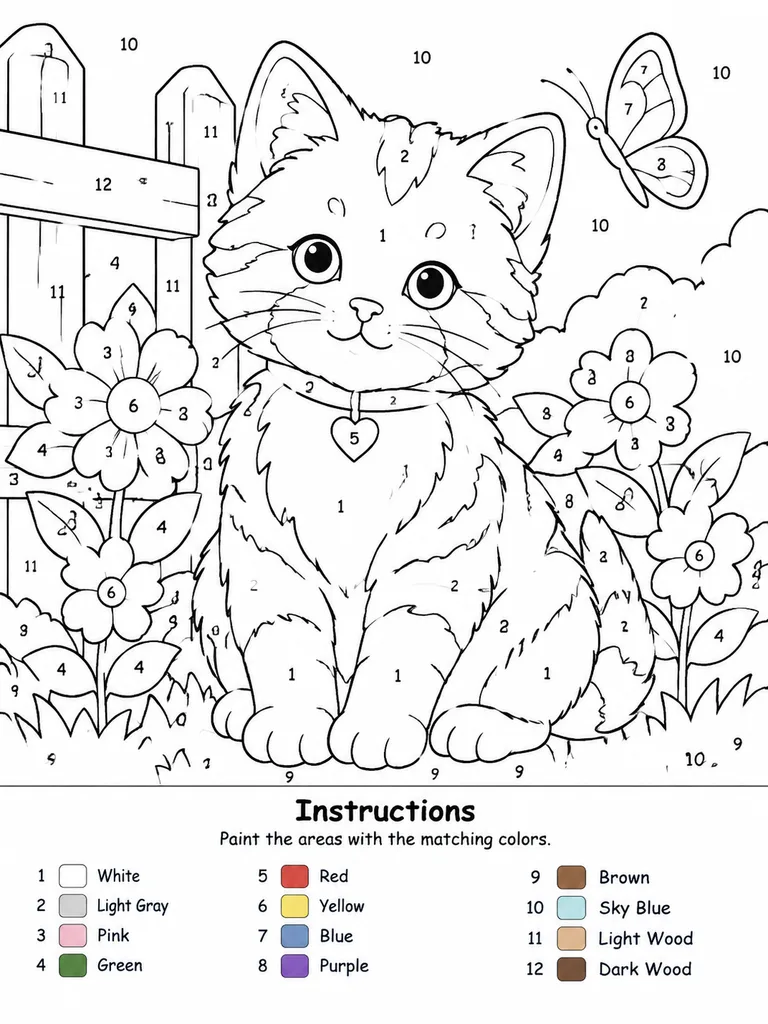
Mẫu Tranh Tô Màu Theo Số Có Thể In
Chuyển ảnh mẫu thành tranh tô màu theo số với các ô đánh số rõ ràng và bảng mã màu. Tùy chỉnh kích thước khung vẽ và số lượng màu sắc tối đa.
Prompt
Create a professional high-resolution paint-by-numbers template from the reference photo on a [A4 portrait ratio canvas] with a pure white background. The main artwork must be a clean black-and-white line drawing featuring only black outlines, black numbers, and white unfilled paintable areas. No color, gray tones, shading, textures, gradients, or pre-filled areas in the main drawing. Adaptively convert the reference photo into simplified, fully closed, easy-to-paint regions while retaining recognizable composition, main subjects, and key details. Choose an adaptive palette from 1 up to a maximum of [14 colors], merging similar tones unless distinction is essential. Every paintable region must contain a clearly centered, upright, legible black number corresponding to its assigned color. Dark or black areas from the reference must remain white numbered regions rather than filled black; only minimal fine line details (such as pupils or fine seams) may remain solid unnumbered lines. At the bottom of the canvas, include a neat legend section with the title “Instructions”, the subtitle “Paint the areas with the matching colors.”, and an aligned list of each number used, paired with a small color swatch and the English color name. Swatches appear exclusively in the legend.
Những phần bạn có thể tùy chỉnh
Trước khi tạo ảnh, hãy thay các phần này của prompt bằng chủ đề hoặc nội dung của bạn.
[A4 portrait ratio canvas]chỗ giữ chỗ[14 colors]chỗ giữ chỗ“Instructions”văn bản trong ngoặc kép“Paint the areas with the matching colors.”văn bản trong ngoặc kép
Chi tiết prompt
- Danh mục
- Áp phích và minh họa
- Mô hình
- GPT IMAGE 2
- Chi phí mỗi ảnh
- 1K: 43 tín dụng · 2K: 86 tín dụng · 4K: 143 tín dụng
- Tỷ lệ khung hình
- 3:4
- Ngày thêm