
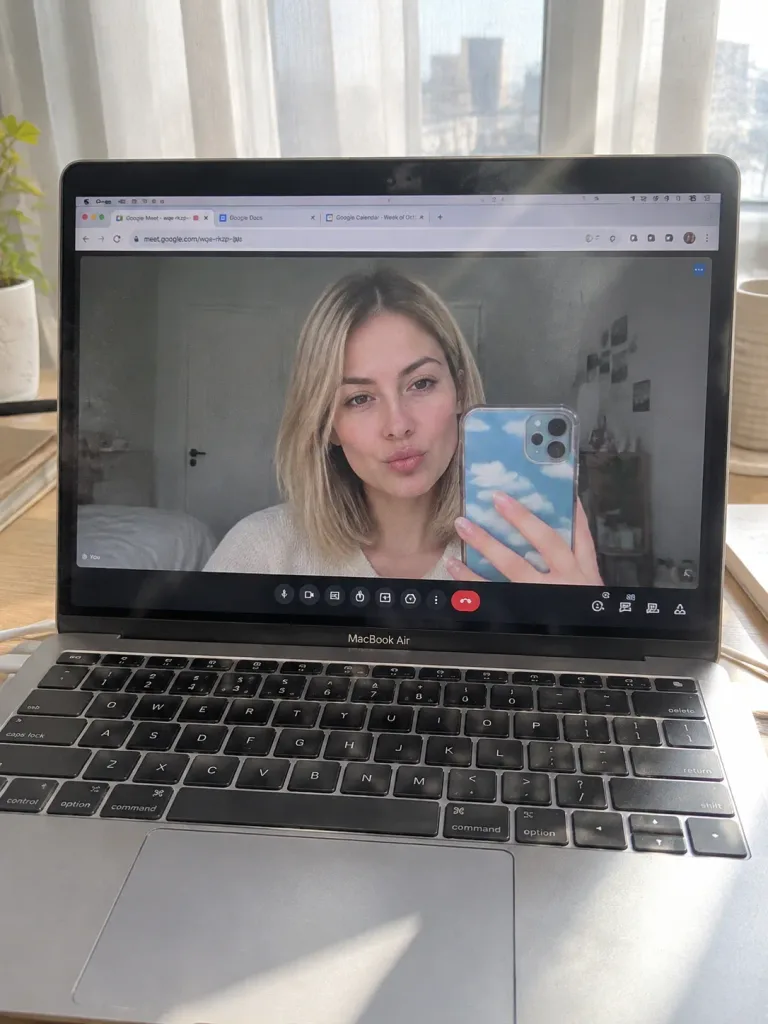
Màn Hình MacBook Hiển Thị Selfie Google Meet
Tạo ảnh chụp thực tế màn hình máy tính xách tay hiển thị selfie trong cuộc gọi video. Tùy chỉnh mẫu máy tính, mặt bàn, ốp điện thoại và biểu cảm khuôn mặt.
Prompt
A raw, handheld physical photograph of a [silver MacBook Air] sitting on a [light oak wooden desk]. Deep depth of field with everything in sharp focus from the keyboard to the window in the background, without artificial bokeh. Setting & Hardware: Bright morning daylight streams in through soft white curtains from a window behind the laptop, partially illuminating the keyboard and creating realistic sun-glare across the screen. Realistic surface imperfections include fine dust particles on the black keyboard keys, faint oily fingerprints on the screen bezel, and visible wood grain on the desk. Subtle moiré patterns are visible on the laptop display pixels. Screen Interface: The screen displays a browser window with active tabs including Google Meet, Google Docs, and Calendar. An active Google Meet call is in progress, with sharp and legible call controls (mute, camera, red end-call button) along the bottom. Video Call Subject: Inside the video call window, accurately preserve the face and identity of the woman from the reference photo. She has [shoulder-length straight blonde hair] and a [playful pout expression], holding up a smartphone with a [blue-and-white cloud-patterned case] to take a mirror selfie reflected through her webcam. Natural skin micro-texture and a soft satin glow are visible through the webcam feed.
Những phần bạn có thể tùy chỉnh
Trước khi tạo ảnh, hãy thay các phần này của prompt bằng chủ đề hoặc nội dung của bạn.
[silver MacBook Air]chỗ giữ chỗ[light oak wooden desk]chỗ giữ chỗ[shoulder-length straight blonde hair]chỗ giữ chỗ[playful pout expression]chỗ giữ chỗ[blue-and-white cloud-patterned case]chỗ giữ chỗ
Chi tiết prompt
- Danh mục
- Mạng xã hội
- Mô hình
- Nano Banana 2
- Chi phí mỗi ảnh
- 1K: 54 tín dụng · 2K: 81 tín dụng · 4K: 122 tín dụng
- Tỷ lệ khung hình
- 3:4
- Ngày thêm