
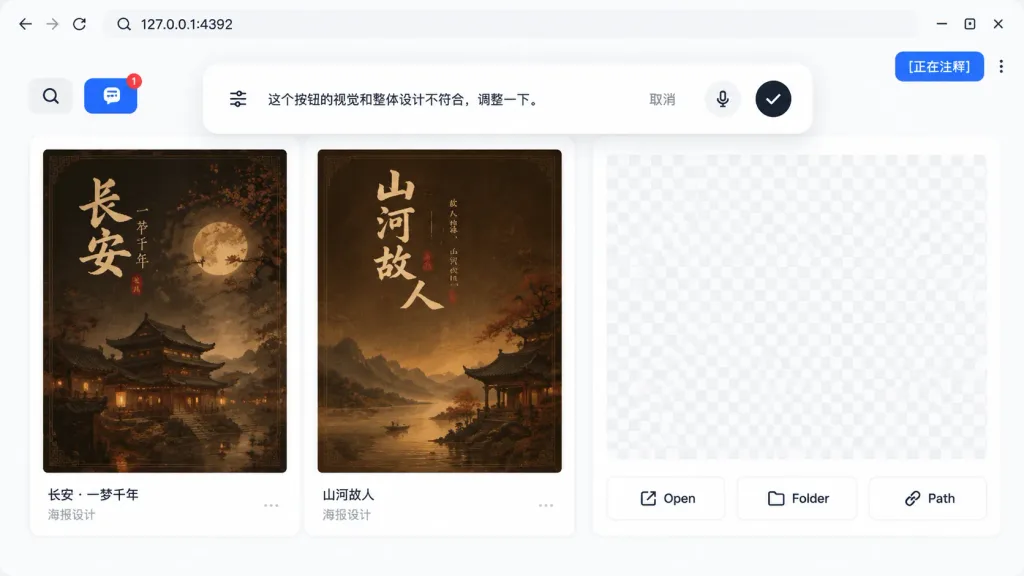
Giao Diện Chú Thích Ứng Dụng Web Cục Bộ
Tạo ảnh chụp màn hình UI trình duyệt chân thực hiển thị công cụ chú thích AI trên ứng dụng web cục bộ. Chỉnh sửa địa chỉ và nội dung bình luận để tùy biến.
Prompt
A realistic UI product screenshot showing a local web app preview environment based on the reference image context, set in a clean browser-like localhost workspace at [127.0.0.1:4392]. Clean white UI design, soft drop shadows, and modern rounded panels. The top browser bar displays the local address on the left and exactly three minimalist window control icons on the right. In the upper-right corner sits a vibrant blue annotation status pill displaying the text "[正在注释]" next to a vertical three-dot menu. The main workspace features a gallery-style UI containing Chinese poster card designs within rounded white panels. A left toolbar row includes a Search icon button and a blue comment annotation button showing a notification badge "1". Inside the workspace are at least two visible poster thumbnails with dark brown traditional Chinese visual aesthetics, alongside subtle checkerboard transparent placeholder areas in the right preview panel. Floating near the top-center of the canvas is a large, rounded annotation input bubble functioning as an inline AI feedback editor. Inside the bubble: a sliders/settings icon on the left, Chinese instruction text "[这个按钮的视觉和整体设计不符合,调整一下。]", a "取消" text button, a microphone icon, and a black circular confirmation button with a white checkmark. At the bottom of the right preview panel are exactly three action buttons labeled "Open", "Folder", and "Path", each accompanied by a simple line icon.
Những phần bạn có thể tùy chỉnh
Trước khi tạo ảnh, hãy thay các phần này của prompt bằng chủ đề hoặc nội dung của bạn.
[正在注释]chỗ giữ chỗ[这个按钮的视觉和整体设计不符合,调整一下。]chỗ giữ chỗ“取消”văn bản trong ngoặc kép“Open”văn bản trong ngoặc kép“Folder”văn bản trong ngoặc kép“Path”văn bản trong ngoặc kép
Chi tiết prompt
- Danh mục
- Thiết kế UI / UX
- Mô hình
- GPT IMAGE 2
- Chi phí mỗi ảnh
- 1K: 43 tín dụng · 2K: 86 tín dụng · 4K: 143 tín dụng
- Tỷ lệ khung hình
- 16:9
- Ngày thêm