
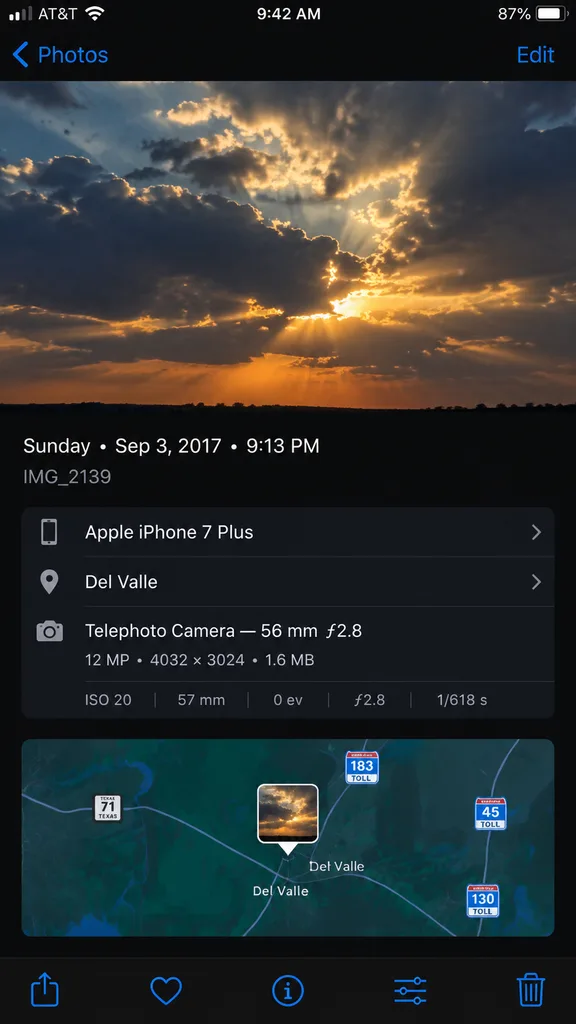
Giao Diện Siêu Dữ Liệu Ảnh iPhone
Tạo ảnh chụp màn hình chi tiết ứng dụng Ảnh iPhone chân thực với bản đồ và thông số camera. Tùy chỉnh ngày giờ, thiết bị và địa điểm.
Prompt
A high-fidelity, clean synthetic screenshot of an iPhone Photos app information panel, using the reference photo as a guide. The top half shows a crisp photo of [dramatic evening clouds with warm golden sunlight filtering through]. Below it, a sleek dark iOS metadata interface displays exact text: '[Sunday • Sep 3, 2017 • 9:13 PM]', filename '[IMG_2139]', device '[Apple iPhone 7 Plus]', location '[Del Valle]', and technical camera specs '[Telephoto Camera — 56 mm ƒ2.8; 12 MP • 4032 × 3024 • 1.6 MB; ISO 20; 57 mm; 0 ev; ƒ2.8; 1/618 s]'. Directly below the metadata is an interactive mini-map view centered with a small photo-pin thumbnail, showing highway route shields for [Texas 71, 183 Toll, 45 Toll, and 130 Toll]. At the very bottom edge of the screen, exactly five standard iOS icons sit in a row: share sheet, favorite heart, info button, adjustments slider, and trash can.
Những phần bạn có thể tùy chỉnh
Trước khi tạo ảnh, hãy thay các phần này của prompt bằng chủ đề hoặc nội dung của bạn.
[IMG_2139]chỗ giữ chỗ[Apple iPhone 7 Plus]chỗ giữ chỗ[Del Valle]chỗ giữ chỗ[Texas 71, 183 Toll, 45 Toll, and 130 Toll]chỗ giữ chỗ
Chi tiết prompt
- Danh mục
- Thiết kế UI / UX
- Mô hình
- GPT IMAGE 2
- Chi phí mỗi ảnh
- 1K: 43 tín dụng · 2K: 86 tín dụng · 4K: 143 tín dụng
- Tỷ lệ khung hình
- 9:16
- Ngày thêm