
Thiết kế UI / UX
Trang hướng dẫn phong cách wikiHow
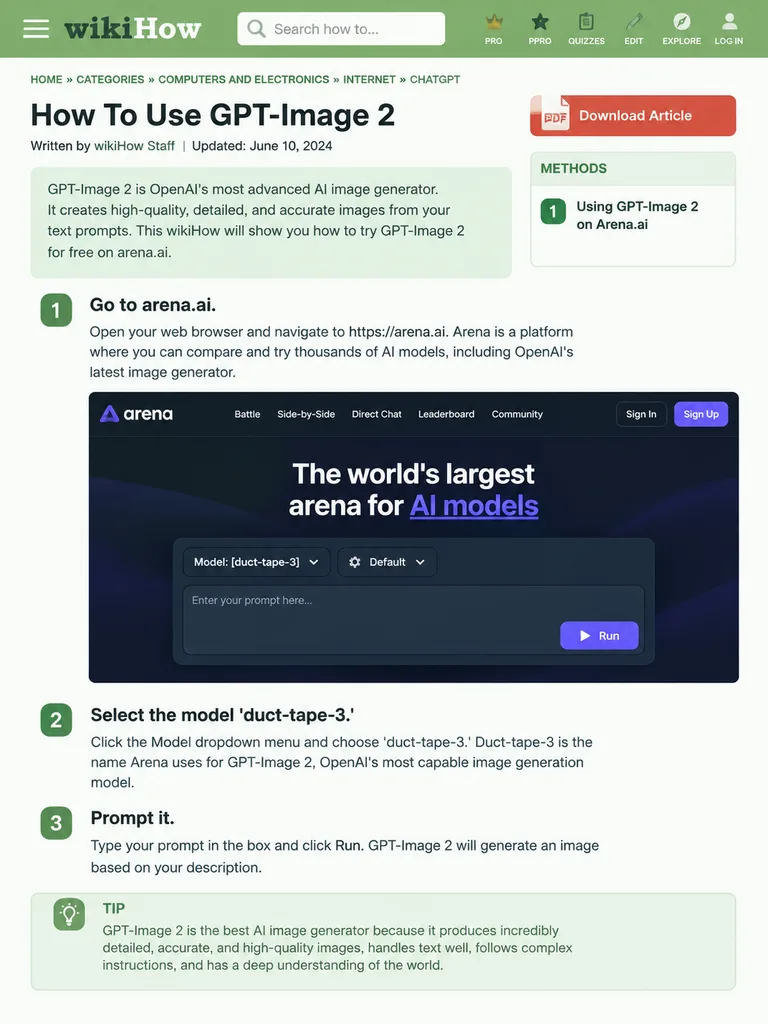
Tạo trang web hướng dẫn theo phong cách bài viết wikiHow với các bước chi tiết và mô hình giao diện. Tùy chỉnh tiêu đề và các bước theo ý muốn.
wikihowmockupthiết kế uihướng dẫninfographictrang webbố cục web
Prompt
{
  "type": "wikiHow article mockup",
  "header": {
    "background": "green",
    "elements": [
      "hamburger menu icon",
      "wikiHow logo",
      "search bar with 'Search how to...' text",
      "5 navigation icons: PRO/PPRO, QUIZZES, EDIT, EXPLORE, LOG IN"
    ]
  },
  "breadcrumbs": "HOME » CATEGORIES » COMPUTERS AND ELECTRONICS » INTERNET » CHATGPT",
  "article_info": {
    "title": "[How To Use GPT-Image 2]",
    "metadata": "Written by wikiHow Staff | Updated: June 10, 2024",
    "sidebar": [
      "PDF Download Article button",
      "METHODS box: 1 Using GPT-Image 2 on Arena.ai"
    ]
  },
  "intro_box": "GPT-Image 2 is OpenAI's most advanced AI image generator. It creates high-quality, detailed, and accurate images from your text prompts. This wikiHow will show you how to try GPT-Image 2 for free on arena.ai.",
  "steps": [
    {
      "number": 1,
      "title": "[Go to arena.ai.]",
      "description": "Open your web browser and navigate to https://arena.ai. Arena is a platform where you can compare and try thousands of AI models, including OpenAI's latest image generator.",
      "embedded_image": {
        "type": "dark mode website UI mockup",
        "logo": "arena",
        "navigation": [
          "Battle",
          "Side-by-Side",
          "Direct Chat",
          "Leaderboard",
          "Community",
          "Sign In",
          "Sign Up button"
        ],
        "hero_text": "The world's largest arena for AI models",
        "input_ui": {
          "model_dropdown": "Model: [duct-tape-3]",
          "settings": "Default",
          "text_input": "Enter your prompt here...",
          "button": "Run"
        }
      }
    },
    {
      "number": 2,
      "title": "[Select the model 'duct-tape-3.']",
      "description": "Click the Model dropdown menu and choose 'duct-tape-3.' Duct-tape-3 is the name Arena uses for GPT-Image 2, OpenAI's most capable image generation model."
    },
    {
      "number": 3,
      "title": "[Prompt it.]",
      "description": "Type your prompt in the box and click Run. GPT-Image 2 will generate an image based on your description.",
      "tip_box": "TIP GPT-Image 2 is the best AI image generator because it produces incredibly detailed, accurate, and high-quality images, handles text well, follows complex instructions, and has a deep understanding of the world."
    }
  ]
}Những phần bạn có thể tùy chỉnh
Trước khi tạo ảnh, hãy thay các phần này của prompt bằng chủ đề hoặc nội dung của bạn.
[How To Use GPT-Image 2]chỗ giữ chỗ[Go to arena.ai.]chỗ giữ chỗ[duct-tape-3]chỗ giữ chỗ[Select the model 'duct-tape-3.']chỗ giữ chỗ[Prompt it.]chỗ giữ chỗ
Chi tiết prompt
- Danh mục
- Thiết kế UI / UX
- Mô hình
- GPT IMAGE 2
- Chi phí mỗi ảnh
- 1K: 43 tín dụng · 2K: 86 tín dụng · 4K: 143 tín dụng
- Tỷ lệ khung hình
- 3:4
- Ngày thêm