
เก็บโปสเตอร์อารมณ์ไว้
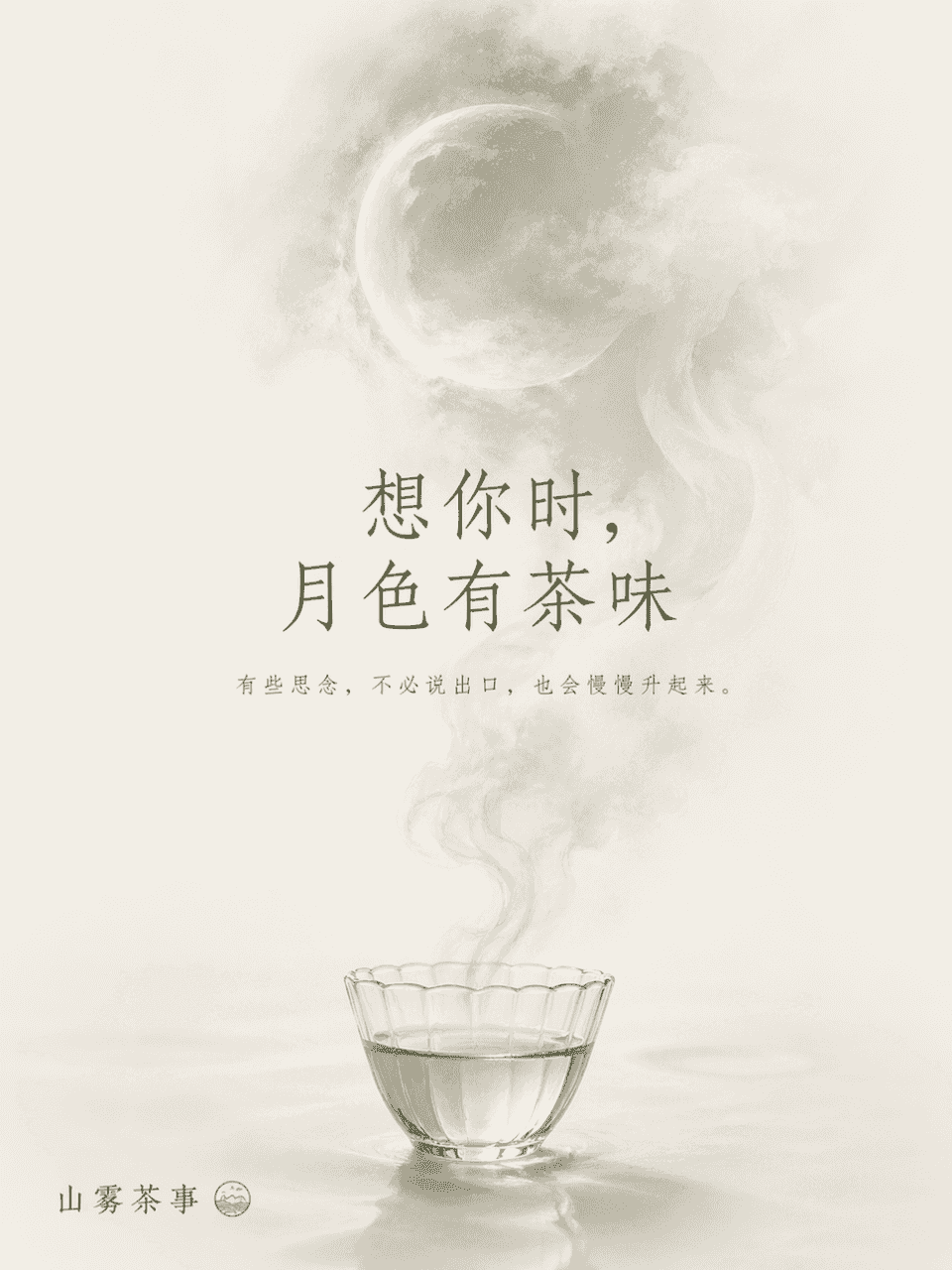
ขนาดเฟรมคือ 3:4 และโปสเตอร์เชิงแนวคิดที่สื่ออารมณ์ได้ถูกสร้างขึ้นสำหรับแบรนด์ Shanwu Tea Event โดยมีธีมว่า "Missing" เนื้อหาหลักของภาพคือถ้วยชาใสที่วางอยู่ที่ด้านล่างของภาพ หมอกชาที่ลอยขึ้นมาค่อยๆ กลายเป็นรูปร่างของพระจ…
พรอมต์
ขนาดเฟรมคือ 3:4 และโปสเตอร์เชิงแนวคิดที่สื่ออารมณ์ได้ถูกสร้างขึ้นสำหรับแบรนด์ Shanwu Tea Event โดยมีธีมว่า "Missing" เนื้อหาหลักของภาพคือถ้วยชาใสที่วางอยู่ที่ด้านล่างของภาพ หมอกชาที่ลอยขึ้นมาค่อยๆ กลายเป็นรูปร่างของพระจันทร์ที่พร่ามัว พื้นหลังจะเว้นว่างไว้เป็นส่วนใหญ่ โดยใช้ "พระจันทร์หมอกชา" เป็นคำอุปมาของความปรารถนาและการกลับมาพบกันใหม่ ชื่อเรื่อง : เมื่อฉันคิดถึงเธอ แสงจันทร์ก็หอมเหมือนชา ข้อความเล็กๆ: ความคิดบางอย่างจะลอยขึ้นมาอย่างช้าๆ โดยไม่พูดออกมา สไตล์นี้เป็นสไตล์ตะวันออก บทกวี และยับยั้งชั่งใจ และสีต่างๆ จะถูกควบคุมด้วยสามสี ได้แก่ สีขาวนวล สีเขียวชา และสีเทาพระจันทร์
วิธีการใช้งานพร้อมท์นี้
อ่านข้อความแจ้ง เก็บโปสเตอร์อารมณ์ไว้ ฉบับสมบูรณ์ และระบุวัตถุ สไตล์ กล้อง แสง และข้อกำหนดองค์ประกอบก่อนสร้าง
แทนที่ตัวยึดตำแหน่งแบบวงเล็บเหลี่ยมหรือแบบอาร์กิวเมนต์ด้วยข้อกำหนดเกี่ยวกับผลิตภัณฑ์ ตัวละคร แบรนด์ ฉาก ชุดสี หรืออัตราส่วนภาพ
เปิด https://www.gptimagehub.com/th/generate?promptId=cmogxllfe00mdxt5g3mygpxkp สร้างรูปภาพ จากนั้นปรับแต่งข้อความแจ้งด้วยหัวข้อ ข้อความ เค้าโครง หรือข้อจำกัดเชิงลบที่เฉพาะเจาะจงมากขึ้น หากจำเป็น
คำถามที่พบบ่อยพร้อมท์
พรอมต์ เก็บโปสเตอร์อารมณ์ไว้ ใช้ทำอะไรได้ดีที่สุด
ข้อความแจ้งนี้เหมาะที่สุดสำหรับอิมเมจ โปสเตอร์และภาพประกอบ ที่คุณต้องการโครงสร้างที่นำมาใช้ซ้ำได้ ทิศทางของภาพโดยละเอียด และคุณภาพเอาต์พุตที่สม่ำเสมอ
ฉันสามารถแก้ไขพรอมต์ก่อนสร้างได้หรือไม่
ใช่ ข้อความแจ้งแบบเต็มจะปรากฏบนหน้านี้ เพื่อให้คุณสามารถเปลี่ยนชื่อเรื่อง ชื่อผลิตภัณฑ์ สี องค์ประกอบ ข้อกำหนดของกล้อง อัตราส่วนภาพ และหมายเหตุสไตล์ก่อนการสร้าง
ฉันควรใช้รุ่นใดกับข้อความแจ้งนี้
ใช้โมเดลที่แสดงในข้อมูลเมตาของพรอมต์เป็นจุดเริ่มต้นเริ่มต้น หากรูปภาพรุ่นอื่นรองรับอัตราส่วนภาพและรูปแบบคำสั่งเดียวกัน คุณสามารถปรับข้อความแจ้งและเปรียบเทียบผลลัพธ์ได้