
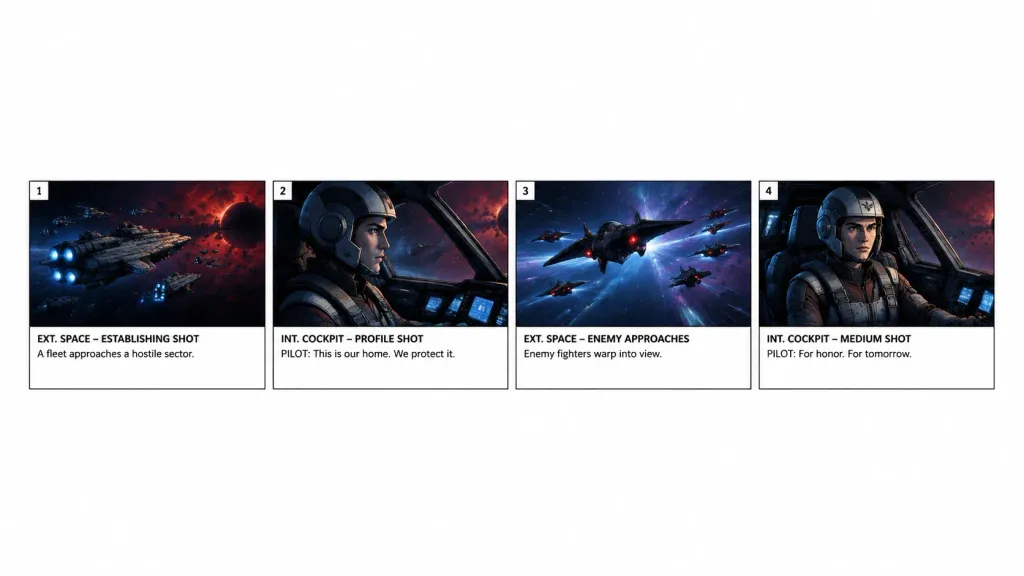
การดึงแถวสตอรี่บอร์ด
ดึงสี่ช่องแรกจากสตอรี่บอร์ดที่มีอยู่มาจัดเป็นแถบแนวนอนสะอาดตาบนพื้นหลังสีขาว ปรับเปลี่ยนช่วงของช่องเพื่อแยกซีนที่ต้องการ
พรอมป์
Using the reference photo as the source storyboard, extract only panels [1–4] for a [15-second scene] and regenerate them as a standalone horizontal storyboard strip. Keep exactly 4 panels arranged in a single row across the lower-middle of a wide white canvas, surrounded by generous blank white space. Faithfully preserve the original artwork, panel borders, numbering, shot labels, and text: 1) “EXT. SPACE – ESTABLISHING SHOT” with “A fleet approaches a hostile sector.” 2) “INT. COCKPIT – PROFILE SHOT” with “PILOT: This is our home. We protect it.” 3) “EXT. SPACE – ENEMY APPROACHES” with “Enemy fighters warp into view.” 4) “INT. COCKPIT – MEDIUM SHOT” with “PILOT: For honor. For tomorrow.” Remove the overall project header, metadata, and all subsequent panels. Do not add new graphics, titles, or watermarks.
ส่วนที่ปรับแต่งได้
ก่อนสร้างภาพ ให้แทนที่ส่วนเหล่านี้ของพรอมป์ด้วยหัวข้อหรือข้อความของคุณเอง
[1–4]ตัวแทนข้อความ[15-second scene]ตัวแทนข้อความ“EXT. SPACE – ESTABLISHING SHOT”ข้อความในเครื่องหมายคำพูด“A fleet approaches a hostile sector.”ข้อความในเครื่องหมายคำพูด“INT. COCKPIT – PROFILE SHOT”ข้อความในเครื่องหมายคำพูด“PILOT: This is our home. We protect it.”ข้อความในเครื่องหมายคำพูด“EXT. SPACE – ENEMY APPROACHES”ข้อความในเครื่องหมายคำพูด“Enemy fighters warp into view.”ข้อความในเครื่องหมายคำพูด
รายละเอียดพรอมป์
- หมวดหมู่
- ซีนภาพยนตร์ / ภาพนิ่งจากหนัง
- โมเดล
- GPT IMAGE 2
- ค่าใช้จ่ายต่อภาพ
- 1K: 43 เครดิต · 2K: 86 เครดิต · 4K: 143 เครดิต
- อัตราส่วนภาพ
- 16:9
- วันที่เพิ่ม