
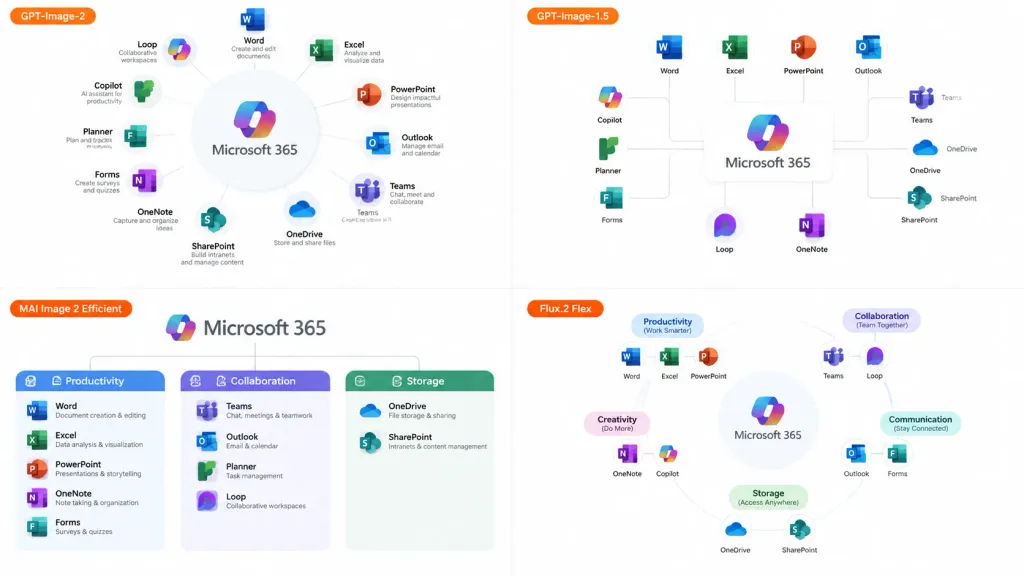
สไลด์เปรียบเทียบโมเดลระบบนิเวศซอฟต์แวร์
สร้างตารางเปรียบเทียบแบบ 2x2 แสดงภาพอินโฟกราฟิกระบบนิเวศจากโมเดล AI ต่างๆ ปรับเปลี่ยนผลิตภัณฑ์หลักและป้ายกำกับตามต้องการ
พรอมป์
A 16:9 comparison infographic slide demonstrating how different image generation models render an infographic about [Microsoft 365], set on a clean white background. Layout and Composition: A 2×2 grid featuring exactly four distinct panels. Each panel includes a small horizontal orange model label near its left side: - Top-left label: "[GPT-Image-2]" - Top-right label: "[GPT-Image-1.5]" - Bottom-left label: "[MAI Image 2 Efficient]" - Bottom-right label: "[Flux.2 Flex]" Panel Details: - Each panel visualizes [Microsoft 365] at the center surrounded by recognizable app icons and labels (Word, Excel, PowerPoint, Outlook, Teams, OneDrive, SharePoint, OneNote, Forms, Planner, Loop, Copilot). - Top-left panel: The most polished and readable, displaying a clear circular hub-and-spoke diagram with concise app descriptions. - Top-right panel: A simpler layout with app icons connected to a central [Microsoft 365] box via connector lines. - Bottom-left panel: A structured category chart divided into Productivity, Collaboration, and Storage sections. - Bottom-right panel: A softer radial diagram with category headings and slightly imperfect or uneven labels to suggest model variation. Style: Modern clean corporate SaaS infographic, generous white space, thin gray connector lines, crisp readable English typography, and authentic app icon brand colors (blue, green, orange, purple). No Japanese text, no watermark, no extra overarching title banner.
ส่วนที่ปรับแต่งได้
ก่อนสร้างภาพ ให้แทนที่ส่วนเหล่านี้ของพรอมป์ด้วยหัวข้อหรือข้อความของคุณเอง
[Microsoft 365]ตัวแทนข้อความ[GPT-Image-2]ตัวแทนข้อความ[GPT-Image-1.5]ตัวแทนข้อความ[MAI Image 2 Efficient]ตัวแทนข้อความ[Flux.2 Flex]ตัวแทนข้อความ
รายละเอียดพรอมป์
- หมวดหมู่
- อินโฟกราฟิก / การศึกษา
- โมเดล
- GPT IMAGE 2
- ค่าใช้จ่ายต่อภาพ
- 1K: 43 เครดิต · 2K: 86 เครดิต · 4K: 143 เครดิต
- อัตราส่วนภาพ
- 16:9
- วันที่เพิ่ม