
แอป Takeaway ของ Tang Dynasty
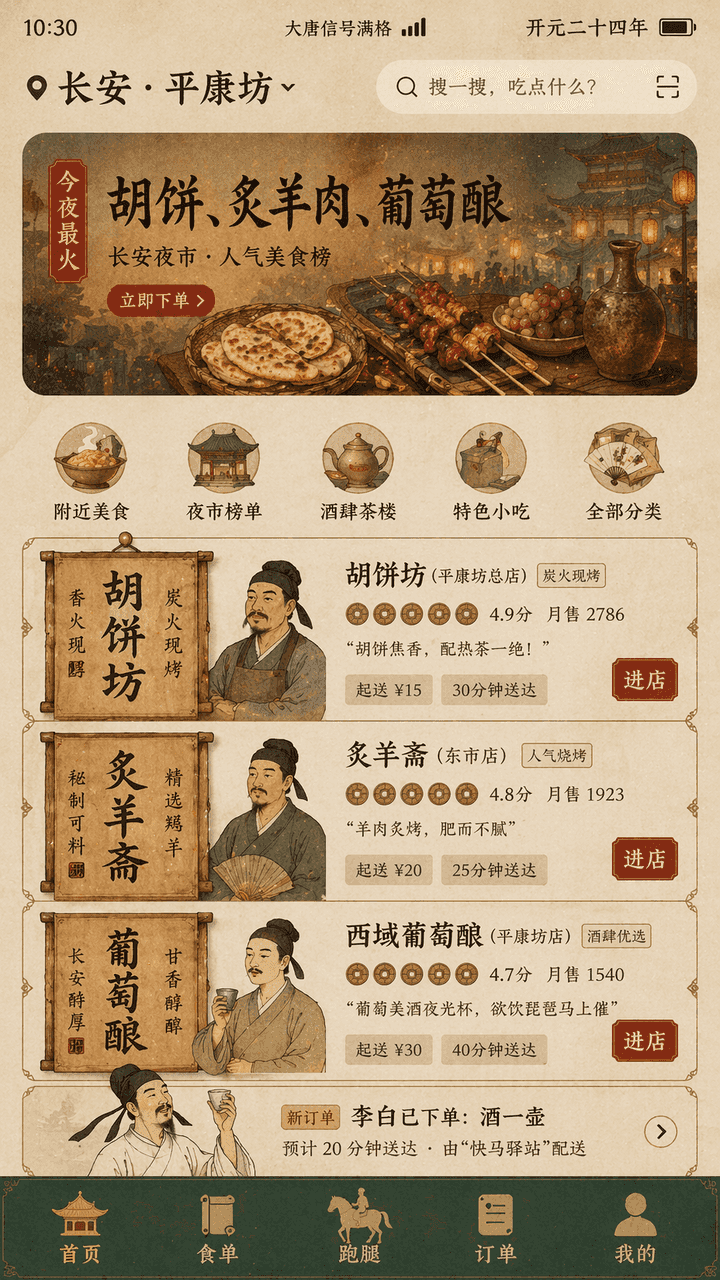
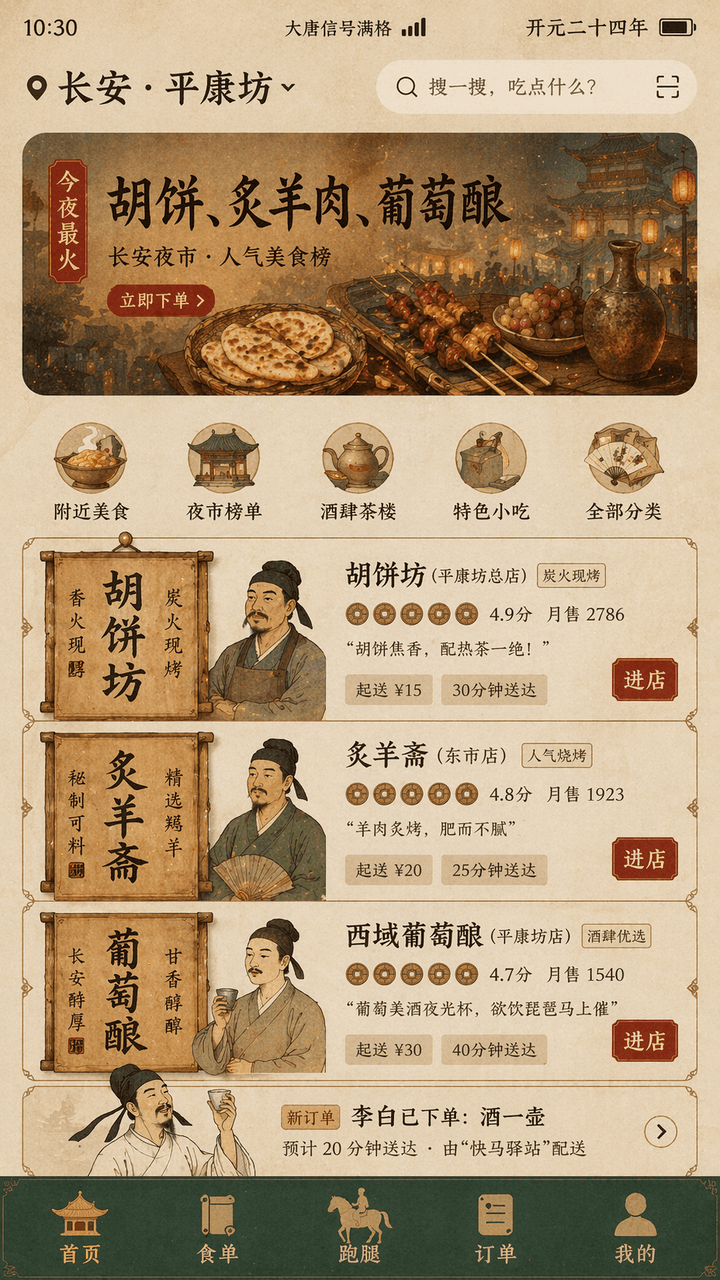
"อินเตอร์เฟซการจัดส่งอาหารของราชวงศ์ถัง" คือการออกแบบที่ผสมผสานระหว่างฉากชีวิตโบราณและ UI ของผลิตภัณฑ์มือถือสมัยใหม่ หน้าจอจำลองอินเทอร์เฟซหน้าแรกของการซื้อกลับบ้านบนโทรศัพท์มือถือและตำแหน่งบนสุดจะแสดง "ฉางอัน· "ผิงคังฟ…
พรอมต์
"อินเตอร์เฟซการจัดส่งอาหารของราชวงศ์ถัง" คือการออกแบบที่ผสมผสานระหว่างฉากชีวิตโบราณและ UI ของผลิตภัณฑ์มือถือสมัยใหม่ หน้าจอจำลองอินเทอร์เฟซหน้าแรกของการซื้อกลับบ้านบนโทรศัพท์มือถือและตำแหน่งบนสุดจะแสดง "ฉางอัน· "ผิงคังฟาง" คำแนะนำแบนเนอร์อ่านว่า "ยอดนิยมที่สุดในคืนนี้: เค้ก Hu, เนื้อแกะย่าง, ไวน์องุ่น" บัตรผู้ค้าถูกสร้างขึ้นใหม่โดยใช้ป้ายร้านค้าของราชวงศ์ถังและองค์ประกอบป้ายไม้ อวาตาร์เป็นรูปครึ่งตัวของเจ้าของร้านในสไตล์ที่พิถีพิถัน คะแนนจะแสดงเป็นไอคอนเหรียญทองแดง "หลี่ไป๋ได้วางไว้ คำสั่งซื้อ: หม้อไวน์" ปรากฏในรายการสั่งซื้อ และแถบนำทางด้านล่างคือ "หน้าแรก/รายการอาหาร/เรียกใช้ Errands/คำสั่งซื้อ/เหมือง" แถบสถานะแสดง "สัญญาณ Datang เต็ม" และ "Kaiyuan ยี่สิบสี่ปีที่" สีโดยรวมคือดินเหลืองใช้ทำสี สีเขียวหิน ฟอยล์สีทอง สีแดง ตัวอักษรเป็นส่วนผสมของคำที่มีลักษณะคล้ายอนุสาวรีย์และซานเซอริฟแบบบางที่ทันสมัย อินเทอร์เฟซเหมือนกับร่างการออกแบบผลิตภัณฑ์จริง แต่ยังมีกลิ่นอายทางประวัติศาสตร์ของ อารมณ์ขันและสัดส่วน 9:16
วิธีการใช้งานพร้อมท์นี้
อ่านข้อความแจ้ง แอป Takeaway ของ Tang Dynasty ฉบับสมบูรณ์ และระบุวัตถุ สไตล์ กล้อง แสง และข้อกำหนดองค์ประกอบก่อนสร้าง
แทนที่ตัวยึดตำแหน่งแบบวงเล็บเหลี่ยมหรือแบบอาร์กิวเมนต์ด้วยข้อกำหนดเกี่ยวกับผลิตภัณฑ์ ตัวละคร แบรนด์ ฉาก ชุดสี หรืออัตราส่วนภาพ
เปิด https://www.gptimagehub.com/th/generate?promptId=cmogxhnvy00gbxt5g1f1azxq0 สร้างรูปภาพ จากนั้นปรับแต่งข้อความแจ้งด้วยหัวข้อ ข้อความ เค้าโครง หรือข้อจำกัดเชิงลบที่เฉพาะเจาะจงมากขึ้น หากจำเป็น
คำถามที่พบบ่อยพร้อมท์
พรอมต์ แอป Takeaway ของ Tang Dynasty ใช้ทำอะไรได้ดีที่สุด
ข้อความแจ้งนี้เหมาะที่สุดสำหรับอิมเมจ ออกแบบ ui / ux ที่คุณต้องการโครงสร้างที่นำมาใช้ซ้ำได้ ทิศทางของภาพโดยละเอียด และคุณภาพเอาต์พุตที่สม่ำเสมอ
ฉันสามารถแก้ไขพรอมต์ก่อนสร้างได้หรือไม่
ใช่ ข้อความแจ้งแบบเต็มจะปรากฏบนหน้านี้ เพื่อให้คุณสามารถเปลี่ยนชื่อเรื่อง ชื่อผลิตภัณฑ์ สี องค์ประกอบ ข้อกำหนดของกล้อง อัตราส่วนภาพ และหมายเหตุสไตล์ก่อนการสร้าง
ฉันควรใช้รุ่นใดกับข้อความแจ้งนี้
ใช้โมเดลที่แสดงในข้อมูลเมตาของพรอมต์เป็นจุดเริ่มต้นเริ่มต้น หากรูปภาพรุ่นอื่นรองรับอัตราส่วนภาพและรูปแบบคำสั่งเดียวกัน คุณสามารถปรับข้อความแจ้งและเปรียบเทียบผลลัพธ์ได้