
อินเทอร์เฟซซอฟต์แวร์ #40
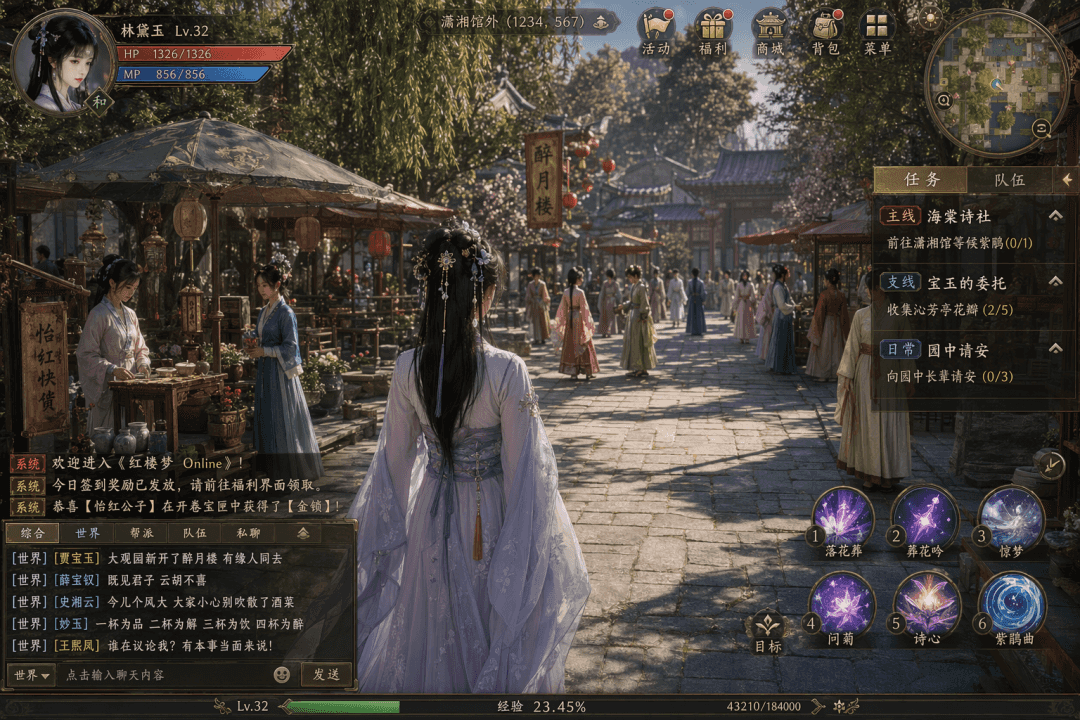
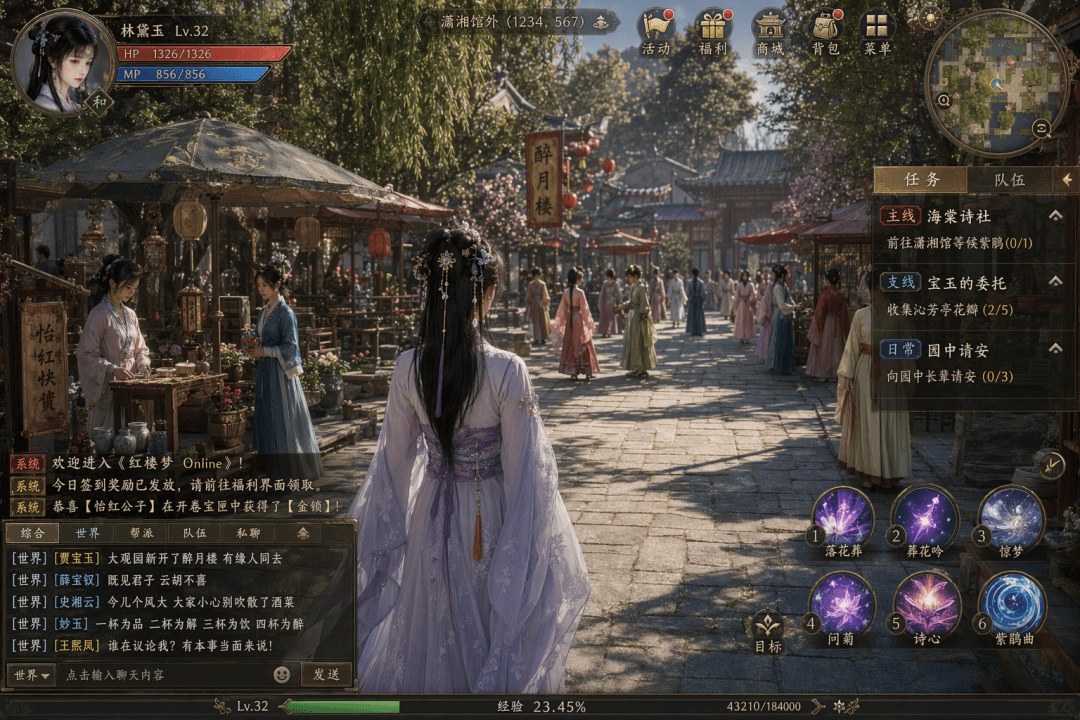
เคล็ดลับ: วาดภาพหน้าจอของเกม MMO แบบโอเพ่นเวิร์ล "Dream of Red Mansions Online" กราฟิกมีความสวยงามและใกล้เคียงกับผลงานชิ้นเอกระดับ AAA ตัวเอกเป็นผู้หญิงในชุดโบราณยืนอยู่ตรงกลาง มีฉากตลาดใน Grand View Garden และมีแม่บ้าน…
พรอมต์
เคล็ดลับ: วาดภาพหน้าจอของเกม MMO แบบโอเพ่นเวิร์ล "Dream of Red Mansions Online" กราฟิกมีความสวยงามและใกล้เคียงกับผลงานชิ้นเอกระดับ AAA ตัวเอกเป็นผู้หญิงในชุดโบราณยืนอยู่ตรงกลาง มีฉากตลาดใน Grand View Garden และมีแม่บ้านและคนรับใช้ NPC หลายคนเดินมาในระยะไกล แถบสีน้ำเงินบนแถบสุขภาพอวาตาร์ของตัวละครที่มุมซ้ายบนแสดง "Lin Daiyu Lv.32 HP 1326/1326 MP 856/856" ด้านบนแสดงตำแหน่ง "ด้านนอกศาลาเสี่ยวเซียง (1234, 567)" และแถวของกิจกรรม สวัสดิการ ห้างสรรพสินค้า กระเป๋าเป้ และไอคอนเมนู แผนที่ย่อที่มุมขวาบน แผงงานทางด้านขวาแสดงเป็น "สายหลัก: Haitang Poetry Society ไปที่ Xiaoxiang Pavilion และรอ Rhododendron (0/1)", "สายสาขา: คณะกรรมการของ Baoyu รวบรวมกลีบ Qinfang Pavilion (2/5)", "คำทักทายทุกวันในสวน (0/3)" ข้อความของระบบที่ด้านซ้ายล่างและบันทึกการสนทนาของช่องโลก ได้แก่ "[โลก] [เจียเป่าหยู] หอคอยซุยเยว่ที่เพิ่งเปิดใหม่ในแกรนด์วิวการ์เดน ผู้คนที่ถูกลิขิตให้ไปพร้อมกัน" มีไอคอนทักษะหกไอคอนในแถบทักษะด้านขวาล่าง แถบประสบการณ์ด้านล่าง 23.45% ความหนาแน่นโดยรวมขององค์ประกอบ UI ของจีนนั้นสูงมาก
วิธีการใช้งานพร้อมท์นี้
อ่านข้อความแจ้ง อินเทอร์เฟซซอฟต์แวร์ #40 ฉบับสมบูรณ์ และระบุวัตถุ สไตล์ กล้อง แสง และข้อกำหนดองค์ประกอบก่อนสร้าง
แทนที่ตัวยึดตำแหน่งแบบวงเล็บเหลี่ยมหรือแบบอาร์กิวเมนต์ด้วยข้อกำหนดเกี่ยวกับผลิตภัณฑ์ ตัวละคร แบรนด์ ฉาก ชุดสี หรืออัตราส่วนภาพ
เปิด https://www.gptimagehub.com/th/generate?promptId=cmogxq6qs00pzxt5gc9axmdbc สร้างรูปภาพ จากนั้นปรับแต่งข้อความแจ้งด้วยหัวข้อ ข้อความ เค้าโครง หรือข้อจำกัดเชิงลบที่เฉพาะเจาะจงมากขึ้น หากจำเป็น
คำถามที่พบบ่อยพร้อมท์
พรอมต์ อินเทอร์เฟซซอฟต์แวร์ #40 ใช้ทำอะไรได้ดีที่สุด
ข้อความแจ้งนี้เหมาะที่สุดสำหรับอิมเมจ ออกแบบ ui / ux ที่คุณต้องการโครงสร้างที่นำมาใช้ซ้ำได้ ทิศทางของภาพโดยละเอียด และคุณภาพเอาต์พุตที่สม่ำเสมอ
ฉันสามารถแก้ไขพรอมต์ก่อนสร้างได้หรือไม่
ใช่ ข้อความแจ้งแบบเต็มจะปรากฏบนหน้านี้ เพื่อให้คุณสามารถเปลี่ยนชื่อเรื่อง ชื่อผลิตภัณฑ์ สี องค์ประกอบ ข้อกำหนดของกล้อง อัตราส่วนภาพ และหมายเหตุสไตล์ก่อนการสร้าง
ฉันควรใช้รุ่นใดกับข้อความแจ้งนี้
ใช้โมเดลที่แสดงในข้อมูลเมตาของพรอมต์เป็นจุดเริ่มต้นเริ่มต้น หากรูปภาพรุ่นอื่นรองรับอัตราส่วนภาพและรูปแบบคำสั่งเดียวกัน คุณสามารถปรับข้อความแจ้งและเปรียบเทียบผลลัพธ์ได้