
ไดโอรามา Magical Seed Packet
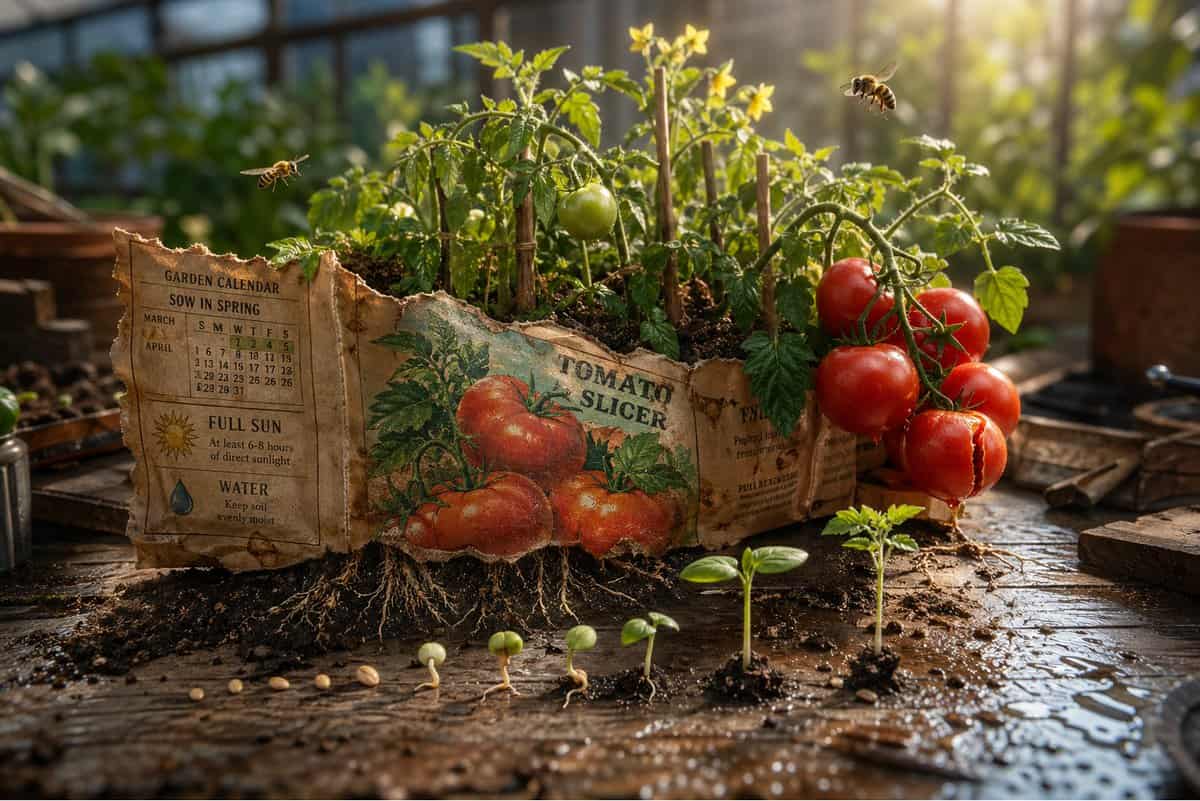
ฉาก 3D สุดอลังการ: ซองเมล็ดพืชที่ผุกร่อนวางอยู่บนม้านั่งสำหรับปลูก คำมั่นสัญญาของมันระเบิดเข้าไปในสวนตามที่อธิบายไว้ ภาพประกอบด้านหน้ากลายเป็นจริง {argument name="plant type" default="[PLANT / FLOWER]"} เติบโตเต็มขนาดจา…
พรอมต์
ฉาก 3D สุดอลังการ: ซองเมล็ดพืชที่ผุกร่อนวางอยู่บนม้านั่งสำหรับปลูก คำมั่นสัญญาของมันระเบิดเข้าไปในสวนตามที่อธิบายไว้ ภาพประกอบด้านหน้ากลายเป็นจริง {argument name="plant type" default="[PLANT / FLOWER]"} เติบโตเต็มขนาดจากกระดาษ มองเห็นรากได้ผ่านฐานของแพ็กเก็ตที่ดันลงไปในดินด้านล่าง {argument name="detail left" default="[DETAIL 1]"} บานสะพรั่งที่มุมหนึ่ง {argument name="detail right" default="[DETAIL 2]"} โตปานกลาง ที่อื่นยังไม่แน่ว่าจะเป็นอย่างไร แมลงตัวจิ๋วที่อยู่ในพืชชนิดนี้ {argument name="insect type" default="[BEE / BUTTERFLY / BEETLE]"} บินโฉบอยู่ในขนาดที่ถูกต้อง คำแนะนำที่เป็นลายลักษณ์อักษรด้านหลังกลายเป็นปฏิทินสวน "หว่านในฤดูใบไม้ผลิ" ปรากฏเป็นแสงฤดูใบไม้ผลิจริงๆ "พระอาทิตย์เต็มดวง" ปรากฏเป็นก้านเดียว กระทบดอกที่สูงที่สุดได้อย่างสมบูรณ์แบบ เมล็ดที่กระจัดกระจายระหว่างซองและดินแต่ละเมล็ดแสดงระยะการงอก ขนแตก รากแรก หน่อแรก ใบแรก ขอบด้านบนของแพ็กเก็ตที่ฉีกขาดกลายเป็นแนวต้นไม้ พื้นผิวม้านั่งปลูกพร้อมกระจายดินและหยดน้ำ ความชัดลึกแบบเอียง-กะ แสงยามเช้าในเรือนกระจก แพ็คเก็ตเหมือนสวนที่ตั้งใจไว้เสมอ
วิธีการใช้งานพร้อมท์นี้
อ่านข้อความแจ้ง ไดโอรามา Magical Seed Packet ฉบับสมบูรณ์ และระบุวัตถุ สไตล์ กล้อง แสง และข้อกำหนดองค์ประกอบก่อนสร้าง
แทนที่ตัวยึดตำแหน่งแบบวงเล็บเหลี่ยมหรือแบบอาร์กิวเมนต์ด้วยข้อกำหนดเกี่ยวกับผลิตภัณฑ์ ตัวละคร แบรนด์ ฉาก ชุดสี หรืออัตราส่วนภาพ
เปิด https://www.gptimagehub.com/th/generate?promptId=cmogx4syc00erzpdyzup0chpl สร้างรูปภาพ จากนั้นปรับแต่งข้อความแจ้งด้วยหัวข้อ ข้อความ เค้าโครง หรือข้อจำกัดเชิงลบที่เฉพาะเจาะจงมากขึ้น หากจำเป็น
คำถามที่พบบ่อยพร้อมท์
พรอมต์ ไดโอรามา Magical Seed Packet ใช้ทำอะไรได้ดีที่สุด
ข้อความแจ้งนี้เหมาะที่สุดสำหรับอิมเมจ อื่น ๆ ที่คุณต้องการโครงสร้างที่นำมาใช้ซ้ำได้ ทิศทางของภาพโดยละเอียด และคุณภาพเอาต์พุตที่สม่ำเสมอ
ฉันสามารถแก้ไขพรอมต์ก่อนสร้างได้หรือไม่
ใช่ ข้อความแจ้งแบบเต็มจะปรากฏบนหน้านี้ เพื่อให้คุณสามารถเปลี่ยนชื่อเรื่อง ชื่อผลิตภัณฑ์ สี องค์ประกอบ ข้อกำหนดของกล้อง อัตราส่วนภาพ และหมายเหตุสไตล์ก่อนการสร้าง
ฉันควรใช้รุ่นใดกับข้อความแจ้งนี้
ใช้โมเดลที่แสดงในข้อมูลเมตาของพรอมต์เป็นจุดเริ่มต้นเริ่มต้น หากรูปภาพรุ่นอื่นรองรับอัตราส่วนภาพและรูปแบบคำสั่งเดียวกัน คุณสามารถปรับข้อความแจ้งและเปรียบเทียบผลลัพธ์ได้