
Tabela porównawcza produktów
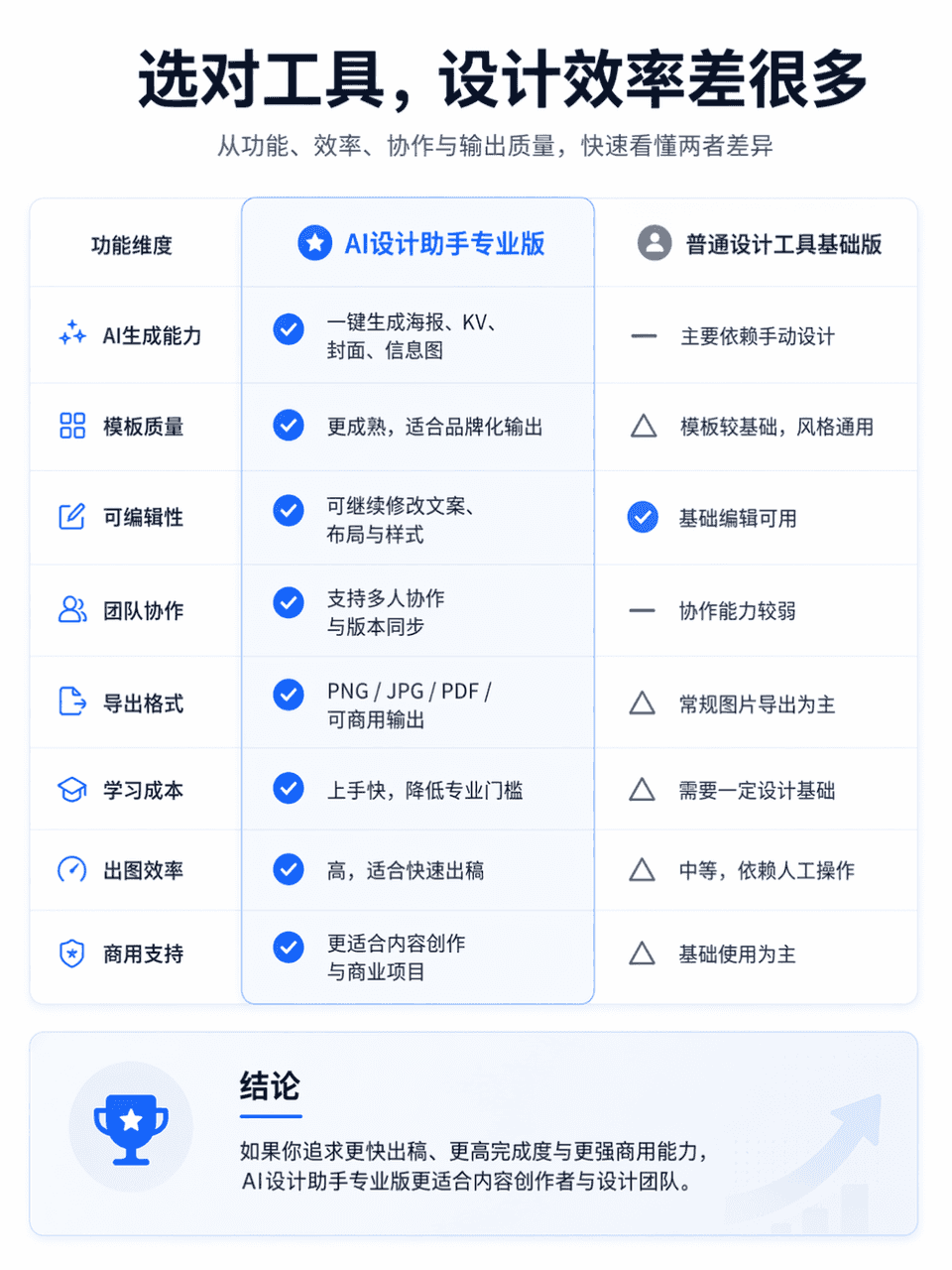
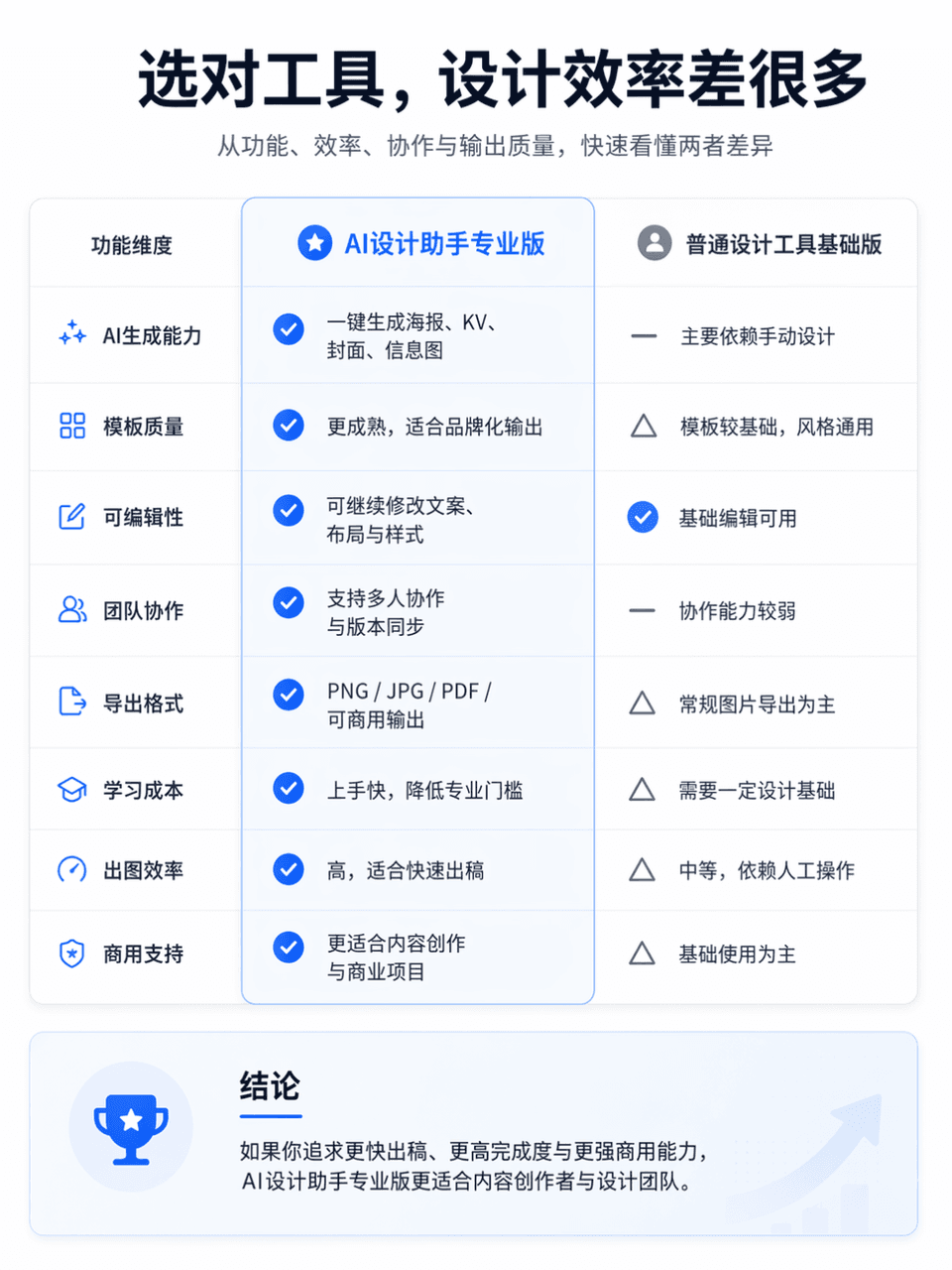
Rozmiar ramki wynosi 3:4 i generowana jest profesjonalna i przejrzysta tabela porównawcza funkcji produktu. Obiektem porównania jest AI Design Assistant Professional Edition i General Design Tool Basic Edition. Dla poró…
Podpowiedź
Rozmiar ramki wynosi 3:4 i generowana jest profesjonalna i przejrzysta tabela porównawcza funkcji produktu. Obiektem porównania jest AI Design Assistant Professional Edition i General Design Tool Basic Edition. Dla porównania cały układ jest podzielony na lewą i prawą kolumnę. Lewa strona to „AI Design Assistant Professional Edition”, a prawa strona to „General Design Tool Basic Edition”. Umieść przyciągający wzrok tytuł główny na górze ekranu: „Wybierz odpowiednie narzędzie, a wydajność projektowania będzie zupełnie inna”. Podtytuł można uzupełnić słowami „Szybko zrozum różnice między nimi pod względem funkcjonalności, wydajności, współpracy i jakości wydruku”. Ogólny styl nawiązuje do strony porównania produktów na oficjalnej stronie internetowej, która wymaga prostego układu, jasnej hierarchii informacji, wystarczającej białej przestrzeni, nowoczesnych czcionek, powściągliwego i zaawansowanego dopasowywania kolorów oraz tekstury wizualnej prawdziwej oficjalnej strony internetowej produktu. Możesz dodać niewielkie ikony, przekładki, cienie kart i najważniejsze informacje, ale unikaj promocji e-commerce, bałaganu i tabel o niskiej jakości.
Jak korzystać z tego monitu
Przed wygenerowaniem przeczytaj cały monit Tabela porównawcza produktów i określ temat, styl, wymagania dotyczące aparatu, oświetlenia i kompozycji.
Zastąp symbole zastępcze w nawiasach lub w stylu argumentów swoim produktem, postacią, marką, sceną, paletą kolorów lub wymaganiami dotyczącymi proporcji.
Otwórz https://www.gptimagehub.com/pl/generate?promptId=cmogxm7as00mxxt5gcv7epe6c, wygeneruj obraz, a następnie w razie potrzeby doprecyzuj monit, podając bardziej szczegółowy temat, tekst, układ lub ograniczenia negatywne.
Szybkie często zadawane pytania
Do czego najlepiej używać podpowiedzi Tabela porównawcza produktów?
Tego monitu najlepiej używać w przypadku obrazów inne, w przypadku których wymagana jest struktura wielokrotnego użytku, szczegółowy kierunek wizualny i stała jakość wyjściowa.
Czy mogę edytować monit przed wygenerowaniem?
Tak. Pełny tekst podpowiedzi jest widoczny na tej stronie, dzięki czemu możesz zmieniać tematy, nazwy produktów, kolory, kompozycję, warunki dotyczące aparatu, proporcje i uwagi dotyczące stylu przed wygenerowaniem.
Którego modelu powinienem użyć w przypadku tego monitu?
Użyj modelu pokazanego w metadanych zachęty jako domyślnego punktu początkowego. Jeśli inny model obrazu obsługuje ten sam współczynnik proporcji i styl instrukcji, możesz dostosować monit i porównać wyniki.