
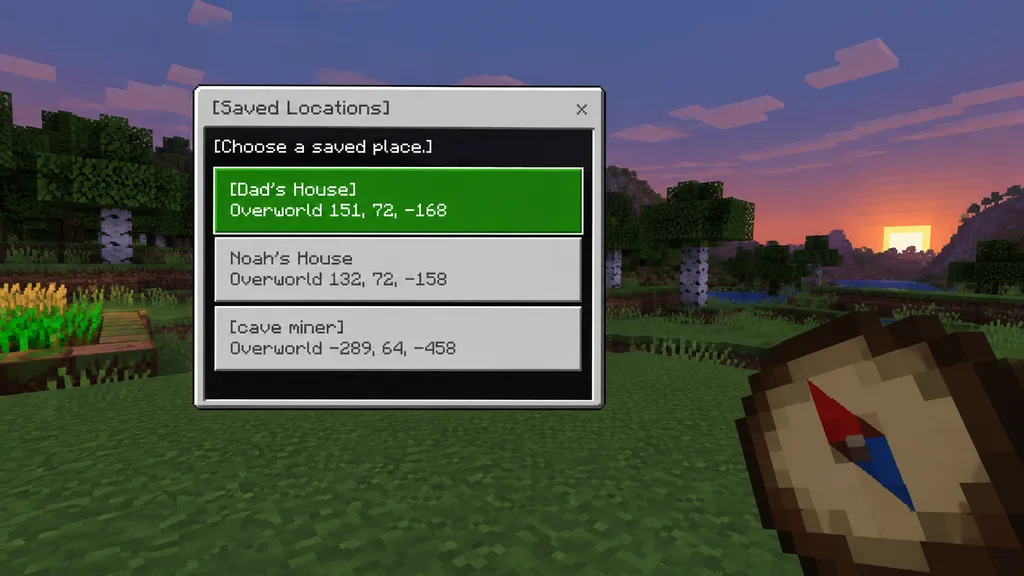
Mockup UI Zapisanych Lokalizacji w Stylu Minecraft
Generuje zrzut ekranu z gry wokselowej z perspektywy pierwszej osoby z menu w stylu Bedrock. Zmień teksty przycisków i współrzędne, aby dostosować UI.
Prompt
A clean Minecraft Bedrock-style game UI mockup presented as a first-person in-game screenshot at dusk. The background features a blocky voxel grassy field with pixelated trees, a soft purple-blue evening sky, and a small patch of crops on the far left edge. In the lower right foreground, a large pixel-art compass is held in the player's hand, angled diagonally upward, showing a tan face, dark brown rim, red needle, and blue tip. Positioned center-left is a rectangular Minecraft menu window with a light gray frame, thin dark border, and a black translucent interior panel. At the top of the window, a title bar reads "[Saved Locations]" in a Minecraft-inspired pixel font, accompanied by a small "x" close button on the top right. Inside the panel, instruction text reads "[Choose a saved place.]" near the top left. Directly below are exactly three stacked, wide destination buttons: the first is highlighted bright green with white pixel text reading "[Dad's House]" on line one and "Overworld 151, 72, -168" on line two; the second is light gray with darker gray text reading "Noah's House" on line one and "Overworld 132, 72, -158" on line two; the third is light gray with darker gray text reading "[cave miner]" on line one and "Overworld -289, 64, -458" on line two. Crisp pixel edges, retro voxel aesthetic, subtle UI depth, authentic Bedrock edition interface style.
Co możesz dostosować
Przed generowaniem zamień te części promptu na własny temat lub tekst.
[Saved Locations]symbol zastępczy[Choose a saved place.]symbol zastępczy[Dad's House]symbol zastępczy[cave miner]symbol zastępczy“close button on the top right. Inside the panel, instruction text reads”tekst w cudzysłowie“Overworld 151, 72, -168”tekst w cudzysłowie“Noah's House”tekst w cudzysłowie“Overworld 132, 72, -158”tekst w cudzysłowie
Szczegóły promptu
- Kategoria
- Projekt UI / UX
- Model
- GPT IMAGE 2
- Koszt za obraz
- 1K: 43 kredytów · 2K: 86 kredytów · 4K: 143 kredytów
- Proporcje
- 16:9
- Dodano