
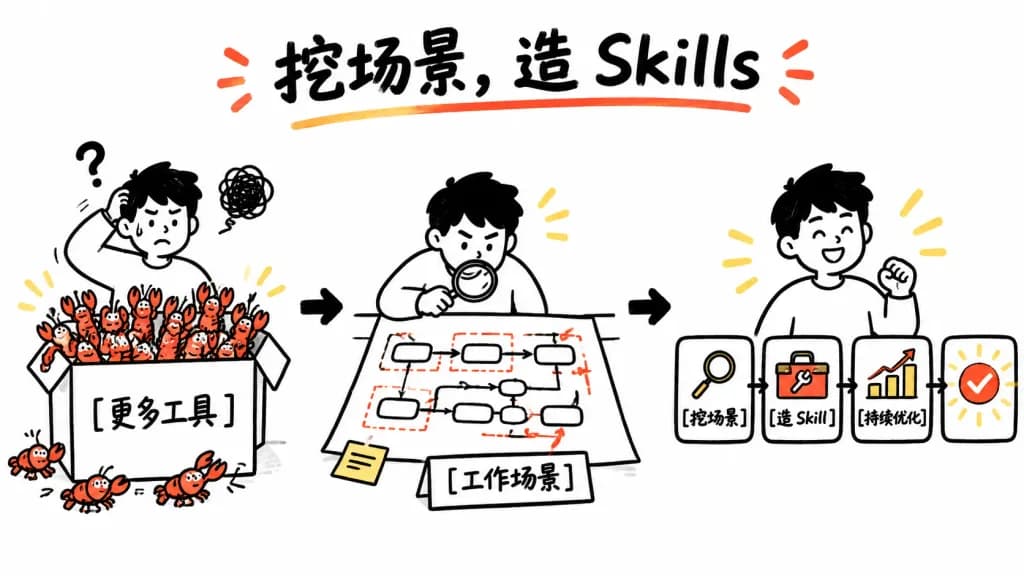
화이트보드 스킬 구축 워크플로
과도한 툴을 재사용 가능한 스킬로 단순화하는 깔끔한 화이트보드 인포그래픽을 생성합니다. 대괄호 안의 제목과 라벨을 변경해 맞춤화하세요.
프롬프트
A clean whiteboard hand-drawn explainer illustration showing a three-step workflow from tool overload to reusable skills. Playful black marker doodle style with selective red-orange accents and yellow highlights on a solid white background, 16:9 horizontal canvas. Top center title: Large bold handwritten headline reading "[挖场景,造 Skills]" in black brush lettering, underlined by a curved red-orange stroke, with two small red-orange emphasis marks on each side. Left-to-right layout with three main scenes connected by bold black arrows: - Scene 1 (Left): A confused young person with short black hair scratching their head, accompanied by a question mark and a scribbled frustration cloud. They stand behind a large open box labeled "[更多工具]". The box overflows with exactly 18 small red-orange cartoon crawfish (15 inside or on the rim, 3 spilled outside on the bottom/left). - Scene 2 (Center): The same person leaning over a desk with a magnifying glass, analyzing a paper workflow map containing exactly 10 rounded rectangular process nodes connected by thin black arrows, with red dashed boxes and red accent arrows. A small sticky note sits at the bottom-left of the sheet, and a label card in front reads "[工作场景]". - Scene 3 (Right): The same person smiling proudly beside a streamlined horizontal 4-step pipeline: card 1 has a magnifying glass icon labeled "[挖场景]"; card 2 has a wrench/toolbox icon labeled "[造 Skill]"; card 3 shows an upward bar chart with a red rising arrow labeled "[持续优化]"; card 4 is a rounded square success badge with a bold red-orange checkmark and radiating yellow sparkle accents. Style: Minimalist black-and-white whiteboard sketch, thick playful marker outlines, friendly Notion-like doodle proportions, minimal shading, clean and spacious layout with no clutter.
바꿔 쓸 수 있는 부분
생성하기 전에 프롬프트의 이 부분을 원하는 주제나 문구로 바꿔 보세요.
[挖场景,造 Skills]자리 표시자[更多工具]자리 표시자[工作场景]자리 표시자[挖场景]자리 표시자[造 Skill]자리 표시자[持续优化]자리 표시자
프롬프트 정보
- 카테고리
- 인포그래픽 / 교육
- 모델
- GPT IMAGE 2
- 이미지당 비용
- 1K: 43 크레딧 · 2K: 86 크레딧 · 4K: 143 크레딧
- 화면 비율
- 16:9
- 추가일