
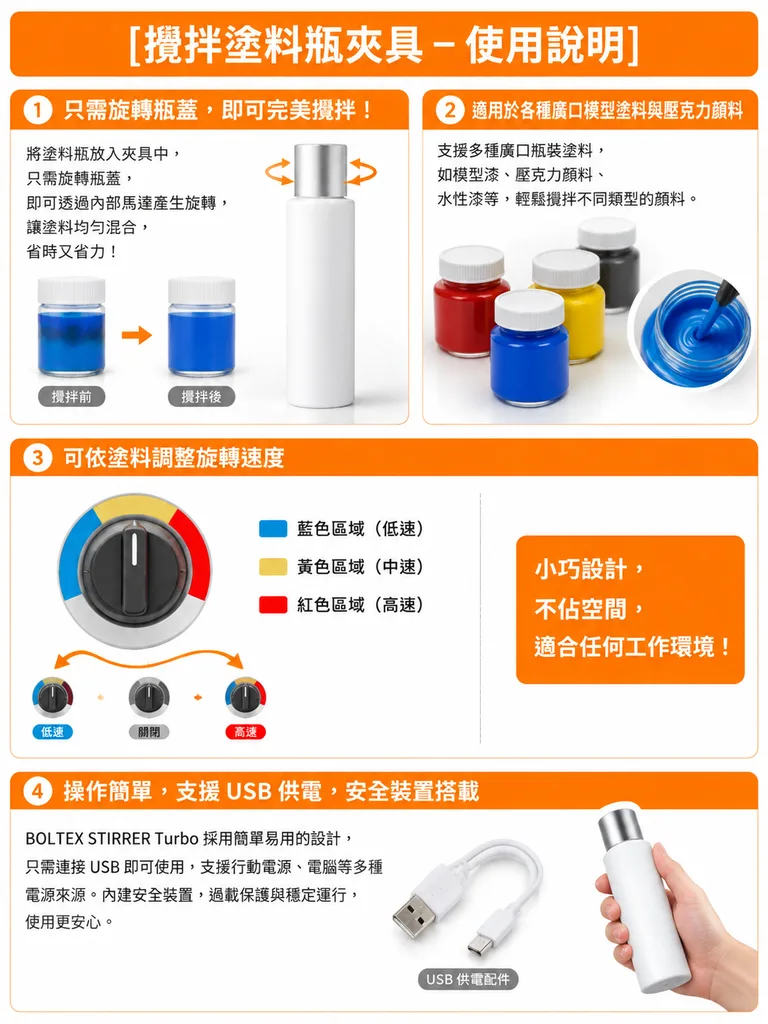
번체 중국어 제품 설명서 리플릿
참조 레이아웃을 바탕으로 깔끔하게 조판된 번체 중국어 제품 설명서를 생성합니다. 괄호 안의 제목과 제품명을 변경해 다른 제품에 맞출 수 있습니다.
프롬프트
Recreate the product instruction leaflet from the reference photo as a clean, professionally typeset Traditional Chinese version. Maintain the original brochure layout, orange header banners, section divisions, product photos, knob diagram, USB accessories photo, and handheld product shot in their original positions. Replace all Japanese text with natural Traditional Chinese copy with sharp catalog typography. Structure and Chinese text: - Top title banner: 「[攪拌塗料瓶夾具-使用說明]」 - Section 1 header: 「[只需旋轉瓶蓋,即可完美攪拌!]」 - Section 2 header: 「[適用於各種廣口模型塗料與壓克力顏料]」 - Section 3 header: 「[可依塗料調整旋轉速度]」 - Section 4 header: 「[操作簡單,支援 USB 供電,安全裝置搭載]」 Speed section details: - Keep the rotary dial knob diagram. - Label the three color-coded ranges: 「[藍色區域(低速)]」, 「[黃色區域(中速)]」, 「[紅色區域(高速)]」. - Three knob position labels: 「[低速]」, 「[關閉]」, 「[高速]」. - Add an orange callout box on the right side: 「[小巧設計,不佔空間,適合任何工作環境!]」. Bottom section: - Include the product name "[BOLTEX STIRRER Turbo]" in Latin characters within the Traditional Chinese paragraph on the lower left. Style: Crisp graphic design, perfectly flat direct scan/flyer perspective, bright studio lighting, white background, high-resolution vector-like printing layout, sharp legible glyphs, commercial product pamphlet.
바꿔 쓸 수 있는 부분
생성하기 전에 프롬프트의 이 부분을 원하는 주제나 문구로 바꿔 보세요.
[攪拌塗料瓶夾具-使用說明]자리 표시자[只需旋轉瓶蓋,即可完美攪拌!]자리 표시자[適用於各種廣口模型塗料與壓克力顏料]자리 표시자[可依塗料調整旋轉速度]자리 표시자[操作簡單,支援 USB 供電,安全裝置搭載]자리 표시자[藍色區域(低速)]자리 표시자[黃色區域(中速)]자리 표시자[紅色區域(高速)]자리 표시자
프롬프트 정보
- 카테고리
- 인포그래픽 / 교육
- 모델
- GPT IMAGE 2
- 이미지당 비용
- 1K: 43 크레딧 · 2K: 86 크레딧 · 4K: 143 크레딧
- 화면 비율
- 3:4
- 추가일