
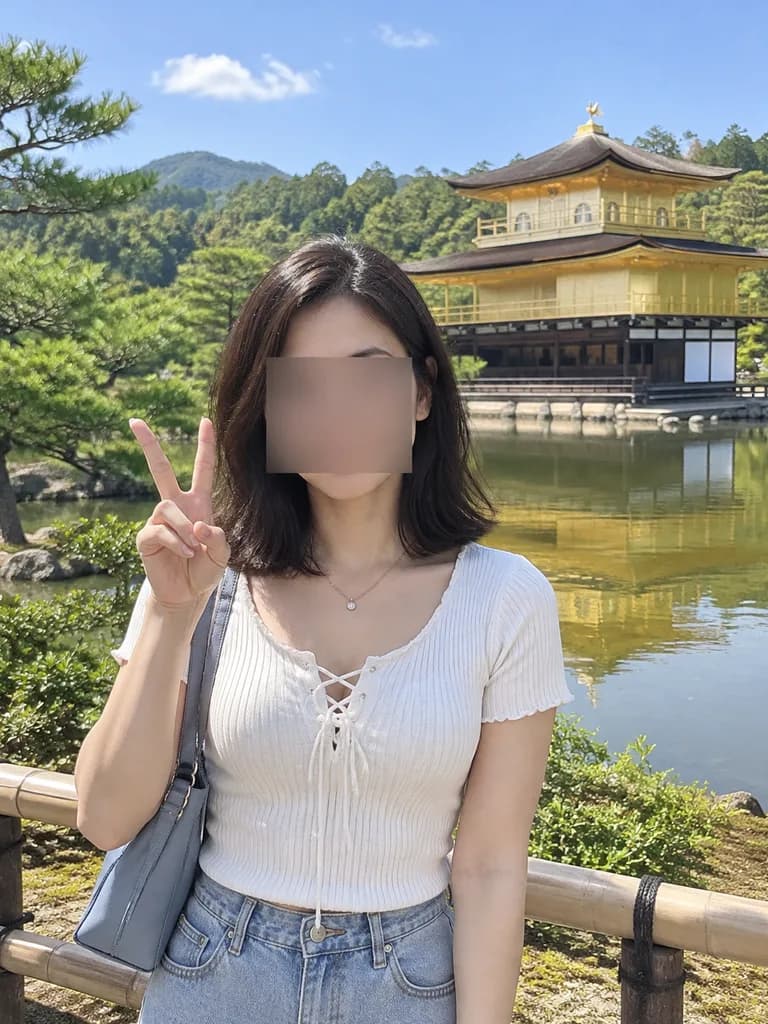
교토 금각사 관광객 스냅 사진 편집
참조 사진의 인물을 교토 금각사 앞 리얼한 여행 스냅사진으로 변환합니다. 배경 명소, 의상, 포즈를 자유롭게 변경해 나만의 기념사진을 만들어 보세요.
프롬프트
Based on the person in the reference photo, create a realistic outdoor travel snapshot in [Kyoto]. Replace the background with [Kinkaku-ji (the Golden Pavilion) beside a reflective pond, with green trees, blue sky, distant wooded hills, and a low wooden fence in the foreground]. Keep the face obscured with [the same rectangular censor blur]. Outfit: [a white short-sleeve ribbed knit top with a lace-up neckline, light blue high-waisted denim bottoms, a thin necklace, and a gray-blue shoulder bag]. Pose: [standing near the fence, holding up a peace sign with her right hand beside her face]. Lighting and style: bright natural midday sunlight, casual smartphone tourist photo, realistic human proportions, soft depth of field.
바꿔 쓸 수 있는 부분
생성하기 전에 프롬프트의 이 부분을 원하는 주제나 문구로 바꿔 보세요.
[Kyoto]자리 표시자[the same rectangular censor blur]자리 표시자
프롬프트 정보
- 카테고리
- 인물 및 사진
- 모델
- Nano Banana Pro
- 이미지당 비용
- 1K: 108 크레딧 · 2K: 108 크레딧 · 4K: 193 크레딧
- 화면 비율
- 3:4
- 추가일