
인포그래픽 / 교육
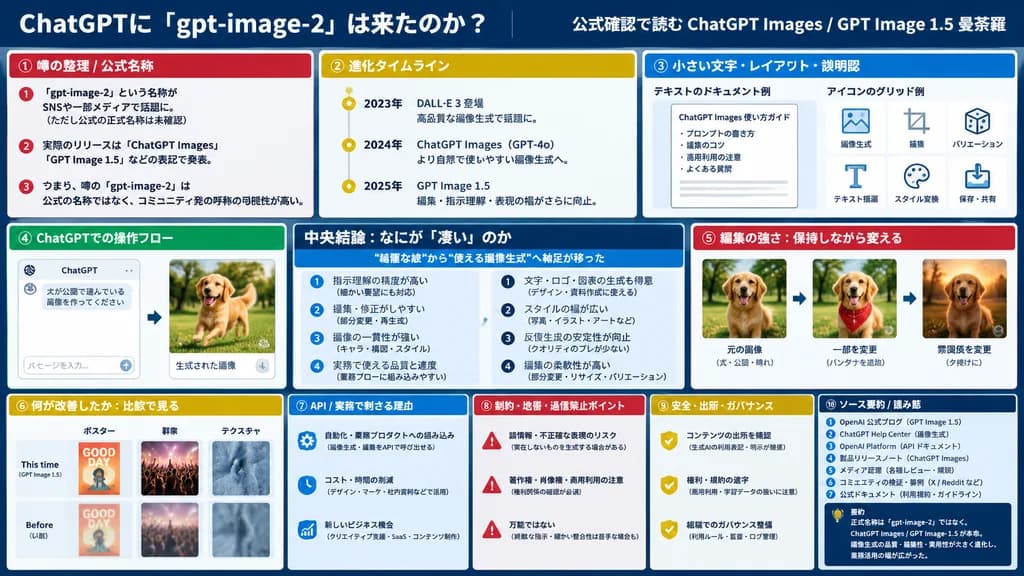
3열 기술 분석 대시보드 슬라이드
10개의 분석 모듈과 UI 비교가 포함된 기업용 프레젠테이션 슬라이드를 생성합니다. JSON 구조 내에서 섹션 제목과 테마 색상을 변경할 수 있습니다.
인포그래픽대시보드프레젠테이션 슬라이드데이터 시각화플랫 디자인비즈니스
유사한 프롬프트 둘러보기인포그래픽 AI 프롬프트
프롬프트
{
  "type": "infographic dashboard",
  "style": "corporate presentation slide, dense information layout, flat design",
  "header": {
    "left_title": "[ChatGPTに『gpt-image-2』は来たのか?]",
    "right_subtitle": "[公式確認で読む ChatGPT Images / GPT Image 1.5 曼荼羅]",
    "background_color": "[dark blue]"
  },
  "layout": {
    "columns": 3,
    "sections": [
      {
        "id": 1,
        "title": "① 噂の整理 / 公式名称",
        "color": "[red]",
        "content_type": "3 bullet points"
      },
      {
        "id": 2,
        "title": "② 進化タイムライン",
        "color": "gold",
        "content_type": "3 timeline bullet points"
      },
      {
        "id": 3,
        "title": "③ 小さい文字・レイアウト・説明図",
        "color": "blue",
        "content_type": "2 embedded images showing text document and icon grid"
      },
      {
        "id": 4,
        "title": "④ ChatGPTでの操作フロー",
        "color": "green",
        "content_type": "UI mockups showing chat interface and dog image"
      },
      {
        "id": "central",
        "title": "中央結論:なにが『凄い』のか",
        "color": "dark blue",
        "subtitle": "[“綺麗な絵”から“使える画像生成”へ軸足が移った]",
        "content_type": "2 columns of 4 bullet points each"
      },
      {
        "id": 5,
        "title": "⑤ 編集の強さ:保持しながら変える",
        "color": "red",
        "content_type": "3 sequential images showing photo editing progression"
      },
      {
        "id": 6,
        "title": "⑥ 何が改善したか:比較で見る",
        "color": "gold",
        "content_type": "6 comparison images (This time vs Before) for posters, crowds, textures"
      },
      {
        "id": 7,
        "title": "⑦ API / 実務で刺さる理由",
        "color": "blue",
        "content_type": "3 bullet points"
      },
      {
        "id": 8,
        "title": "⑧ 制約・地雷・過信禁止ポイント",
        "color": "red",
        "content_type": "3 bullet points"
      },
      {
        "id": 9,
        "title": "⑨ 安全・出所・ガバナンス",
        "color": "gold",
        "content_type": "3 bullet points"
      },
      {
        "id": 10,
        "title": "⑩ ソース要約 / 読み筋",
        "color": "dark blue",
        "content_type": "list of 7 sources and a summary box"
      }
    ]
  }
}바꿔 쓸 수 있는 부분
생성하기 전에 프롬프트의 이 부분을 원하는 주제나 문구로 바꿔 보세요.
[ChatGPTに『gpt-image-2』は来たのか?]자리 표시자[公式確認で読む ChatGPT Images / GPT Image 1.5 曼荼羅]자리 표시자[dark blue]자리 표시자[red]자리 표시자[“綺麗な絵”から“使える画像生成”へ軸足が移った]자리 표시자
프롬프트 정보
- 카테고리
- 인포그래픽 / 교육
- 모델
- GPT IMAGE 2
- 이미지당 비용
- 1K: 43 크레딧 · 2K: 86 크레딧 · 4K: 143 크레딧
- 화면 비율
- 16:9
- 추가일