
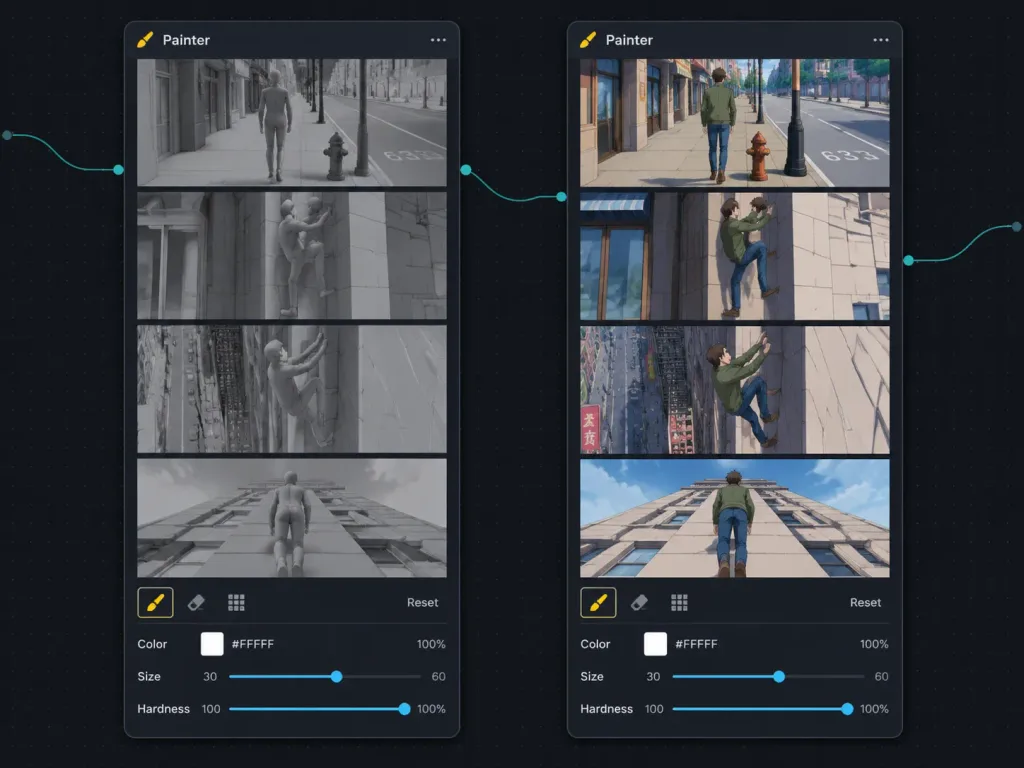
스토리보드 리렌더링 노드 워크플로우 UI
3D 프리비즈와 애니메이션 리페인트 스토리보드를 비교하는 다크 노드 그래프 UI를 생성합니다. 파이프라인에 맞춰 화풍과 의상을 변경할 수 있습니다.
프롬프트
Dark node-based workflow UI screenshot showing a side-by-side comparison between a 3D animation previz storyboard and an anime-style re-render inside a visual AI compositing application. Landscape 4:3 screen capture on a nearly black dotted grid canvas with thin curved teal connector lines between nodes and small circular input/output connection ports. Layout: Exactly two tall rounded-rectangle dark charcoal nodes side by side. Both nodes have a header titled "Painter" on the top-left with a small brush/pen icon, and a three-dot menu icon on the top-right. The left node displays the source grayscale storyboard; the right node displays the stylized output storyboard. Each node contains exactly 4 vertically stacked widescreen storyboard frames separated by crisp black dividers, followed by a compact control toolbar at the bottom. Left node frames: Rendered as monochrome neutral-gray 3D viewport cinematic previz with clay materials and geometric urban assets. Frame 1: a generic featureless male mannequin walking down a city sidewalk past storefronts, a fire hydrant, street pole, and road markings. Frame 2: the mannequin lifts one leg onto a stone building wall, initiating a climb. Frame 3: the mannequin climbing the building facade, leaning backward with feet pressed against the wall. Frame 4: rear perspective of the mannequin walking straight up a tall vertical wall toward the roofline. Right node frames: Exactly mirrors the same 4 actions and angles, rendered in [1990s hand-painted anime cel animation] style. Features a young adult male with brown hair wearing [a green jacket, blue jeans, and brown shoes] in classic anime proportions. Frame 1: walking along a sunlit city street past shops, a red hydrant, lamppost, and road marking "633". Frame 2: stepping onto the building wall beside a shopfront window. Frame 3: climbing higher on the facade with city street, fire escape, and signs visible below. Frame 4: rear view walking vertically up the pale building exterior. Bottom controls on each node: Top row features exactly three icons (a highlighted yellow brush, an eraser, and a grid icon) alongside a right-aligned "Reset" text label. Bottom row features three parameter fields: "Color" with a white swatch, "#FFFFFF", and "100%"; "Size" with a slider showing [30] on the left and [60] on the right; "Hardness" with a slider and "100%". Crisp UI mockup, dark mode, subtle drop shadows, precise typographic alignment.
바꿔 쓸 수 있는 부분
생성하기 전에 프롬프트의 이 부분을 원하는 주제나 문구로 바꿔 보세요.
[1990s hand-painted anime cel animation]자리 표시자[a green jacket, blue jeans, and brown shoes]자리 표시자[30]자리 표시자[60]자리 표시자“Painter”따옴표 안 문구“633”따옴표 안 문구“Reset”따옴표 안 문구“Color”따옴표 안 문구
프롬프트 정보
- 카테고리
- UI / UX 디자인
- 모델
- GPT IMAGE 2
- 이미지당 비용
- 1K: 43 크레딧 · 2K: 86 크레딧 · 4K: 143 크레딧
- 화면 비율
- 4:3
- 추가일