
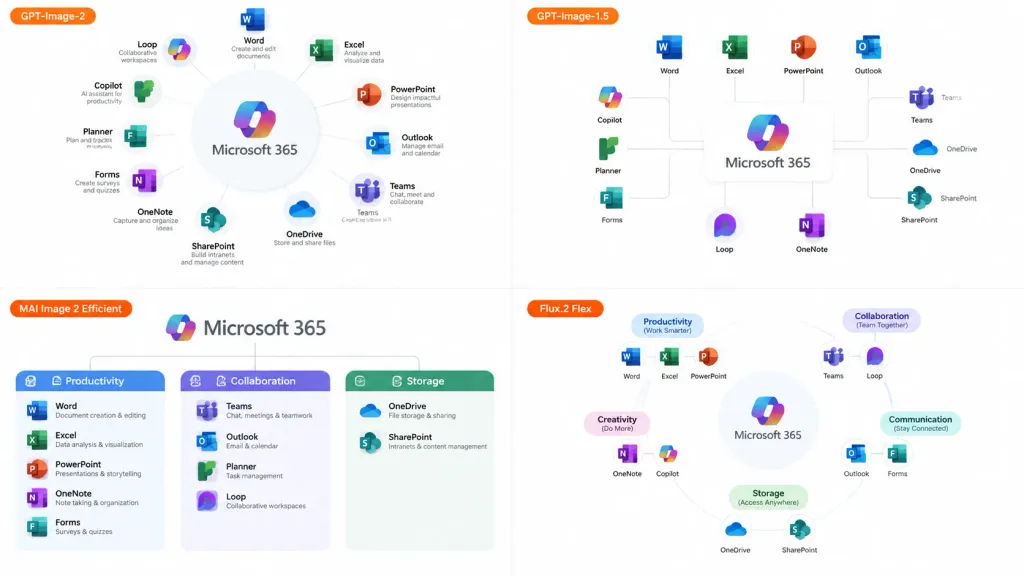
소프트웨어 에코시스템 모델 비교 슬라이드
다양한 AI 모델이 에코시스템 인포그래픽을 표현하는 방식을 비교하는 2x2 그리드를 생성합니다. 중심 제품과 라벨을 변경해 맞춤 설정하세요.
프롬프트
A 16:9 comparison infographic slide demonstrating how different image generation models render an infographic about [Microsoft 365], set on a clean white background. Layout and Composition: A 2×2 grid featuring exactly four distinct panels. Each panel includes a small horizontal orange model label near its left side: - Top-left label: "[GPT-Image-2]" - Top-right label: "[GPT-Image-1.5]" - Bottom-left label: "[MAI Image 2 Efficient]" - Bottom-right label: "[Flux.2 Flex]" Panel Details: - Each panel visualizes [Microsoft 365] at the center surrounded by recognizable app icons and labels (Word, Excel, PowerPoint, Outlook, Teams, OneDrive, SharePoint, OneNote, Forms, Planner, Loop, Copilot). - Top-left panel: The most polished and readable, displaying a clear circular hub-and-spoke diagram with concise app descriptions. - Top-right panel: A simpler layout with app icons connected to a central [Microsoft 365] box via connector lines. - Bottom-left panel: A structured category chart divided into Productivity, Collaboration, and Storage sections. - Bottom-right panel: A softer radial diagram with category headings and slightly imperfect or uneven labels to suggest model variation. Style: Modern clean corporate SaaS infographic, generous white space, thin gray connector lines, crisp readable English typography, and authentic app icon brand colors (blue, green, orange, purple). No Japanese text, no watermark, no extra overarching title banner.
바꿔 쓸 수 있는 부분
생성하기 전에 프롬프트의 이 부분을 원하는 주제나 문구로 바꿔 보세요.
[Microsoft 365]자리 표시자[GPT-Image-2]자리 표시자[GPT-Image-1.5]자리 표시자[MAI Image 2 Efficient]자리 표시자[Flux.2 Flex]자리 표시자
프롬프트 정보
- 카테고리
- 인포그래픽 / 교육
- 모델
- GPT IMAGE 2
- 이미지당 비용
- 1K: 43 크레딧 · 2K: 86 크레딧 · 4K: 143 크레딧
- 화면 비율
- 16:9
- 추가일