
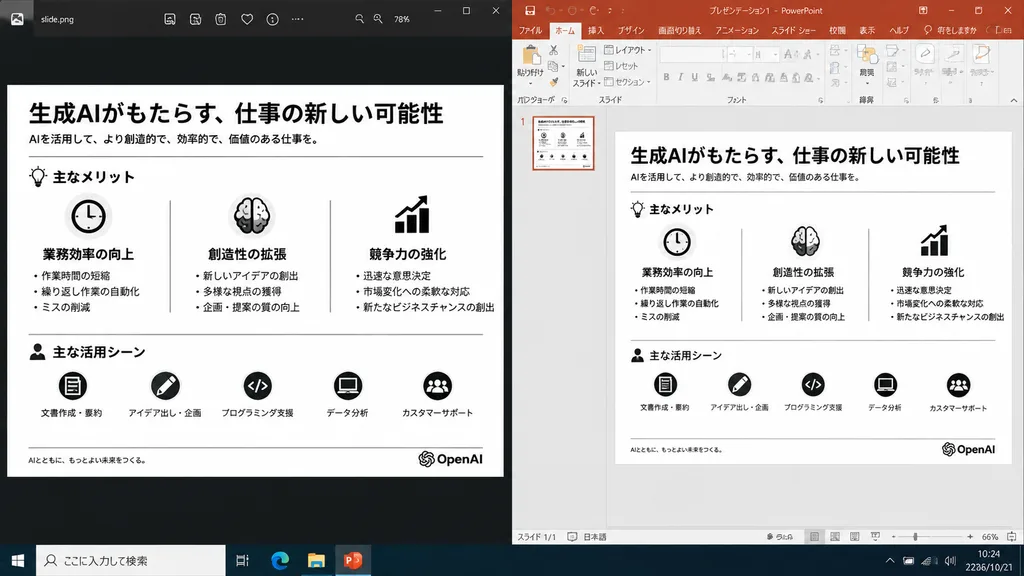
프레젠테이션 슬라이드 재구성 비교 화면
내보낸 슬라이드 이미지와 PowerPoint 편집 화면을 나란히 배치한 현실적인 데스크톱 스크린샷을 생성합니다. 괄호 안의 로고나 주제를 변경해 활용하세요.
프롬프트
A realistic side-by-side Windows desktop screenshot showing a polished presentation slide reconstruction based on the reference image. The left panel shows a dark image viewer window displaying the clean exported slide. The right panel shows Microsoft PowerPoint in editing view containing the exact same editable slide. The slide retains the original Japanese monochrome infographic layout: 1 top title and header row, 3 mid-page comparison columns, and 1 bottom use-case row with 5 icon-labeled items, a footer line, and the [OpenAI] logo at the bottom right. Clean, legible Japanese typography, properly aligned dividers, crisp monochrome icons, and no clutter, selection handles, or malformed vector artifacts. Crisp UI detailing, native desktop app appearance, high readability.
바꿔 쓸 수 있는 부분
생성하기 전에 프롬프트의 이 부분을 원하는 주제나 문구로 바꿔 보세요.
[OpenAI]자리 표시자
프롬프트 정보
- 카테고리
- UI / UX 디자인
- 모델
- GPT IMAGE 2
- 이미지당 비용
- 1K: 43 크레딧 · 2K: 86 크레딧 · 4K: 143 크레딧
- 화면 비율
- 16:9
- 추가일