
UI / UX 디자인
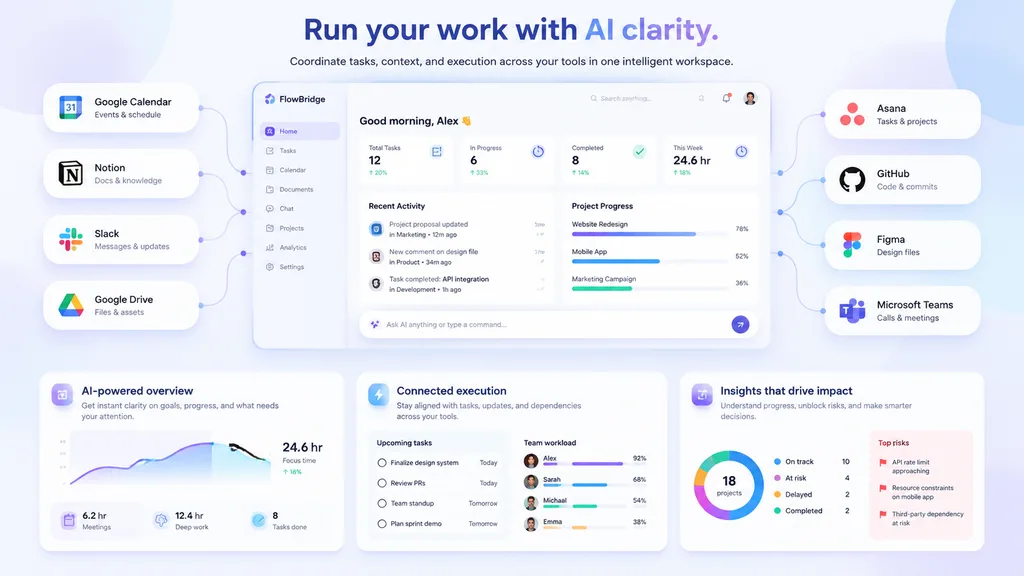
SaaS AI 워크스페이스 랜딩 페이지 목업
AI 대시보드, 연동 앱 칩, 기능 요약 카드가 포함된 깔끔한 SaaS 랜딩 페이지를 렌더링합니다. 헤드라인, 브랜드명, 그라디언트 색상을 수정해 활용하세요.
saas대시보드랜딩페이지ui목업웹디자인글래스모피즘히어로섹션
프롬프트
{
  "type": "SaaS landing page hero graphic",
  "style": "Modern UI/UX, light theme, soft shadows, glassmorphism, [purple and blue gradients]",
  "header": {
    "headline": "[Run your work with AI clarity.]",
    "subheadline": "Coordinate tasks, context, and execution across your tools in one intelligent workspace."
  },
  "layout": {
    "center_dashboard": {
      "app_name": "[FlowBridge]",
      "greeting": "[Good morning, Alex 👋]",
      "sidebar_links": 8,
      "top_metrics_cards": 4,
      "recent_activity_items": 3,
      "project_progress_bars": 3,
      "floating_action_bar": "[Ask AI anything or type a command...]"
    },
    "left_integrations": {
      "count": 4,
      "style": "pill-shaped cards connected by thin lines to the center dashboard",
      "labels": [
        "Google Calendar: Events & schedule",
        "Notion: Docs & knowledge",
        "Slack: Messages & updates",
        "Google Drive: Files & assets"
      ]
    },
    "right_integrations": {
      "count": 4,
      "style": "pill-shaped cards connected by thin lines to the center dashboard",
      "labels": [
        "Asana: Tasks & projects",
        "GitHub: Code & commits",
        "Figma: Design files",
        "Microsoft Teams: Calls & meetings"
      ]
    },
    "bottom_feature_cards": {
      "count": 3,
      "style": "rectangular cards with soft shadows",
      "cards": [
        {
          "title": "AI-powered overview",
          "description": "Get instant clarity on goals, progress, and what needs your attention.",
          "visuals": "Line chart showing 24.6 hr focus time, and 3 bottom metrics (Meetings, Deep work, Tasks done)"
        },
        {
          "title": "Connected execution",
          "description": "Stay aligned with tasks, updates, and dependencies across your tools.",
          "visuals": "List of 4 upcoming tasks and 4 team workload progress bars with user avatars"
        },
        {
          "title": "Insights that drive impact",
          "description": "Understand progress, unblock risks, and make smarter decisions.",
          "visuals": "Donut chart showing 18 projects by status, and a list of 3 top risks with red flag icons"
        }
      ]
    }
  }
}바꿔 쓸 수 있는 부분
생성하기 전에 프롬프트의 이 부분을 원하는 주제나 문구로 바꿔 보세요.
[purple and blue gradients]자리 표시자[Run your work with AI clarity.]자리 표시자[FlowBridge]자리 표시자[Good morning, Alex 👋]자리 표시자[Ask AI anything or type a command...]자리 표시자
프롬프트 정보
- 카테고리
- UI / UX 디자인
- 모델
- GPT IMAGE 2
- 이미지당 비용
- 1K: 43 크레딧 · 2K: 86 크레딧 · 4K: 143 크레딧
- 화면 비율
- 16:9
- 추가일