
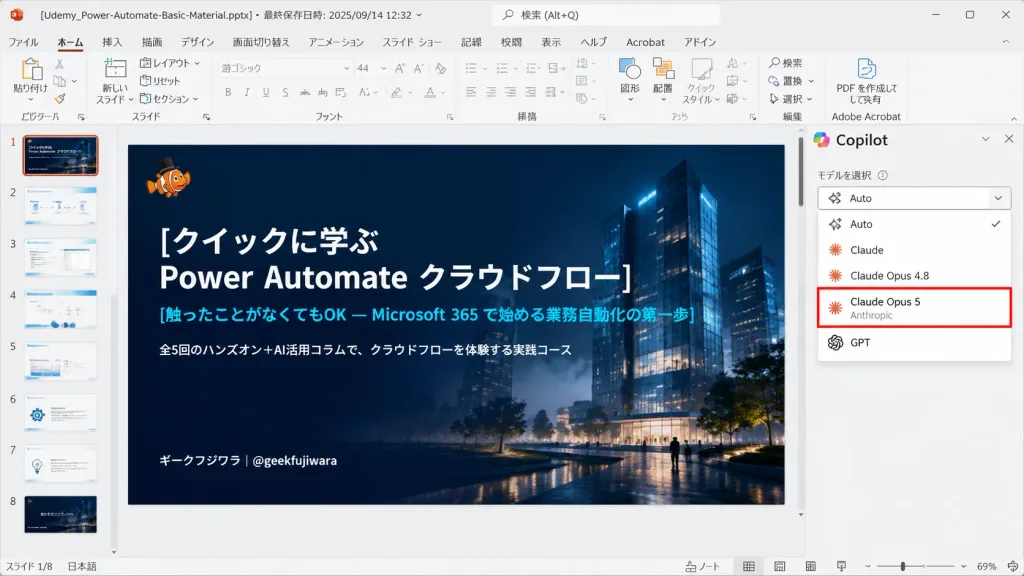
AI 모델 선택기가 있는 파워포인트 데스크톱 스크린샷
다크 테마 표지 슬라이드와 AI 모델 선택 사이드바가 포함된 사실적인 일본어 파워포인트 화면을 생성합니다. 텍스트와 모델 옵션을 맞춤 설정하세요.
프롬프트
Realistic 16:9 desktop screenshot of Microsoft PowerPoint running on Windows in Japanese, capturing an active slide editing session. The PowerPoint interface features a light gray chrome, Japanese ribbon tabs (File, Home, Insert, Draw, Design, Transitions, Animations, Slide Show, Record, Review, View, Help), and add-in icons. Top title bar displays the file name "[Udemy_Power-Automate-Basic-Material.pptx]" alongside last-saved metadata. The left thumbnail panel displays exactly 8 slide thumbnails numbered 1 to 8; Slide 1 is highlighted with an orange selection border. The central slide canvas features a dark, cinematic title slide with a deep navy gradient overlay atop a night architectural render of glowing glass towers, subtle mist, and small walking silhouettes. In the top-left of the slide sits a tiny orange clownfish mascot wearing a black top hat. The slide text is left-aligned in crisp Japanese typography: large bold white title "[クイックに学ぶ\nPower Automate クラウドフロー]", cyan subtitle "[触ったことがなくてもOK — Microsoft 365 で始める業務自動化の第一歩]", smaller white description "[全5回のハンズオン+AI活用コラムで、クラウドフローを体験する実践コース]", and bottom-left author tag "[ギークフジワラ|@geekfujiwara]". On the right side, an open AI assistant sidebar showcases a model selection dropdown menu listing exactly five options: "Auto" with a checkmark, "Claude", "Claude Opus 4.8", "Claude Opus 5" highlighted by a prominent red rectangular outline with small gray "Anthropic" subtext, and "GPT". Authentic UI elements including status bar, scrollbars, zoom slider, and clean vector icons, with no browser chrome.
바꿔 쓸 수 있는 부분
생성하기 전에 프롬프트의 이 부분을 원하는 주제나 문구로 바꿔 보세요.
[Udemy_Power-Automate-Basic-Material.pptx]자리 표시자[クイックに学ぶ\nPower Automate クラウドフロー]자리 표시자[触ったことがなくてもOK — Microsoft 365 で始める業務自動化の第一歩]자리 표시자[全5回のハンズオン+AI活用コラムで、クラウドフローを体験する実践コース]자리 표시자[ギークフジワラ|@geekfujiwara]자리 표시자“Auto”따옴표 안 문구“Claude”따옴표 안 문구“Claude Opus 4.8”따옴표 안 문구
프롬프트 정보
- 카테고리
- UI / UX 디자인
- 모델
- GPT IMAGE 2
- 이미지당 비용
- 1K: 43 크레딧 · 2K: 86 크레딧 · 4K: 143 크레딧
- 화면 비율
- 16:9
- 추가일