
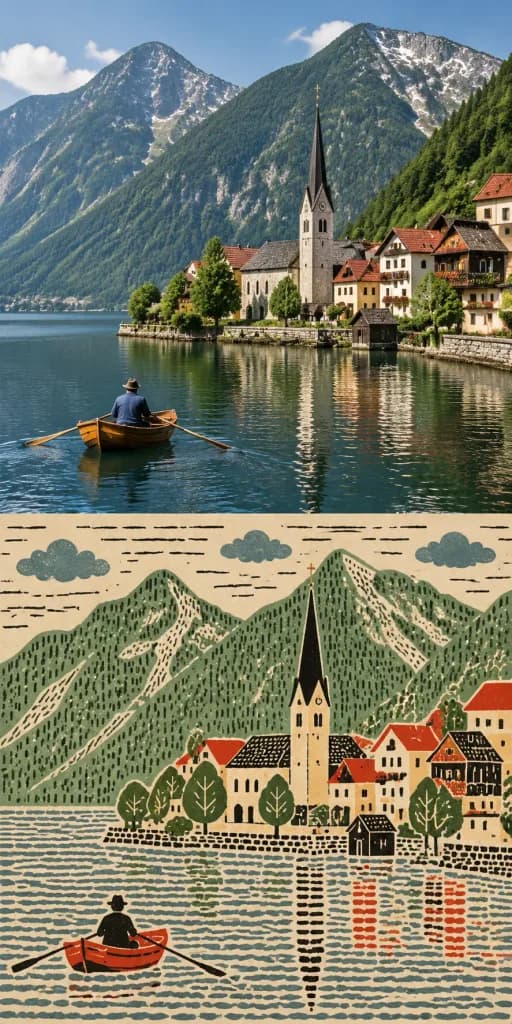
나이브 민속 예술 상하 비교 컷
업로드한 참조 사진을 상단에 두고, 하단에 평면적인 민속 판화 스타일로 변환하여 배치합니다. 포인트 색상과 패턴을 조정해 활용하세요.
프롬프트
Create a vertically stacked before-and-after comparison using the reference photo as the only source. LAYOUT: - Exactly two equal-height panels: original reference image on top, transformed image on the bottom. - Both panels maintain the reference photo's aspect ratio and identical width. Clean horizontal seam between panels, with no borders, frames, dividers, or text. TOP PANEL — ORIGINAL: - Place the reference photo unchanged in the upper half. Preserve its full composition, colors, lighting, details, and crop without alteration or texture. BOTTOM PANEL — NAÏVE FOLK ART: - Redraw the exact scene as a flat, densely textured naïve outsider folk-art print. Preserve the main subject, recognizable silhouettes, relative positions, and key objects without adding new props or characters. - Flatten the perspective into map-like color zones, presenting figures, architecture, and landscape elements in flat frontal or side elevation. Eliminate photographic depth, shadows, and directional lighting. - Color palette: Warm paper white, warm ink black, and two to four muted tones sampled from the original photo, with exactly one saturated accent color highlighting a key detail. - Texture and rendering: Each major zone features a uniform, rhythmic, handmade pattern (such as linework, cross-hatching, irregular grids, or dense stippling). Render as opaque matte ink print on paper. People are depicted as small, stylized, faceless silhouette figures with filled clothing. No gradients, gloss, or digital photorealism.
프롬프트 정보
- 카테고리
- 포스터 및 일러스트
- 모델
- GPT IMAGE 2.5 Sunburst
- 이미지당 비용
- 1K: 11 크레딧 · 2K: 22 크레딧 · 4K: 36 크레딧
- 화면 비율
- 1:2
- 추가일