
인포그래픽 / 교육
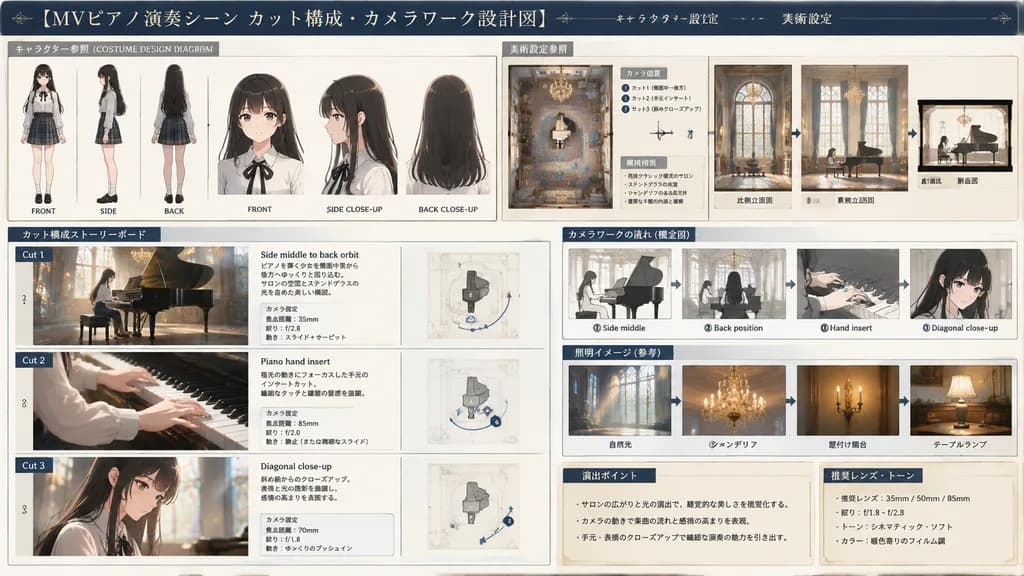
뮤직비디오 제작 스토리보드 설계도
캐릭터 설정도, 평면 배치도, 컷 구성 스토리보드가 포함된 전문 영상 제작 설계도를 생성합니다. 괄호 안의 의상, 공간, 연출 동작을 수정하여 다양하게 활용하세요.
스토리보드제작설정설계도인포그래픽뮤직비디오캐릭터디자인카메라워크
프롬프트
{
  "type": "production design and storyboard blueprint",
  "header": {
    "title": "[MVピアノ演奏シーン カット構成・カメラワーク設計図]",
    "subtitles": [
      "キャラクター設定",
      "美術設定"
    ]
  },
  "character_reference": {
    "title": "キャラクター参照 (COSTUME DESIGN DIAGRAM)",
    "description": "[young woman with long black hair, white blouse, black ribbon, plaid skirt]",
    "views_count": 6,
    "labels": [
      "FRONT",
      "SIDE",
      "BACK",
      "FRONT CLOSE-UP",
      "SIDE CLOSE-UP",
      "BACK CLOSE-UP"
    ]
  },
  "art_setting": {
    "title": "美術設定参照",
    "setting": "[classic western-style salon with stained glass and chandelier]",
    "diagrams_count": 4,
    "diagram_types": [
      "top-down floor plan with camera nodes",
      "North elevation",
      "East elevation",
      "cross-section"
    ],
    "text_boxes": [
      "カメラ位置",
      "環境特徴"
    ]
  },
  "storyboard": {
    "title": "カット構成ストーリーボード",
    "action": "[playing a grand piano]",
    "panels_count": 3,
    "panels": [
      {
        "cut": "Cut 1",
        "description": "Side middle to back orbit",
        "elements": [
          "main image",
          "descriptive text",
          "camera settings box",
          "small diagram"
        ]
      },
      {
        "cut": "Cut 2",
        "description": "Piano hand insert",
        "elements": [
          "main image",
          "descriptive text",
          "camera settings box",
          "small diagram"
        ]
      },
      {
        "cut": "Cut 3",
        "description": "Diagonal close-up",
        "elements": [
          "main image",
          "descriptive text",
          "camera settings box",
          "small diagram"
        ]
      }
    ]
  },
  "camera_workflow": {
    "title": "カメラワークの流れ (概念図)",
    "steps_count": 4,
    "descriptions": [
      "Side middle",
      "Back position",
      "Hand insert",
      "Diagonal close-up"
    ]
  },
  "lighting_reference": {
    "title": "照明イメージ (参考)",
    "images_count": 4,
    "labels": [
      "自然光",
      "シャンデリア",
      "壁付け燭台",
      "テーブルランプ"
    ]
  },
  "notes": {
    "boxes_count": 2,
    "labels": [
      "演出ポイント",
      "推奨レンズ・トーン"
    ]
  }
}바꿔 쓸 수 있는 부분
생성하기 전에 프롬프트의 이 부분을 원하는 주제나 문구로 바꿔 보세요.
[MVピアノ演奏シーン カット構成・カメラワーク設計図]자리 표시자[playing a grand piano]자리 표시자
프롬프트 정보
- 카테고리
- 인포그래픽 / 교육
- 모델
- GPT IMAGE 2
- 이미지당 비용
- 1K: 43 크레딧 · 2K: 86 크레딧 · 4K: 143 크레딧
- 화면 비율
- 16:9
- 추가일