
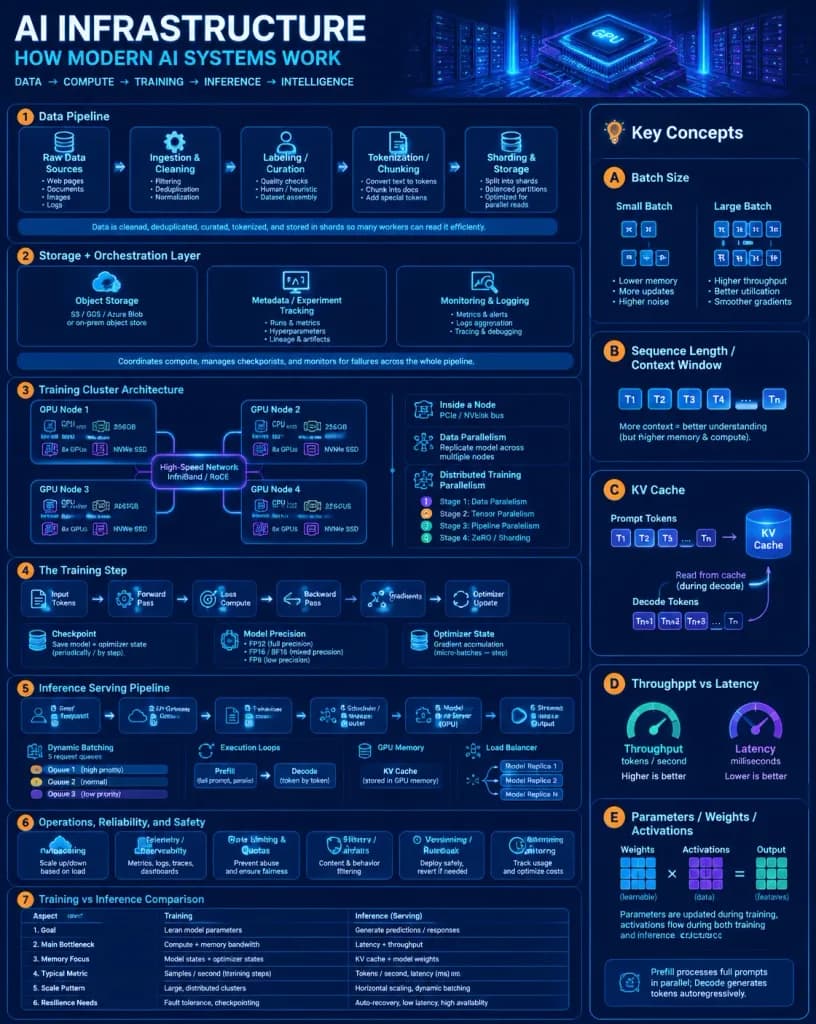
현대 AI 인프라 아키텍처 교육 인포그래픽
최신 AI 시스템 아키텍처를 세밀하게 설명하는 하이테크 교육용 포스터입니다. 제목, 세부 항목 및 색상 팔레트를 자유롭게 변경해 보세요.
프롬프트
A dense, highly polished vertical educational infographic poster titled "[AI INFRASTRUCTURE]" with the subtitle "[HOW MODERN AI SYSTEMS WORK]", explaining modern AI infrastructure from data pipelines and GPU training clusters to inference serving, dynamic batching, and KV cache. Style & Atmosphere: Dark navy futuristic data-center aesthetic, glowing blue and purple cybernetic grid background with subtle stylized server racks, silicon GPU chip graphics, neon circuit traces, thin rounded panels, crisp white and cyan typography, and vibrant orange numbered badges. Clean, highly technical, and legible visual architecture. Layout: - Top banner: Large bold title on top left, subtitle and technical tagline underneath, decorative glowing server rack and GPU processor illustration on top right. - Main structure: Exactly 8 numbered core sections, a dedicated right-hand "Key Concepts" sidebar column, and a bottom workflow footer. Sections & Content Details: 1. Data Pipeline: 5 sequential stages connected by arrows: Raw Data Sources (bullets: Web pages, Documents, Code, Images, Logs), Ingestion & Cleaning (bullets: Filtering, Deduplication, Normalization), Labeling / Curation (bullets: Quality checks, Human / heuristic, Dataset assembly), Tokenization / Chunking (bullets: Convert text to tokens, Chunk into docs, Add special tokens), Sharding & Storage (bullets: Split into shards, Balanced partitions, Optimized for parallel reads). Bottom caption: "Data is cleaned, deduplicated, curated, tokenized, and stored in shards so many workers can read it efficiently." 2. Storage + Orchestration Layer: 3 vertical cards: Object Storage (cloud/database icon, note "S3 / GCS / Azure Blob or on-prem object store"), Metadata / Experiment Tracking (dashboard icon, bullets: Runs & metrics, Hyperparameters, Lineage & artifacts), Monitoring & Logging (chart/lens icon, bullets: Metrics & alerts, Logs aggregation, Tracing & debugging). Footer note summarizing compute coordination, checkpoints, and failure monitoring. 3. Training Cluster Architecture: Central diagram titled "Training Cluster Architecture" with 4 GPU node boxes in a 2x2 grid linked by glowing connections labeled "High-Speed Network InfiniBand / RoCE". Each node shows CPU Host, RAM, 8x GPUs, NVMe SSD. Sub-panels: "Inside a Node" (PCIe/NVLink bus), "Data Parallelism", and "Distributed Training Parallelism" legend (Stages 1 through 4). 4. The Training Step: Left-to-right 6-step flow: Input Tokens -> Forward Pass -> Loss Compute -> Backward Pass -> Gradients -> Optimizer Update. Checkpoint stack graphic, Model Precision panel (FP32, FP16/BF16, FP8), and Optimizer State panel with gradient accumulation arrows. 5. Inference Serving Pipeline: 6-step horizontal sequence: User Request -> API Gateway -> Tokenizer -> Scheduler / Router -> Model Server (GPU) -> Streamed Output. Details include Dynamic Batching with 3 request queues, Prefill vs Decode execution loops, GPU memory KV Cache, and a load balancer routing to Model Replicas 1, 2, and N. 6. Operations, Reliability, and Safety: 6 rounded operational feature cards with icons: Autoscaling, Telemetry / Observability, Rate Limiting & Quotas, Safety Filters / Guardrails, Versioning / Rollback, Cost Monitoring. 7. Training vs Inference Comparison Table: A 6-row by 2-column comparative table evaluating Training vs Inference (Serving) across Goal, Main Bottleneck, Memory Focus, Typical Metric, Scale Pattern, and Resilience Needs. 8. Key Concepts Sidebar: Vertical right-side column with 5 lettered cards: - A. Batch Size (small vs large batch diagram with token icons) - B. Sequence Length / Context Window (prompt token blocks T1 through Tn) - C. KV Cache (prompt tokens feeding a cylindrical cache block, decode reading from cache) - D. Throughput vs Latency (dual gauge indicators) - E. Parameters / Weights / Activations (multiplied matrix grid schematics) - Bottom note: "Prefill processes full prompts in parallel; Decode generates tokens autoregressively."
바꿔 쓸 수 있는 부분
생성하기 전에 프롬프트의 이 부분을 원하는 주제나 문구로 바꿔 보세요.
[AI INFRASTRUCTURE]자리 표시자[HOW MODERN AI SYSTEMS WORK]자리 표시자“Key Concepts”따옴표 안 문구“S3 / GCS / Azure Blob or on-prem object store”따옴표 안 문구“Training Cluster Architecture”따옴표 안 문구“High-Speed Network InfiniBand / RoCE”따옴표 안 문구“Inside a Node”따옴표 안 문구“Data Parallelism”따옴표 안 문구
프롬프트 정보
- 카테고리
- 인포그래픽 / 교육
- 모델
- GPT IMAGE 2
- 이미지당 비용
- 1K: 43 크레딧 · 2K: 86 크레딧 · 4K: 143 크레딧
- 화면 비율
- 4:5
- 추가일