
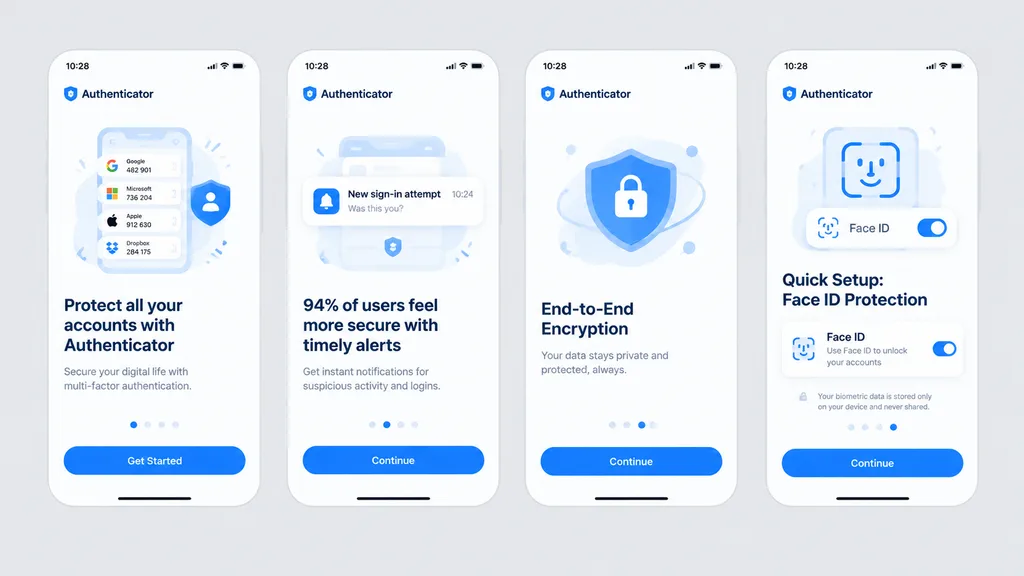
모바일 인증 앱 온보딩 플로우
연한 회색 배경 위에 보안 앱의 4개 화면 온보딩 목업을 생성합니다. 브랜드에 맞춰 강조 색상과 앱 이름, 문구를 변경해보세요.
프롬프트
Clean front-facing design mockup of a mobile onboarding flow, recreating the UI from the reference photo. Display exactly four iPhone-style screens arranged horizontally and evenly spaced across a solid light gray background, completely flat with no perspective distortion, glare, browser chrome, or laptop borders, appearing as a crisp Figma export. Consistent white light theme with [bright blue] as the primary accent color, rounded card frames, modern typography hierarchy, vector icons, and clean UI illustrations. App name is [Authenticator], status bar time displays [10:28]. Four screens from left to right: 1) Authenticator accounts list with headline “Protect all your accounts with Authenticator” and CTA button “Get Started”. 2) Security alert notifications with headline “94% of users feel more secure with timely alerts” and CTA button “Continue”. 3) Shield and lock illustration with headline “End-to-End Encryption” and CTA button “Continue”. 4) Face ID setup with biometric scanning graphic, headline “Quick Setup: Face ID Protection”, Face ID toggle card, privacy note, and CTA button “Continue”.
바꿔 쓸 수 있는 부분
생성하기 전에 프롬프트의 이 부분을 원하는 주제나 문구로 바꿔 보세요.
[bright blue]자리 표시자[Authenticator]자리 표시자“Protect all your accounts with Authenticator”따옴표 안 문구“Get Started”따옴표 안 문구“94% of users feel more secure with timely alerts”따옴표 안 문구“Continue”따옴표 안 문구“End-to-End Encryption”따옴표 안 문구“Quick Setup: Face ID Protection”따옴표 안 문구
프롬프트 정보
- 카테고리
- UI / UX 디자인
- 모델
- GPT IMAGE 2
- 이미지당 비용
- 1K: 43 크레딧 · 2K: 86 크레딧 · 4K: 143 크레딧
- 화면 비율
- 16:9
- 추가일