
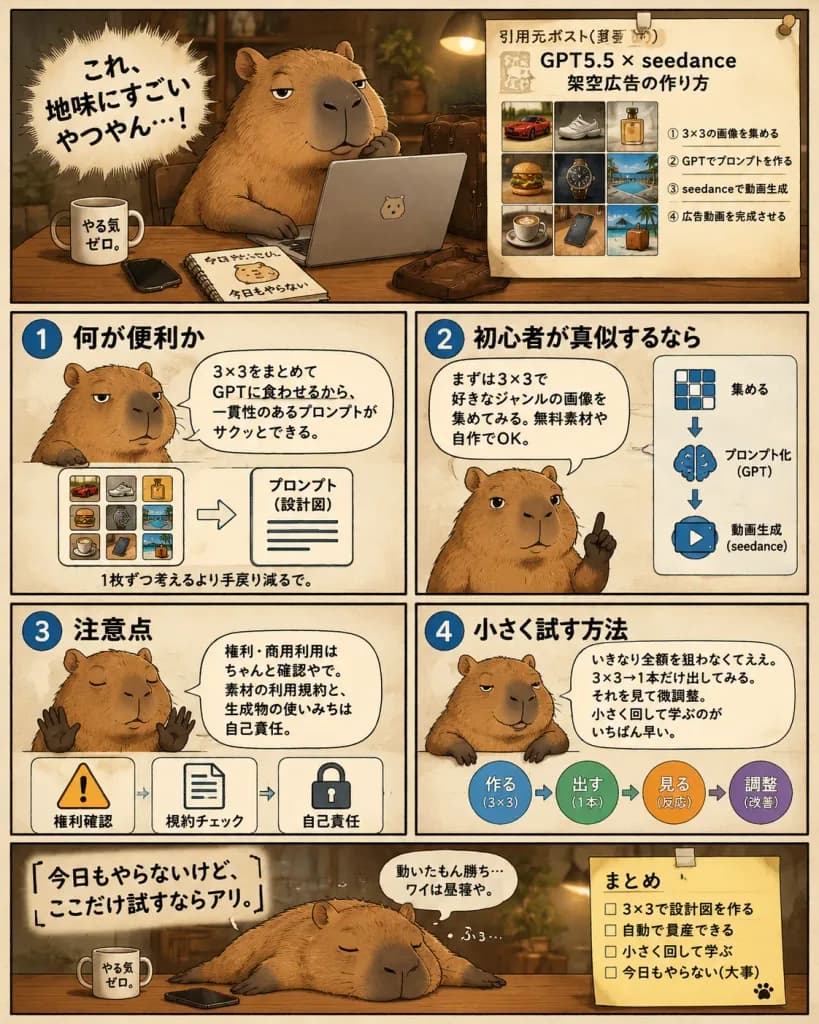
게으른 카피바라의 AI 워크플로 만화
졸린 카피바라 전략가가 설명하는 6컷 일본 만화 인포그래픽을 제작합니다. 대사, 캐릭터 설정, 요약 메모를 수정해 다양한 작업 과정을 설명할 수 있습니다.
프롬프트
A single-page Japanese manga-style instructional infographic comic about using a 3×3 image grid workflow with GPT and video generation tools for advertising, hosted by a [lazy capybara strategist]. Composition & Layout: Vertical 4:5 layout divided into exactly 6 panels with hand-drawn panel borders on a warm cream paper background with a thin black outer border. Warm sepia-brown palette, soft shadows, cozy ambient lighting, and subtle paper texture. Panels Structure: 1. Hero Panel (top): The chubby capybara sits at a wooden desk in a dim cozy office, one paw under its chin, looking sleepy and smug in front of an open silver laptop. On the desk are 4 items: a white mug labeled 「やる気ゼロ。」, a black smartphone, a spiral notebook labeled 「今日もやらない」 with a capybara doodle, and a brown leather satchel. On the left, a dynamic spiky manga burst contains the bold text 「[これ、地味にすごいやつやん…!]」. On the right, a pinned beige reference sheet titled 「引用元ポスト(要約)」 with headline 「GPT5.5 × seedance 架空広告の作り方」 features a 3×3 thumbnail grid (red sports car, sneaker, perfume bottle, burger, luxury wristwatch, resort pool, coffee cup, smartphone on desk, tropical suitcase/beach scene) and four numbered Japanese steps underneath. 2. Instruction Panel 1 (middle row, top-left): Blue circle badge 「1」 titled 「何が便利か」. Capybara shown chest-up, unimpressed, with speech bubble 「3×3をまとめてGPTに食わせるから、一貫性のあるプロンプトがサクッとできる。」 Bottom diagram shows a mini 3×3 color grid pointing to a document labeled 「プロンプト(設計図)」, captioned 「1枚ずつ考えるより手戻り減るで。」 3. Instruction Panel 2 (middle row, top-right): Blue circle badge 「2」 titled 「初心者が真似するなら」. Capybara raises one finger advice-style with speech bubble 「まずは3×3で好きなジャンルの画像を集めてみる。無料素材や自作でOK。」 Right side has 3 vertical icons with arrows: 3×3 grid 「集める」, brain 「プロンプト化(GPT)」, play button 「動画生成(seedance)」. 4. Instruction Panel 3 (lower-middle row, bottom-left): Blue circle badge 「3」 titled 「注意点」. Capybara holds up two paws sleepily with speech bubble 「権利・商用利用はちゃんと確認やで。素材の利用規約と、生成物の使いみちは自己責任。」 Bottom row has 3 warning icons: warning triangle 「権利確認」, document 「規約チェック」, lock 「自己責任」. 5. Instruction Panel 4 (lower-middle row, bottom-right): Blue circle badge 「4」 titled 「小さく試す方法」. Capybara leans casually on the border with speech bubble 「いきなり全額を狙わなくてええ。3×3→1本だけ出してみる。それを見て微調整。小さく回して学ぶのがいちばん早い。」 Right side shows a circular 4-step workflow: 「作る(3×3)」 → 「出す(1本)」 → 「見る(反応)」 → 「調整(改善)」. 6. Closing Panel (bottom wide): Capybara lies sprawled flat across the desk sleeping, snoring 「ふぅ…」. Large text on left reads 「[今日もやらないけど、ここだけ試すならアリ。]」 with small thought bubble 「動いたもん勝ち…ワイは昼寝や。」 On the right, a taped yellow sticky note titled 「まとめ」 with 4 unchecked items: 「3×3で設計図を作る」, 「自動で量産できる」, 「小さく回して学ぶ」, 「今日もやらない(大事)」, and a cute paw print. Style: Semi-realistic capybara rendering with detailed fur, clean black ink lines, legible Japanese typography, and authentic social media explainer comic aesthetic.
바꿔 쓸 수 있는 부분
생성하기 전에 프롬프트의 이 부분을 원하는 주제나 문구로 바꿔 보세요.
[lazy capybara strategist]자리 표시자[これ、地味にすごいやつやん…!]자리 표시자[今日もやらないけど、ここだけ試すならアリ。]자리 표시자“やる気ゼロ。”따옴표 안 문구“今日もやらない”따옴표 안 문구“引用元ポスト(要約)”따옴표 안 문구“GPT5.5 × seedance 架空広告の作り方”따옴표 안 문구“1”따옴표 안 문구
프롬프트 정보
- 카테고리
- 인포그래픽 / 교육
- 모델
- GPT IMAGE 2
- 이미지당 비용
- 1K: 43 크레딧 · 2K: 86 크레딧 · 4K: 143 크레딧
- 화면 비율
- 4:5
- 추가일