
인포그래픽 / 교육
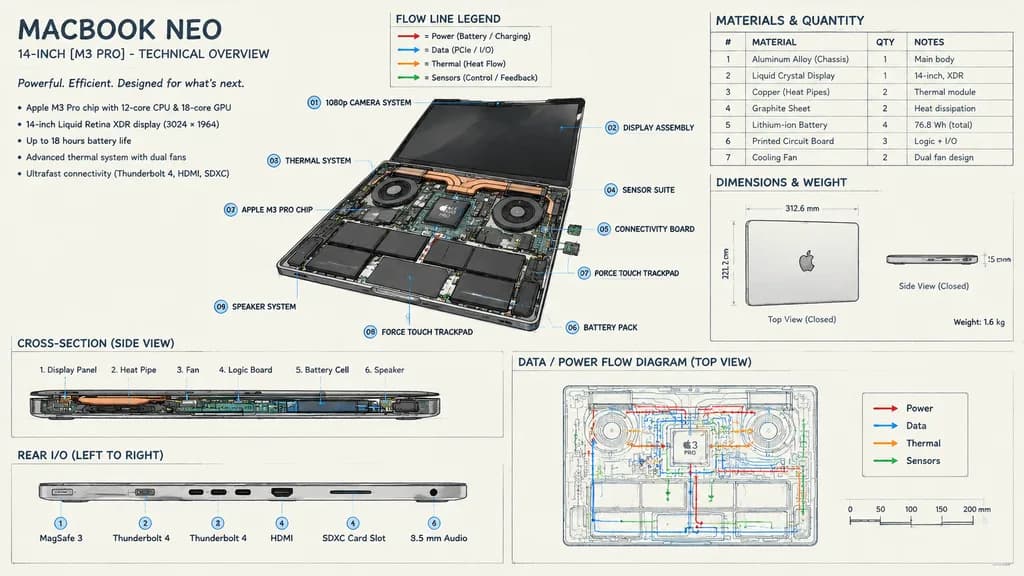
노트북 기술 개요 분해도 인포그래픽
내부 하드웨어 구성 요소 설명선과 흐름도가 포함된 정밀한 기술 사양 인포그래픽을 생성합니다. 기기 모델명, 프로세서 및 강조 색상을 자유롭게 변경하세요.
인포그래픽설계도도면노트북 하드웨어기술 스케치분해도
프롬프트
{
  "type": "technical overview infographic",
  "style": "[hand-drawn technical sketch with clean typography]",
  "product": {
    "name": "[MACBOOK NEO]",
    "subtitle": "14-INCH [M3 PRO] - TECHNICAL OVERVIEW"
  },
  "layout": {
    "centerpiece": {
      "description": "isometric view of an opened laptop revealing internal hardware components like dual fans, copper heat pipes, battery cells, and logic board",
      "callouts_count": 9,
      "callout_labels": [
        "01 1080p CAMERA SYSTEM",
        "02 DISPLAY ASSEMBLY",
        "03 THERMAL SYSTEM",
        "04 SENSOR SUITE",
        "05 CONNECTIVITY BOARD",
        "06 BATTERY PACK",
        "07 [APPLE M3 PRO CHIP]",
        "08 FORCE TOUCH TRACKPAD",
        "09 SPEAKER SYSTEM"
      ]
    },
    "sections": [
      {
        "title": "Header Text",
        "position": "top-left",
        "content": "Marketing blurb and 5-bullet specification list"
      },
      {
        "title": "Legend",
        "position": "top-center",
        "content": "4 color-coded arrows indicating [red, blue, orange, green] flow lines for Power, Data, Thermal, and Sensors"
      },
      {
        "title": "MATERIALS & QUANTITY",
        "position": "top-right",
        "type": "table",
        "rows_count": 7,
        "columns": [
          "#",
          "MATERIAL",
          "QTY",
          "NOTES"
        ]
      },
      {
        "title": "DIMENSIONS & WEIGHT",
        "position": "mid-right",
        "content": "Top and side views of closed laptop with measurements"
      },
      {
        "title": "CROSS-SECTION (SIDE VIEW)",
        "position": "bottom-left (top half)",
        "content": "Side profile showing internal component layout with 6 labels"
      },
      {
        "title": "REAR I/O (LEFT TO RIGHT)",
        "position": "bottom-left (bottom half)",
        "content": "Side profile showing 6 ports"
      },
      {
        "title": "DATA / POWER FLOW DIAGRAM (TOP VIEW)",
        "position": "bottom-right",
        "content": "Wireframe top-down view with colored flow lines, legend, and scale bar"
      }
    ]
  }
}바꿔 쓸 수 있는 부분
생성하기 전에 프롬프트의 이 부분을 원하는 주제나 문구로 바꿔 보세요.
[hand-drawn technical sketch with clean typography]자리 표시자[MACBOOK NEO]자리 표시자[M3 PRO]자리 표시자[APPLE M3 PRO CHIP]자리 표시자[red, blue, orange, green]자리 표시자
프롬프트 정보
- 카테고리
- 인포그래픽 / 교육
- 모델
- GPT IMAGE 2
- 이미지당 비용
- 1K: 43 크레딧 · 2K: 86 크레딧 · 4K: 143 크레딧
- 화면 비율
- 16:9
- 추가일