
인포그래픽 / 교육
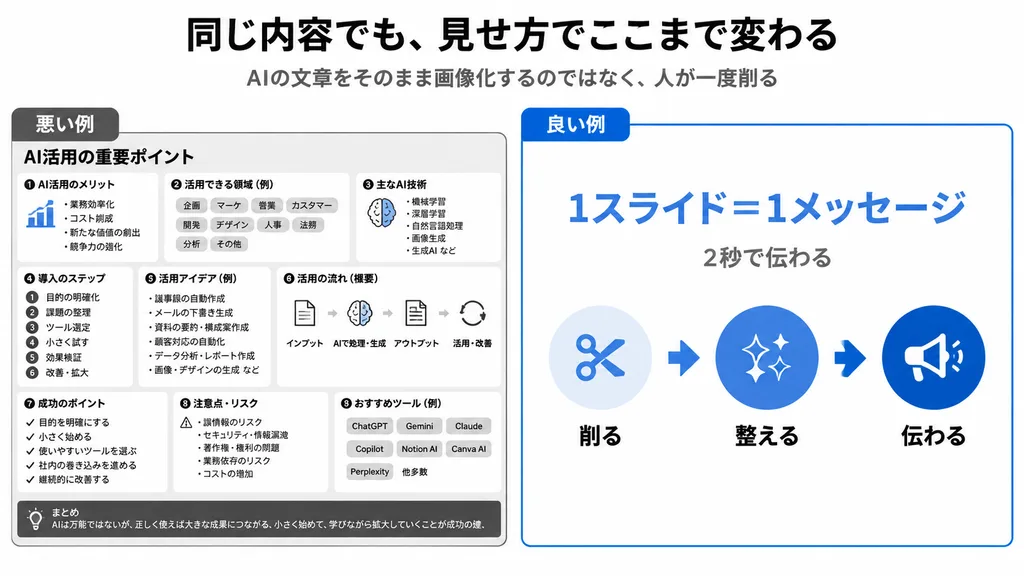
일본식 슬라이드 디자인 비교 인포그래픽
이 프롬프트는 나쁜 슬라이드와 좋은 슬라이드의 시각적 계층 구조를 좌우로 비교하는 프레젠테이션을 생성합니다. 헤드라인과 핵심 메시지를 변경하여 맞춤 설정할 수 있습니다.
인포그래픽슬라이드 디자인프레젠테이션일본어 타이포그래피비즈니스미니멀비교
프롬프트
{
  "type": "clean Japanese presentation infographic comparing bad and good slide design",
  "format": "wide 16:9 slide, white background, minimalist corporate style",
  "headline": "[同じ内容でも、見せ方でここまで変わる]",
  "subtitle": "[AIの文章をそのまま画像化するのではなく、人が一度削る]",
  "layout": {
    "top": "large bold black Japanese headline centered, smaller gray subtitle centered underneath",
    "comparison_panels": [
      {
        "title": "悪い例",
        "position": "left half",
        "style": "dense monochrome black and gray boxed slide with many tiny sections, intentionally cluttered and hard to read",
        "main_heading": "AI活用の重要ポイント",
        "section_count": 9,
        "sections": [
          {
            "label": "AI活用のメリット",
            "description": "small list with a tiny blue bar chart icon"
          },
          {
            "label": "活用できる領域(例)",
            "description": "row of many pill tags such as 企画, マーケ, 営業, カスタマー, 開発, デザイン, 人事, 法務, 分析, その他"
          },
          {
            "label": "主なAI技術",
            "description": "compact bullet list with a small brain icon"
          },
          {
            "label": "導入のステップ",
            "description": "numbered vertical list of 6 steps: 1 目的の明確化, 2 課題の整理, 3 ツール選定, 4 小さく試す, 5 効果検証, 6 改善・拡大"
          },
          {
            "label": "活用アイデア(例)",
            "description": "dense bullet list of use cases"
          },
          {
            "label": "活用の流れ(概要)",
            "description": "horizontal process diagram with 5 icons connected by arrows: インプット, AIで処理・生成, アウトプット, 活用・改善"
          },
          {
            "label": "成功のポイント",
            "description": "checklist of 5 short items"
          },
          {
            "label": "注意点・リスク",
            "description": "warning triangle and risk bullet list"
          },
          {
            "label": "おすすめツール(例)",
            "description": "small buttons for ChatGPT, Gemini, Claude, Copilot, Notion AI, Canva AI, Perplexity plus 他多数"
          }
        ],
        "bottom_note": "まとめ AIは万能ではないが、正しく使えば大きな成果につながる。小さく始めて、学びながら拡大していくことが成功の鍵。"
      },
      {
        "title": "良い例",
        "position": "right half",
        "style": "simple spacious white card with thin blue border and a blue title tab",
        "main_message": "[1スライド=1メッセージ]",
        "sub_message": "[2秒で伝わる]",
        "visual_flow": {
          "count": 3,
          "items": [
            {
              "label": "削る",
              "icon": "scissors in pale blue circle"
            },
            {
              "label": "整える",
              "icon": "sparkles in medium blue circle"
            },
            {
              "label": "伝わる",
              "icon": "megaphone in dark blue circle"
            }
          ],
          "connectors": "two thick blue arrows between the three icons"
        }
      }
    ]
  },
  "colors": {
    "primary_blue": "#0057d8",
    "light_blue": "#d6ebff",
    "black": "#111111",
    "gray": "#555555"
  },
  "typography": "bold modern Japanese sans-serif, strong hierarchy, right side very readable, left side deliberately overloaded",
  "composition": "clear side-by-side contrast: cluttered bad example on the left and simplified good example on the right, with generous margins and crisp vector graphics"
}바꿔 쓸 수 있는 부분
생성하기 전에 프롬프트의 이 부분을 원하는 주제나 문구로 바꿔 보세요.
[同じ内容でも、見せ方でここまで変わる]자리 표시자[AIの文章をそのまま画像化するのではなく、人が一度削る]자리 표시자[1スライド=1メッセージ]자리 표시자[2秒で伝わる]자리 표시자
프롬프트 정보
- 카테고리
- 인포그래픽 / 교육
- 모델
- GPT IMAGE 2
- 이미지당 비용
- 1K: 43 크레딧 · 2K: 86 크레딧 · 4K: 143 크레딧
- 화면 비율
- 16:9
- 추가일