
인포그래픽 / 교육
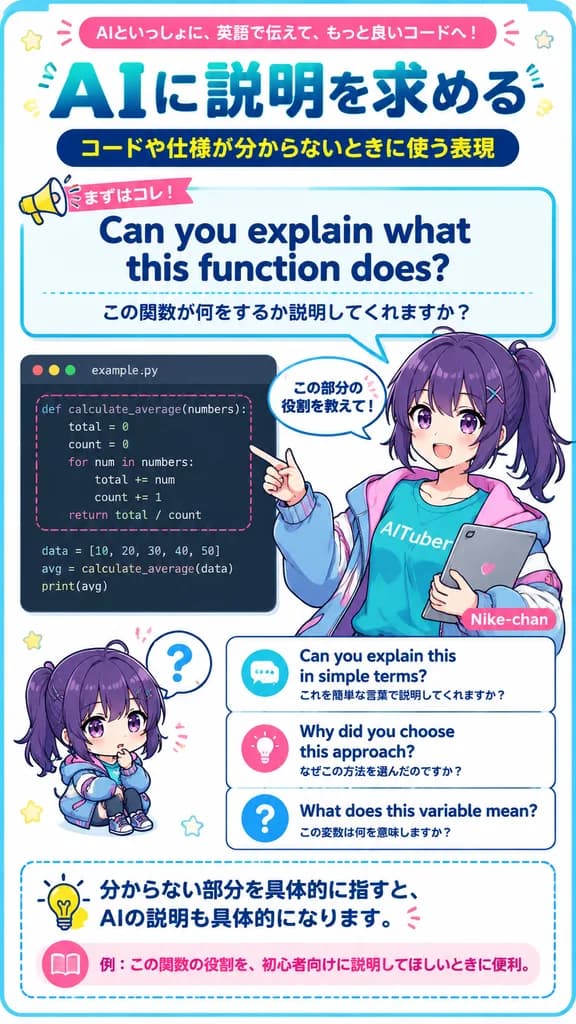
일본 애니메이션 스타일 영어 학습 인포그래픽 포스터
AI 코딩 도우미에게 질문할 때 쓰는 영어 표현을 안내하는 애니메이션 스타일 교육용 인포그래픽을 제작합니다. 주제, 예문, 캐릭터를 맞춤 설정할 수 있습니다.
인포그래픽애니메이션교육코딩일본풍포스터버튜버
프롬프트
{
  "type": "vertical Japanese educational infographic poster for English learning with AI coding assistant",
  "style": "bright clean anime magazine layout, crisp vector typography mixed with polished anime illustration, white background, rounded blue border, teal and navy gradients, pink accent ribbons, dotted divider lines, cute icons, high-resolution printable study material",
  "canvas": {
    "orientation": "portrait",
    "aspect_ratio": "9:16",
    "background": "white with thin rounded cyan frame and small decorative stars and emphasis marks"
  },
  "theme": {
    "headline_context": "practical English learning material for asking AI to explain code and specifications",
    "main_topic": "[AIに説明を求める]",
    "top_badge_text": "[AIといっしょに、英語で伝えて、もっと良いコードへ!]",
    "subtitle_text": "[コードや仕様が分からないときに使う表現]"
  },
  "layout": {
    "sections": [
      {
        "title": "top header",
        "position": "top",
        "elements": [
          "pink rounded banner with the top badge text",
          "huge Japanese headline in teal-to-navy gradient: AIに説明を求める",
          "dark navy pill subtitle with yellow Japanese text"
        ]
      },
      {
        "title": "main phrase speech panel",
        "position": "upper middle",
        "elements": [
          "small megaphone label reading まずはコレ!",
          "large English phrase: Can you explain what this function does?",
          "Japanese translation below: この関数が何をするか説明してくれますか?"
        ],
        "panel_style": "large rounded rectangle speech bubble outlined in cyan, pointing down toward the character"
      },
      {
        "title": "coding example panel",
        "position": "middle left",
        "elements": [
          "dark code editor window labeled example.py with three macOS-style dots and Python code for def calculate_average(numbers):, total=0, count=0, loop through numbers, return total/count, data list, avg calculation, print(avg); function block highlighted by pink dashed rounded rectangle"
        ]
      },
      {
        "title": "anime teacher character",
        "position": "middle right",
        "elements": [
          "female anime AI-tuber teacher with [deep purple] hair in a high side ponytail, teal T-shirt reading AITuber, oversized blue-and-pink jacket, holding a gray tablet with a heart icon, pointing at the code panel",
          "small speech bubble near her hand reading この部分の役割を教えて!"
        ],
        "character": {
          "name": "[Nike-chan]",
          "hair_color": "[deep purple]",
          "outfit": "teal AITuber shirt, pastel cyber jacket, casual friendly educator look"
        }
      },
      {
        "title": "chibi reaction character",
        "position": "lower left",
        "elements": [
          "small seated chibi version of the same purple-haired character, puzzled expression, question mark speech bubble above head"
        ]
      },
      {
        "title": "alternative phrase cards",
        "position": "lower middle right",
        "labels": [
          "Can you explain this in simple terms? / これを簡単な言葉で説明してくれますか?",
          "Why did you choose this approach? / なぜこの方法を選んだのですか?",
          "What does this variable mean? / この変数は何を意味しますか?"
        ],
        "card_style": "three stacked rounded white cards with blue outlines, dotted separators, and circular icons: chat bubble, light bulb, question mark"
      },
      {
        "title": "bottom advice box",
        "position": "bottom",
        "elements": [
          "dashed rounded blue advice box with light bulb icon and Japanese sentence: 分からない部分を具体的に指すと、AIの説明も具体的になります。",
          "bottom example strip with pink book icon and text: 例:この関数の役割を、初心者向けに説明してほしいときに便利。"
        ]
      }
    ]
  },
  "composition": "dense but readable educational poster; strong typography hierarchy with the English example phrase centered as the main learning point; character overlaps the code panel and phrase cards slightly to create depth",
  "rendering_notes": "Use accurate Japanese typography, clean sans-serif fonts, thick rounded outlines, vibrant cyan/navy/pink palette, cute classroom-tech atmosphere, no photorealism, preserve all listed visible text exactly."
}바꿔 쓸 수 있는 부분
생성하기 전에 프롬프트의 이 부분을 원하는 주제나 문구로 바꿔 보세요.
[AIに説明を求める]자리 표시자[AIといっしょに、英語で伝えて、もっと良いコードへ!]자리 표시자[コードや仕様が分からないときに使う表現]자리 표시자[deep purple]자리 표시자[Nike-chan]자리 표시자
프롬프트 정보
- 카테고리
- 인포그래픽 / 교육
- 모델
- GPT IMAGE 2
- 이미지당 비용
- 1K: 43 크레딧 · 2K: 86 크레딧 · 4K: 143 크레딧
- 화면 비율
- 9:16
- 추가일