
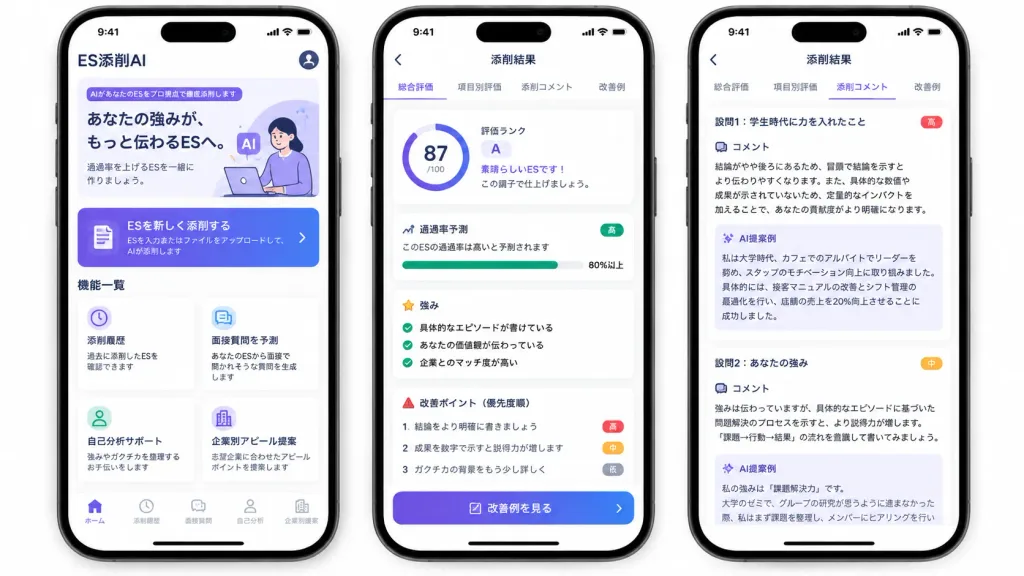
일본어 AI 자소서 첨삭 앱 UI 목업
세 대의 iPhone에 나란히 표시된 취업 자소서 첨삭 AI 앱 마케팅 목업입니다. 대괄호 안의 앱 이름, 점수, 등급을 수정하여 맞춤화할 수 있습니다.
프롬프트
A polished marketing mockup for a Japanese mobile app called [ES添削AI], an AI entry-sheet critique tool for job-hunting students, presented on three modern black-framed iPhones displayed side-by-side on an isolated white background. Composition & Layout: Wide horizontal 16:9 framing showing exactly three smartphones with subtle drop shadows, rounded corners, top Dynamic Island displaying status bar time 9:41, and bottom iOS home indicators. Clean UI cards, soft elevation shadows, and a purple-to-indigo gradient visual identity. Phone 1 (Home Screen): - Top header: text "ES添削AI" at top left, circular profile icon at top right. - Hero card: purple tag reading "AIがあなたのESをプロ視点で徹底添削します", bold headline "あなたの強みが、もっと伝わるESへ。", subtext "通過率を上げるESを一緒に作りましょう。", and a minimal graphic of a student working on a laptop with lavender AI badges. - Primary CTA button: gradient card with document icon reading "ESを新しく添削する" and small text "ESを入力またはファイルをアップロードして、AIが添削します" with a right chevron. - Feature grid section titled "機能一覧" with exactly four white cards: 1) Clock icon: "添削履歴" / "過去に添削したESを確認できます"; 2) Chat icon: "面接質問を予測" / "あなたのESから面接で聞かれそうな質問を生成します"; 3) User icon: "自己分析サポート" / "強みやガクチカを整理するお手伝いをします"; 4) Building icon: "企業別アピール提案" / "志望企業に合わせたアピールポイントを提案します". - Bottom tab bar with 5 items: "ホーム" (active), "添削履歴", "面接質問", "自己分析", "企業別提案". Phone 2 (Results Overview Screen): - Top navigation bar: back arrow and centered title "添削結果". - Tab bar with 4 items: "総合評価" (active with purple underline), "項目別評価", "添削コメント", "改善例". - Overall evaluation card: circular progress score ring showing "[87]/100", alongside text "評価ランク", large letter "[A]", "素晴らしいESです!", and "この調子で仕上げましょう。". - Pass rate card: title "通過率予測", text "このESの通過率は高いと予測されます", green badge "高", progress bar filled to "80%以上". - Strengths section: title "強み" with 3 green checkmark items: "具体的なエピソードが書けている", "あなたの価値観が伝わっている", "企業とのマッチ度が高い". - Areas for improvement: title "改善ポイント(優先度順)" with 3 items: 1 "結論をより明確に書きましょう" (red badge "高"), 2 "成果を数字で示すと説得力が増します" (orange badge "中"), 3 "ガクチカの背景をもう少し詳しく" (gray badge "低"). - Bottom gradient button: "改善例を見る". Phone 3 (Detailed Critique Screen): - Top navigation bar: back arrow and title "添削結果", repeating the 4 tabs with "添削コメント" active. - Two stacked white critique cards: 1. Heading "設問1:学生時代に力を入れたこと" (red badge "高"), "コメント" analyzing conclusion placement and quantitative impact, followed by a pale lavender box titled "AI提案例" rewriting a cafe leadership experience with a 20% sales increase. 2. Heading "設問2:あなたの強み" (orange badge "中"), "コメント" advising evidence-based problem-solving structure, followed by an "AI提案例" box beginning "私の強みは『課題解決力』です。", slightly cut off at the bottom. Style: Modern Japanese iOS mobile app design, crisp Japanese typography, clean whitespace, subtle pastel accents, trustworthy and professional finish.
바꿔 쓸 수 있는 부분
생성하기 전에 프롬프트의 이 부분을 원하는 주제나 문구로 바꿔 보세요.
[ES添削AI]자리 표시자[87]자리 표시자[A]자리 표시자“ES添削AI”따옴표 안 문구“AIがあなたのESをプロ視点で徹底添削します”따옴표 안 문구“あなたの強みが、もっと伝わるESへ。”따옴표 안 문구“通過率を上げるESを一緒に作りましょう。”따옴표 안 문구“ESを新しく添削する”따옴표 안 문구
프롬프트 정보
- 카테고리
- UI / UX 디자인
- 모델
- GPT IMAGE 2
- 이미지당 비용
- 1K: 43 크레딧 · 2K: 86 크레딧 · 4K: 143 크레딧
- 화면 비율
- 16:9
- 추가일