
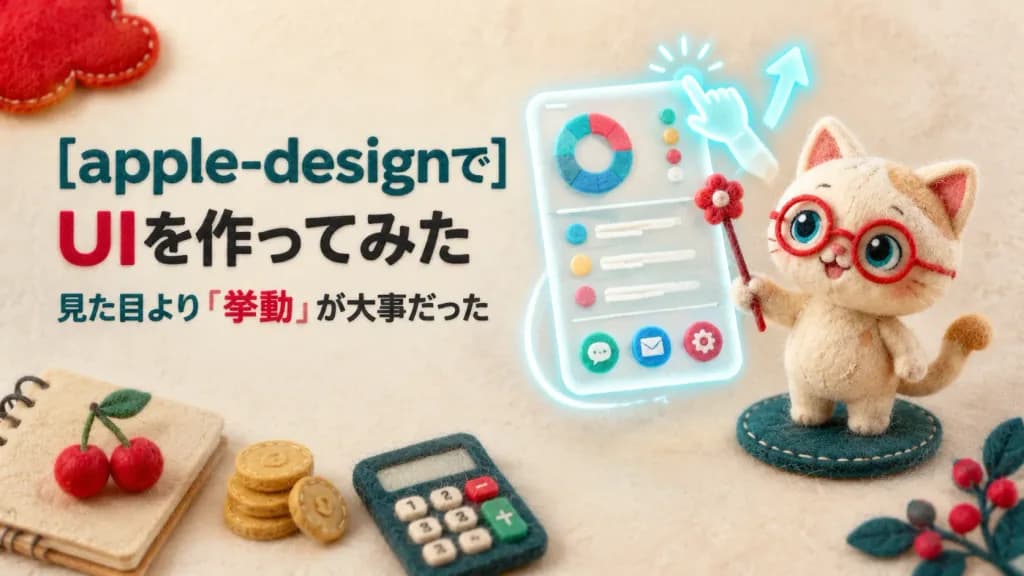
펠트 공예 애플 디자인 UI 배너
고양이 마스코트, 빛나는 모바일 UI 카드, 일본어 텍스트가 어우러진 양모 펠트풍 소셜 배너를 생성합니다. 디자인 홍보용으로 문구와 소품을 수정해보세요.
프롬프트
A wide social media banner in a handmade needle-felt craft style combining cozy tactile wool textures with a futuristic glowing interface mockup, set against a soft cream fabric background with shallow depth of field. Left side composition: Three left-aligned text lines in clean rounded sans-serif typography: - First line: "[apple-designで]" in large bold dark teal. - Second line: "[UIを作ってみた]" with "UI" in bright red and remaining characters in black. - Third line: "[見た目より「挙動」が大事だった]" in smaller dark teal and black, with "「挙動」" emphasized in red. Right side composition: A cream-colored needle-felt cat mascot wearing red round spectacles, featuring large teal-and-cream eyes, stitched edges, and a curved tail, standing on an oval felt base while holding a red pointer wand topped with a pom-pom flower. Beside and slightly behind the cat floats a tilted translucent frosted-glass mobile UI card glowing with pale cyan light, displaying a donut chart, three status dots, three list items, and three circular app icons. A glowing cyan gesture finger touches the top of the UI card, accompanied by an upward arrow and a sweeping motion trail curving downward to illustrate interaction. Craft props and framing: Six decorative felt props arranged along the borders: a beige spiral notebook with black wire binding at the bottom-left corner with two red felt cherries on top, a small stack of golden felt coins, a dark teal felt calculator with cream, red, and green buttons, a red felt cloud cropped at the top-left corner, and a dark teal leafy branch with red berries cropped at the bottom-right. Style and constraints: Tactile wool-felt diorama aesthetic, soft warm ambient lighting, clean Apple-inspired minimalism without any official Apple logos, no extra text, no watermarks, and no photorealistic human hands.
바꿔 쓸 수 있는 부분
생성하기 전에 프롬프트의 이 부분을 원하는 주제나 문구로 바꿔 보세요.
[apple-designで]자리 표시자[UIを作ってみた]자리 표시자[見た目より「挙動」が大事だった]자리 표시자“UI”따옴표 안 문구“「挙動」”따옴표 안 문구
프롬프트 정보
- 카테고리
- 소셜 미디어
- 모델
- GPT IMAGE 2
- 이미지당 비용
- 1K: 43 크레딧 · 2K: 86 크레딧 · 4K: 143 크레딧
- 화면 비율
- 16:9
- 추가일