
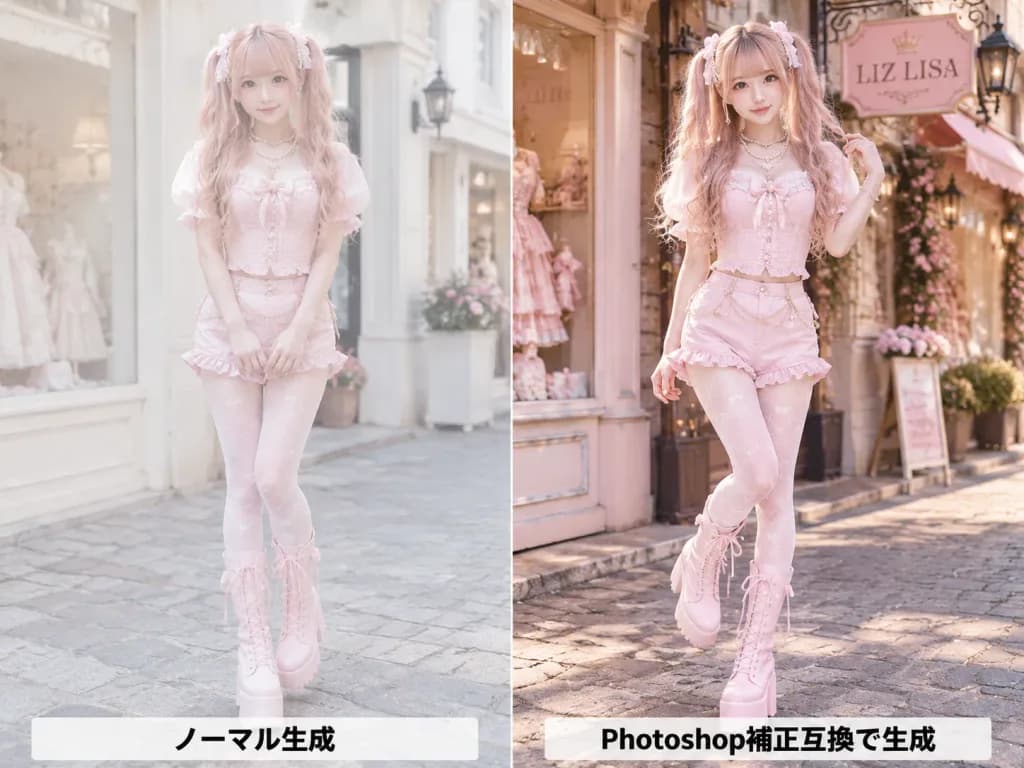
패션 포트레이트 색보정 비교
AI 원본 생성 결과와 색보정된 보정본을 나란히 비교하는 패션 화보를 생성합니다. 의상 색상, 헤어 컬러, 매장 간판 텍스트를 원하는 대로 변경해 보세요.
프롬프트
A side-by-side comparison image split exactly into two equal vertical panels with a sharp center dividing line, showing an AI-generated fashion portrait before and after color correction. Subject: A cute young Japanese fashion model with fair skin, long wavy twin-tail hair in [pink blonde], soft bangs, pearl and ribbon hair accessories, and glossy idol-style makeup. She wears a [pastel pink] corset top with puff sleeves, matching shorts, decorative waist chains, patterned tights, layered pearl necklaces, and tall lace-up platform boots. Setting & Composition: Full-body street-level perspective on a charming European boutique shopping street, shallow depth of field, 4:3 aspect ratio. Left Panel (Uncorrected): The model stands in front of a pale boutique facade with a gentle smile. Lighting and colors appear slightly flat, low-contrast, pale, airy, and softly washed out. A horizontal label in bold black text at the bottom reads "ノーマル生成". Right Panel (Color Corrected): The same model poses in front of a boutique featuring a hanging sign reading "[LIZ LISA]", placing one hand in her hair with one leg slightly bent. Professional retouched finish with richer contrast, warmer highlights, vibrant pinks, crisp details, and polished skin tones. A horizontal label in bold black text at the bottom reads "Photoshop補正互換で生成". Constraints: Both panels must depict the same fashion photoshoot session. Realistic anatomy, full-body framing, and no additional watermarks or borders other than the central vertical split.
바꿔 쓸 수 있는 부분
생성하기 전에 프롬프트의 이 부분을 원하는 주제나 문구로 바꿔 보세요.
[pink blonde]자리 표시자[pastel pink]자리 표시자[LIZ LISA]자리 표시자“ノーマル生成”따옴표 안 문구“Photoshop補正互換で生成”따옴표 안 문구
프롬프트 정보
- 카테고리
- 인물 및 사진
- 모델
- GPT IMAGE 2
- 이미지당 비용
- 1K: 43 크레딧 · 2K: 86 크레딧 · 4K: 143 크레딧
- 화면 비율
- 4:3
- 추가일