
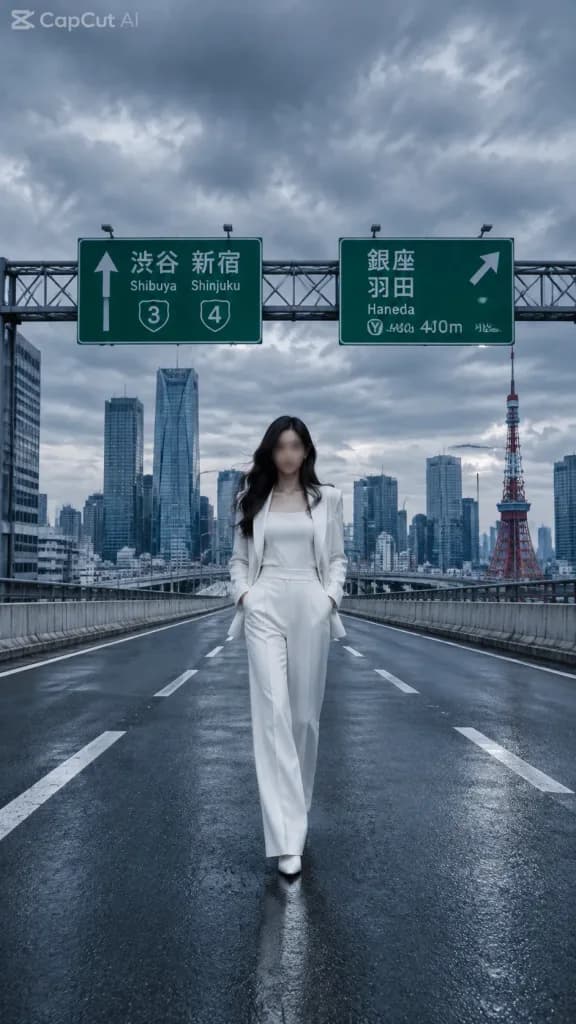
도쿄 고속도로 패션 에디토리얼
텅 빈 도쿄 고속도로 한가운데를 걷는 모델의 하이패션 화보를 생성합니다. 의상, 모델, 배경 랜드마크, 워터마크 텍스트를 맞춤 설정할 수 있습니다.
프롬프트
Cinematic editorial fashion photograph of [a stylish young woman] walking alone down the center of an empty elevated Tokyo expressway, appearing as if the Shuto Expressway was closed for a private shoot. She wears a crisp [all-white tailored pantsuit with a white top and white shoes], hands resting in trouser pockets, confident relaxed posture, full-body centered composition, long dark wavy hair, and face softly anonymized or blurred. The road surface is dark wet-look asphalt with strong perspective lines, crisp white lane markings, and concrete guardrails on both sides, with no vehicles or pedestrians. In the background, dense modern Tokyo skyscrapers and [Tokyo Tower] on the right rise beneath a dramatic cloudy gray sky. Overhead highway gantry features two green Japanese directional signs: one pointing straight with "Shibuya" and "Shinjuku" and route shields 3 and 4; one pointing right with "Ginza", "Haneda", route shield Y, and "400m". Cool blue-gray color grading, moody overcast lighting, wide-angle low street-level perspective, realistic lens depth, sharp architectural detail, high-fashion magazine aesthetic. Subtle semi-transparent "[CapCut AI]" watermark in the upper-left corner. No extra text.
바꿔 쓸 수 있는 부분
생성하기 전에 프롬프트의 이 부분을 원하는 주제나 문구로 바꿔 보세요.
[a stylish young woman]자리 표시자[all-white tailored pantsuit with a white top and white shoes]자리 표시자[Tokyo Tower]자리 표시자[CapCut AI]자리 표시자“Shibuya”따옴표 안 문구“Shinjuku”따옴표 안 문구“Ginza”따옴표 안 문구“Haneda”따옴표 안 문구
프롬프트 정보
- 카테고리
- 인물 및 사진
- 모델
- GPT IMAGE 2
- 이미지당 비용
- 1K: 43 크레딧 · 2K: 86 크레딧 · 4K: 143 크레딧
- 화면 비율
- 9:16
- 추가일