
인포그래픽 / 교육
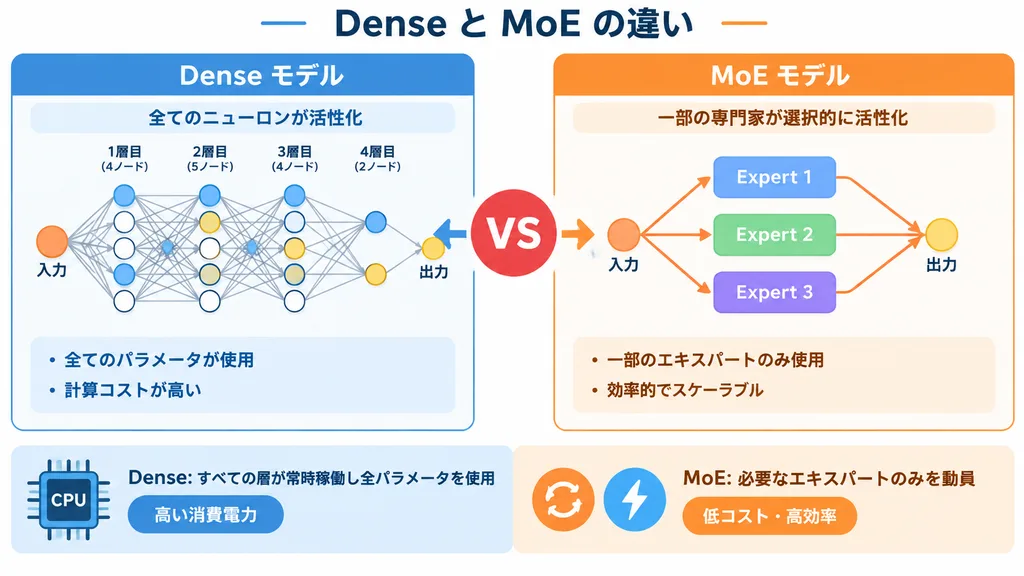
Dense 대 MoE 아키텍처 비교 인포그래픽
Dense 신경망과 MoE(전문가 혼합) 구조를 나란히 비교하는 기술 인포그래픽을 생성합니다. 대괄호 안의 텍스트를 수정해 적용할 수 있습니다.
인포그래픽신경망딥러닝아키텍처다이어그램ai비교기술일러스트
유사한 프롬프트 둘러보기인포그래픽 AI 프롬프트
프롬프트
{
  "type": "infographic comparison diagram",
  "header": {
    "title": "[Dense と MoE の違い]"
  },
  "layout": {
    "structure": "two main columns separated by a central VS badge, with a split footer at the bottom",
    "sections": [
      {
        "position": "left column",
        "theme_color": "blue",
        "header": "[Dense モデル]",
        "subtitle": "全てのニューロンが活性化",
        "diagram": {
          "type": "fully connected neural network",
          "elements": [
            "1 orange input node labeled 入力",
            "4 hidden layers with 4, 5, 4, and 2 nodes respectively",
            "nodes colored white, blue, and yellow",
            "dense intersecting connection lines between all adjacent nodes"
          ]
        },
        "bullet_points": [
          "[全てのパラメータが使用]",
          "計算コストが高い"
        ]
      },
      {
        "position": "right column",
        "theme_color": "orange",
        "header": "[MoE モデル]",
        "subtitle": "一部の専門家が選択的に活性化",
        "diagram": {
          "type": "mixture of experts network",
          "elements": [
            "1 orange input node labeled 入力",
            "3 rectangular blocks labeled Expert 1, Expert 2, Expert 3",
            "1 yellow output node labeled 出力",
            "branching arrows connecting input to experts, and experts to output"
          ]
        },
        "bullet_points": [
          "[一部のエキスパートのみ使用]",
          "効率的でスケーラブル"
        ]
      },
      {
        "position": "center",
        "element": "red circular badge with text VS",
        "connections": "blue arrow pointing left, orange arrow pointing right"
      },
      {
        "position": "footer left",
        "background": "light blue",
        "text": "Dense: すべての層が常時稼働し全パラメータを使用",
        "icon": "1 CPU chip graphic",
        "label": "高い消費電力"
      },
      {
        "position": "footer right",
        "background": "light orange",
        "text": "MoE: 必要なエキスパートのみを動員",
        "icons": "2 circular graphics (orange arrows, blue lightning bolt)",
        "label": "低コスト・高効率"
      }
    ]
  }
}바꿔 쓸 수 있는 부분
생성하기 전에 프롬프트의 이 부분을 원하는 주제나 문구로 바꿔 보세요.
[Dense と MoE の違い]자리 표시자[Dense モデル]자리 표시자[全てのパラメータが使用]자리 표시자[MoE モデル]자리 표시자[一部のエキスパートのみ使用]자리 표시자
프롬프트 정보
- 카테고리
- 인포그래픽 / 교육
- 모델
- GPT IMAGE 2
- 이미지당 비용
- 1K: 43 크레딧 · 2K: 86 크레딧 · 4K: 143 크레딧
- 화면 비율
- 16:9
- 추가일