
인포그래픽 / 교육
다크 테크 워크플로 인포그래픽 슬라이드
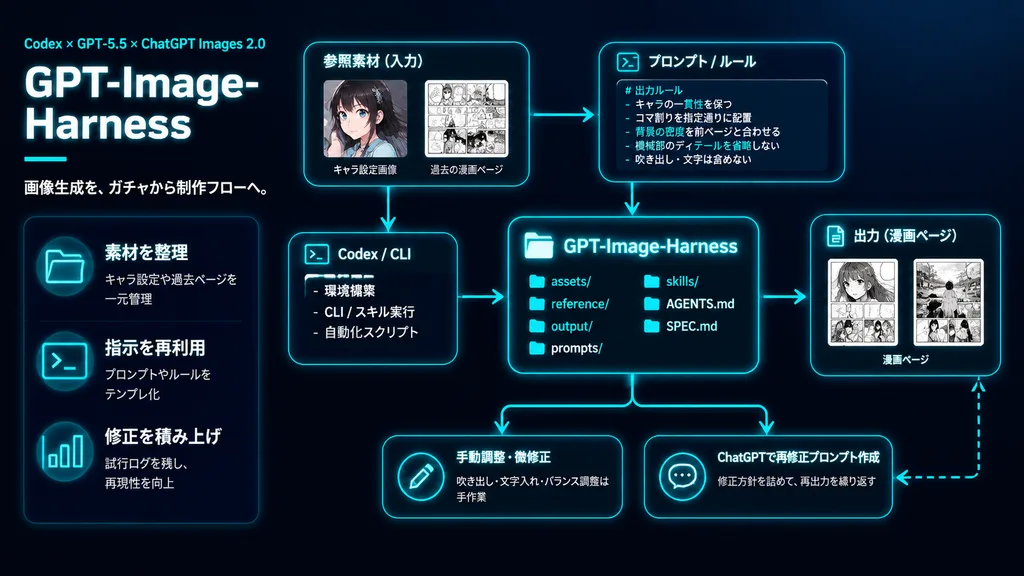
네온 시안 발광 UI 카드로 AI 이미지 제작 파이프라인을 도식화한 다크 모드 발표 슬라이드입니다. 노드 문구, 화살표 또는 브랜딩을 시스템에 맞춰 변경할 수 있습니다.
인포그래픽프레젠테이션다크모드ui카드워크플로파이프라인미래형
프롬프트
{
  "type": "dark tech workflow infographic",
  "style": "clean futuristic presentation slide, black to deep navy gradient background, neon cyan glow accents, thin cyan connector arrows, modern UI cards with rounded corners, subtle shadows, high-contrast white typography, polished tech startup presentation visual",
  "canvas": {
    "aspect_ratio": "16:9",
    "composition": "left-aligned title block with modular flow diagram across center and right"
  },
  "branding": {
    "topline": "Codex × GPT-5.5 × ChatGPT Images 2.0",
    "title": "GPT-Image-Harness",
    "subtitle": "画像生成を、ガチャから制作フローへ。"
  },
  "layout": {
    "sections": [
      {
        "title": "left feature list",
        "position": "left column",
        "count": 3,
        "labels": [
          "素材を整理",
          "指示を再利用",
          "修正を積み上げ"
        ]
      },
      {
        "title": "参照素材(入力)",
        "position": "upper center-left",
        "count": 2,
        "labels": [
          "キャラ設定画像",
          "過去の漫画ページ"
        ]
      },
      {
        "title": "プロンプト / ルール",
        "position": "upper center-right",
        "count": 1,
        "labels": [
          "# 出力ルール"
        ]
      },
      {
        "title": "Codex / CLI",
        "position": "middle left of center",
        "count": 3,
        "labels": [
          "環境構築",
          "CLI / スキル実行",
          "自動化スクリプト"
        ]
      },
      {
        "title": "GPT-Image-Harness",
        "position": "center",
        "count": 6,
        "labels": [
          "assets/",
          "reference/",
          "output/",
          "prompts/",
          "skills/",
          "AGENTS.md",
          "SPEC.md"
        ]
      },
      {
        "title": "出力(漫画ページ)",
        "position": "middle right",
        "count": 1,
        "labels": [
          "漫画ページ"
        ]
      },
      {
        "title": "bottom actions",
        "position": "bottom row",
        "count": 2,
        "labels": [
          "手動調整・微修正",
          "ChatGPTで再修正プロンプト作成"
        ]
      }
    ]
  },
  "left_panel": {
    "headline_scale": "very large",
    "title_weight": "bold extra-heavy",
    "decorative_line": "short horizontal cyan line under title block",
    "feature_items": [
      {
        "icon": "glowing cyan folder icon",
        "title": "素材を整理",
        "description": "キャラ設定や過去ページを一元管理"
      },
      {
        "icon": "glowing cyan terminal icon",
        "title": "指示を再利用",
        "description": "プロンプトやルールをテンプレ化"
      },
      {
        "icon": "glowing cyan bar chart icon",
        "title": "修正を積み上げ",
        "description": "試行ログを残し、再現性を向上"
      }
    ]
  },
  "diagram": {
    "nodes": [
      {
        "kind": "input card",
        "title": "参照素材(入力)",
        "visual": "two thumbnail cards, one character portrait preview, one monochrome manga page preview"
      },
      {
        "kind": "rule card",
        "title": "プロンプト / ルール",
        "visual": "code-styled card with bullet points",
        "body_text": [
          "# 出力ルール",
          "- キャラの一貫性を保つ",
          "- コマ割りを指定通りに配置",
          "- 背景の密度を前ページと合わせる",
          "- 機械部のディテールを省略しない",
          "- 吹き出し・文字は含めない"
        ]
      },
      {
        "kind": "tool card",
        "title": "Codex / CLI",
        "visual": "terminal UI card with prompt symbol >_ and task bullets"
      },
      {
        "kind": "repository card",
        "title": "GPT-Image-Harness",
        "visual": "central glowing cyan file directory panel"
      },
      {
        "kind": "output card",
        "title": "出力(漫画ページ)",
        "visual": "two manga page thumbnails side by side"
      },
      {
        "kind": "action card",
        "title": "手動調整・微修正",
        "visual": "pencil icon in circle",
        "description": "吹き出し・文字入れ・バランス調整は手作業"
      },
      {
        "kind": "action card",
        "title": "ChatGPTで再修正プロンプト作成",
        "visual": "chat bubble icon with three dots",
        "description": "修正方針を詰めて、再出力を繰り返す"
      }
    ],
    "connectors": "cyan glowing arrows routing input, rules, and CLI into central repository card; forward arrows to output card; downward arrows to bottom action cards; dashed cyan feedback loop returning from output to action area"
  },
  "typography": {
    "language": "Japanese",
    "title_color": "white",
    "accent_color": "bright cyan",
    "body_color": "#e0e6ed"
  },
  "lighting": "soft neon cyan rim light on UI cards and line indicators",
  "quality": "crisp vector diagram, perfectly aligned layout, sharp text rendering"
}프롬프트 정보
- 카테고리
- 인포그래픽 / 교육
- 모델
- GPT IMAGE 2
- 이미지당 비용
- 1K: 43 크레딧 · 2K: 86 크레딧 · 4K: 143 크레딧
- 화면 비율
- 16:9
- 추가일