
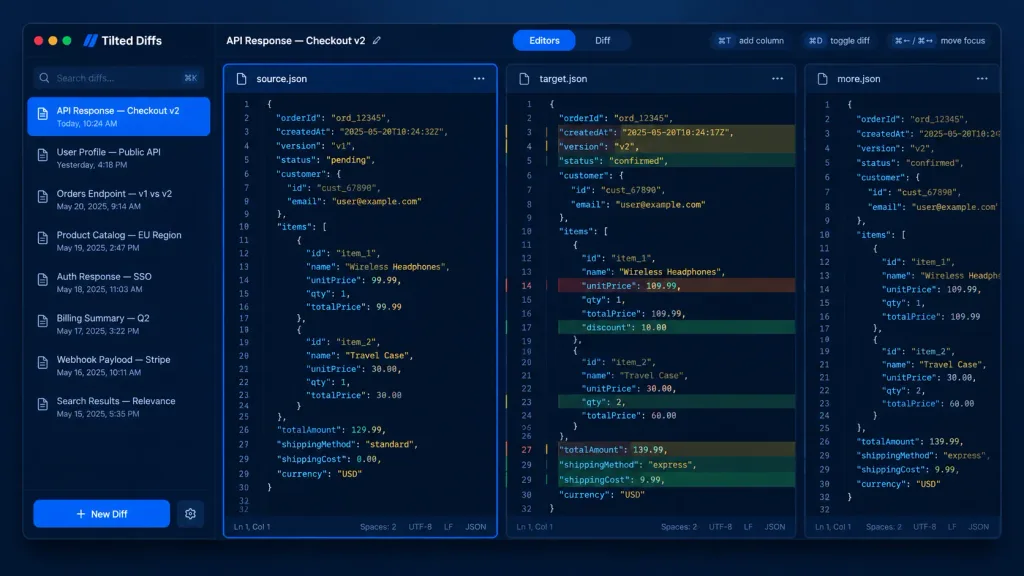
다크 모드 개발자 JSON 비교 툴 UI
다크 모드 기반의 다중 열 JSON 코드 비교 macOS 데스크톱 UI 목업을 생성합니다. 괄호 안의 앱 이름, 비교 제목, 코드 내용을 자유롭게 수정하세요.
프롬프트
A dark-mode desktop app UI mockup for a JSON diff tool named [Tilted Diffs], displaying an API response comparison titled [API Response — Checkout v2]. Canvas & Style: 16:10 desktop screenshot with a macOS-style app window floating on a dark bluish gradient background. Features subtle soft drop shadows, rounded corners, thin borders, and a polished developer-tool SaaS aesthetic. Crisp vector-like UI rendering with cobalt-blue accents, dark navy backgrounds, muted gray text, and perfectly aligned typography. No people, no watermarks, no external browser chrome. Layout: Divided into four main areas: a left sidebar, a top toolbar, and three vertical code editor panes side-by-side. The leftmost editor pane is selected with a glowing bright blue focus border. The middle pane displays inline colored diff highlights. The rightmost pane is narrow and partially visible, representing an extra comparison column. Left Sidebar: Top left features macOS traffic-light window controls (red, yellow, green circles). Below the app name is a search field with placeholder "Search diffs…" and a keyboard shortcut hint. Below that, an active list of 8 saved diff items with small document icons and timestamps: 1) "API Response — Checkout v2" with "Today, 10:24 AM" (highlighted in blue as active), 2) "User Profile — Public API" with "Yesterday, 4:18 PM", 3) "Orders Endpoint — v1 vs v2" with "May 20, 2025, 9:14 AM", 4) "Product Catalog — EU Region" with "May 19, 2025, 2:47 PM", 5) "Auth Response — SSO" with "May 18, 2025, 11:03 AM", 6) "Billing Summary — Q2" with "May 17, 2025, 3:22 PM", 7) "Webhook Payload — Stripe" with "May 16, 2025, 10:11 AM", 8) "Search Results — Relevance" with "May 15, 2025, 5:35 PM". At the bottom is a prominent blue "+ New Diff" button and a settings gear icon. Top Toolbar: Left side shows "API Response — Checkout v2" with an edit pencil icon. Center features a segmented tab control: active "Editors" tab in blue and inactive "Diff" tab. Right side includes compact shortcut pills: "⌘T add column", "⌘D toggle diff", and "⌘← / ⌘→ move focus". Editor Panes: Monospaced code font, line numbers (around 32 lines visible), JSON syntax highlighting, dark navy editor background, and thin borders. Pane tabs: left "source.json" with icon and menu; middle "target.json" with icon and menu; right "more.json" partially clipped. Each full pane has a bottom status bar showing "Ln 1, Col 1", "Spaces: 2", "UTF-8", "LF", and "JSON". Code Content: Shows order checkout JSON data. Left source has status "pending", totalAmount 129.99, Wireless Headphones unitPrice 99.99, Travel Case qty 1 at 30.00, standard shipping. Middle target shows diff row highlights with red removed lines, green added lines, and yellow modified lines: timestamp changed, version v2, status "confirmed", totalAmount 139.99, Wireless Headphones unitPrice 109.99 with 10.00 discount, Travel Case qty 2, and express shipping.
바꿔 쓸 수 있는 부분
생성하기 전에 프롬프트의 이 부분을 원하는 주제나 문구로 바꿔 보세요.
[Tilted Diffs]자리 표시자[API Response — Checkout v2]자리 표시자“Search diffs…”따옴표 안 문구“API Response — Checkout v2”따옴표 안 문구“Today, 10:24 AM”따옴표 안 문구“User Profile — Public API”따옴표 안 문구“Yesterday, 4:18 PM”따옴표 안 문구“Orders Endpoint — v1 vs v2”따옴표 안 문구
프롬프트 정보
- 카테고리
- UI / UX 디자인
- 모델
- GPT IMAGE 2
- 이미지당 비용
- 1K: 43 크레딧 · 2K: 86 크레딧 · 4K: 143 크레딧
- 화면 비율
- 16:9
- 추가일