
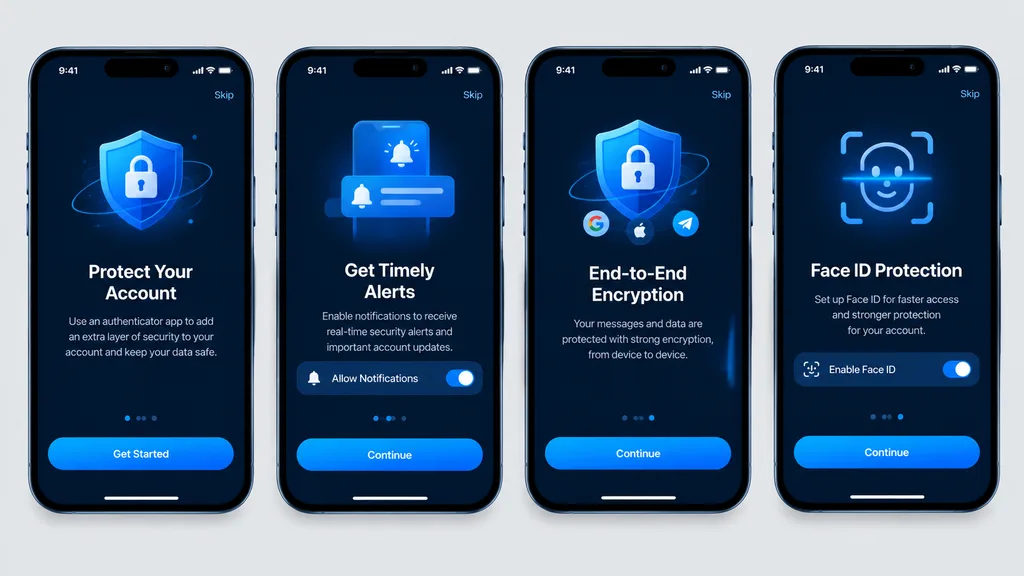
다크 모드 인증 앱 온보딩 목업
다크 모드 보안 앱 UI를 보여주는 4개 화면 모바일 온보딩 흐름입니다. 강조 색상, 버튼 문구, 기능 아이콘을 변경해 다양한 유틸리티 앱에 적용할 수 있습니다.
프롬프트
Clean, high-fidelity UI mockups recreating 4 mobile onboarding screens based on the reference design, rendered as direct digital graphic mockups without perspective distortion, glare, or device surroundings. The four [iPhone-style] smartphone frames are aligned front-facing and evenly spaced in a single horizontal row on a [light gray] background canvas. Dark mode theme featuring a [blue security visual style], rounded phone bezels, top status bars, top skip links, and bottom home indicators. From left to right, exactly 4 screens: 1. Authenticator account protection screen with main call-to-action button labeled "[Get Started]". 2. Timely alerts screen featuring a notification permission toggle switch and a button labeled "[Continue]". 3. End-to-end encryption screen featuring a shield and lock graphic, social icons, and a button labeled "[Continue]". 4. Face ID protection quick setup screen featuring a biometric scan overlay graphic, activation toggle, and a button labeled "[Continue]". Crisp vector typography, consistent spacing, sharp readable text, and polished app store presentation quality.
바꿔 쓸 수 있는 부분
생성하기 전에 프롬프트의 이 부분을 원하는 주제나 문구로 바꿔 보세요.
[iPhone-style]자리 표시자[light gray]자리 표시자[blue security visual style]자리 표시자[Get Started]자리 표시자[Continue]자리 표시자
프롬프트 정보
- 카테고리
- UI / UX 디자인
- 모델
- GPT IMAGE 2
- 이미지당 비용
- 1K: 43 크레딧 · 2K: 86 크레딧 · 4K: 143 크레딧
- 화면 비율
- 16:9
- 추가일