
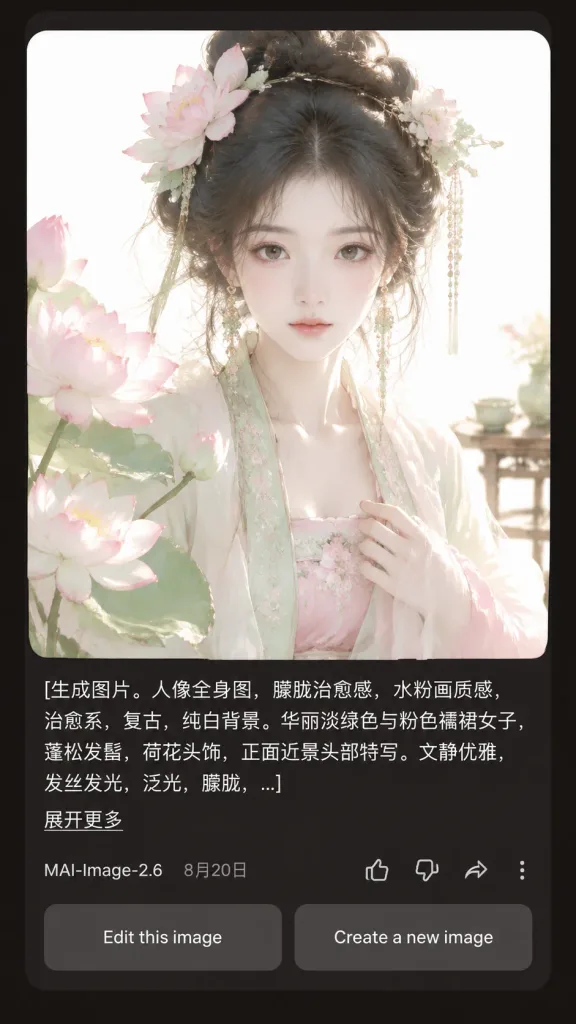
다크 모드 AI 생성 결과 인터페이스
AI 인물 사진 생성 결과 카드가 포함된 사실적인 다크 모드 모바일 UI 스크린샷을 생성합니다. 인물 설명과 프롬프트 텍스트를 원하는 대로 수정해보세요.
프롬프트
A realistic mobile app screenshot showing an AI image generation result card in dark mode, set against a dark charcoal-brown app background with rounded card borders and generous margins. Main content: - Top card: A large square portrait with rounded corners featuring [a beautiful young woman in pale green and pink Hanfu, lotus-flower hair ornaments, loose black updo, delicate dangling jewelry, soft melancholic expression, facing forward in a close-up half-body composition]. Style of the portrait: ethereal, vintage, soft pale watercolor-like, diffused daylight, glowing hair strands, translucent silk fabrics, pure white background, pastel lotus blossoms in the left foreground, a pale blossom hair ornament on the right, and a subtle tea table detail in the right background. - Prompt text block below image: Left-aligned white text spanning three lines ending in an ellipsis with the exact text: "[生成图片。人像全身图,朦胧治愈感,水粉画质感,治愈系,复古,纯白背景。华丽淡绿色与粉色襦裙女子,蓬松发髻,荷花头饰,正面近景头部特写。文静优雅,发丝发光,泛光,朦胧,...]". Beneath it, a small underlined link reads "[展开更多]". - Metadata row: Displays "[MAI-Image-2.6]" on the left next to date "[8月20日]". On the right, four outline icons: thumbs up, thumbs down, share arrow, and a vertical three-dot menu. - Bottom action buttons: Two side-by-side rounded rectangular gray buttons reading "Edit this image" and "Create a new image". Style: Crisp mobile UI typography, realistic app rendering, balanced dark mode layout, high visual contrast between the glowing pastel portrait and dark UI background.
바꿔 쓸 수 있는 부분
생성하기 전에 프롬프트의 이 부분을 원하는 주제나 문구로 바꿔 보세요.
[展开更多]자리 표시자[MAI-Image-2.6]자리 표시자[8月20日]자리 표시자“. Beneath it, a small underlined link reads”따옴표 안 문구“Edit this image”따옴표 안 문구“Create a new image”따옴표 안 문구
프롬프트 정보
- 카테고리
- UI / UX 디자인
- 모델
- GPT IMAGE 2
- 이미지당 비용
- 1K: 43 크레딧 · 2K: 86 크레딧 · 4K: 143 크레딧
- 화면 비율
- 9:16
- 추가일