
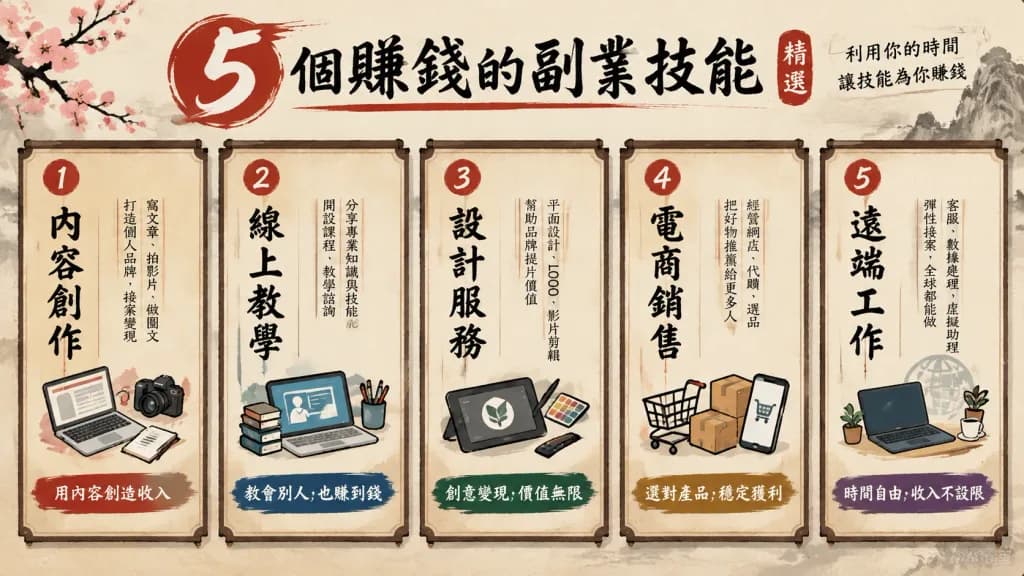
크리에이티브 다이어그램 인포그래픽 템플릿
메뉴판, 처방전, 대시보드 등 5가지 테마 스타일의 구조화된 다이어그램을 생성합니다. 대괄호 안의 주제와 지표를 원하는 내용으로 변경해 보세요.
프롬프트
Create an infographic diagram based on one of the following visual formats: 1. Menu Style: A diagram displaying "5 selected [skills to earn money with side jobs]" designed as a traditional Japanese restaurant menu. Features vertical Japanese-style typography, expressive brush strokes, calligraphic accents, and a textured washi paper background. 2. Prescription Style: A diagram illustrating "[correct way to use AI]" in the visual layout of a clinical medical prescription. Includes a prominent "Rx" symbol, clean white background, minimalist grid lines, and medical blue accent colors. 3. Boarding Pass Style: A graphic comparison showing "[life without AI] → [life after AI utilization]" formatted as an airline boarding pass. Includes clear departure and destination airport-style fields, flight gate details, seat assignment, and a readable barcode. 4. Dashboard UI Style: A comparative performance infographic for "[ChatGPT vs Claude]" rendered as a modern dark mode software dashboard UI. Features sleek KPI metric cards, comparative bar charts, graphs, and refined glowing neon accent indicators. 5. Diagnosis Chart Style: A decision tree flowchart helping users find the right "[AI tool]" for their needs. Formatted as a clear Yes/No branching diagnostic flowchart with directional arrows, labeled pathways, and organized color-coded nodes.
바꿔 쓸 수 있는 부분
생성하기 전에 프롬프트의 이 부분을 원하는 주제나 문구로 바꿔 보세요.
[skills to earn money with side jobs]자리 표시자[correct way to use AI]자리 표시자[life without AI]자리 표시자[life after AI utilization]자리 표시자[ChatGPT vs Claude]자리 표시자[AI tool]자리 표시자“5 selected [skills to earn money with side jobs]”따옴표 안 문구“Rx”따옴표 안 문구
프롬프트 정보
- 카테고리
- 인포그래픽 / 교육
- 모델
- Nano Banana 2
- 이미지당 비용
- 1K: 54 크레딧 · 2K: 81 크레딧 · 4K: 122 크레딧
- 화면 비율
- 16:9
- 추가일