
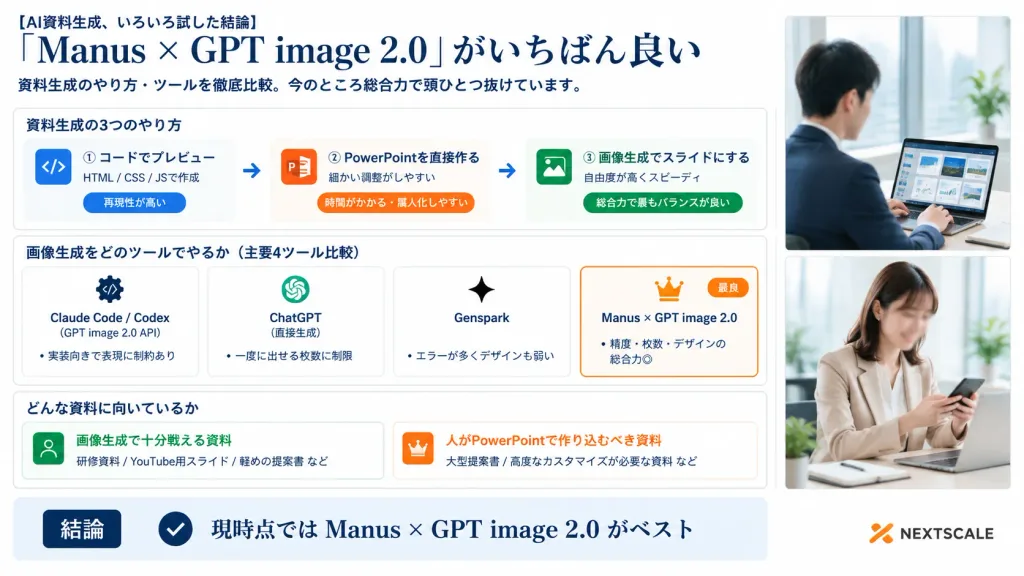
기업용 AI 슬라이드 툴 비교 인포그래픽
정돈된 카드 레이아웃과 사진 패널이 포함된 16:9 일본식 비즈니스 비교 슬라이드를 생성합니다. 대괄호 안의 헤드라인, 툴 평가 및 결론 문구를 맞춤 설정할 수 있습니다.
프롬프트
A polished Japanese business infographic presentation slide in 16:9 widescreen format, with a corporate white background, deep navy typography, thin light-gray card borders, subtle blue-gray shadows, and an accent palette of navy, orange, and vibrant green. Layout and Structure: - Left and Center (76% width): Main infographic content organized into a clear header, three structured sections, and a bottom summary bar. - Right Side (24% width): A vertical panel containing exactly two stacked realistic corporate lifestyle photos with soft bright office lighting and clean white borders. Top photo shows a Japanese businessman in a navy suit working on a laptop displaying slide thumbnails near a window (face softly blurred). Bottom photo shows a Japanese businesswoman in a beige blazer checking a smartphone at her desk (face softly blurred). Header (Top Left): - Small lead-in text: "[AI資料生成、いろいろ試した結論]" - Large elegant serif headline: "[「Manus × GPT image 2.0」がいちばん良い]" - Subtitle below: "[資料生成のやり方・ツールを徹底比較。今のところ総合力で頭ひとつ抜けています。]" Section 1 (Card titled "資料生成の3つのやり方"): Contains three horizontal method cards connected by two right-pointing arrows: 1. Blue code icon | "① コードでプレビュー" | "HTML / CSS / JSで作成" | pill tag "再現性が高い" 2. Orange PowerPoint icon | "② PowerPointを直接作る" | "細かい調整がしやすい" | pill tag "時間がかかる・属人化しやすい" 3. Green image icon | "③ 画像生成でスライドにする" | "自由度が高くスピーディ" | pill tag "総合力で最もバランスが良い" Section 2 (Card titled "画像生成をどのツールでやるか(主要4ツール比較)"): Contains four equal comparison cards side-by-side: 1. "Claude Code / Codex" | gear/code icon | "(GPT image 2.0 API)" | bullet "実装向きで表現に制約あり" 2. "ChatGPT" | OpenAI knot icon | "(直接生成)" | bullet "一度に出せる枚数に制限" 3. "Genspark" | sparkle icon | bullet "エラーが多くデザインも弱い" 4. Featured card with an orange border, crown icon, and small orange "最良" badge | "[Manus × GPT image 2.0]" | bullet "精度・枚数・デザインの総合力◎" Section 3 (Card titled "どんな資料に向いているか"): Two side-by-side cards: - Left card with green user icon | "画像生成で十分戦える資料" | examples "研修資料 / YouTube用スライド / 軽めの提案書 など" - Right card with orange crown icon | "人がPowerPointで作り込むべき資料" | examples "大型提案書 / 高度なカスタマイズが必要な資料 など" Bottom Bar: Full-width light-blue conclusion strip with a dark navy badge reading "結論", a circular checkmark icon, and large bold text reading "[現時点では Manus × GPT image 2.0 がベスト]". At the bottom right corner, a subtle orange abstract logo mark with dark gray text reading "NEXTSCALE". Crisp Japanese corporate graphic design, sharp typography, precise grid alignment.
바꿔 쓸 수 있는 부분
생성하기 전에 프롬프트의 이 부분을 원하는 주제나 문구로 바꿔 보세요.
[AI資料生成、いろいろ試した結論]자리 표시자[「Manus × GPT image 2.0」がいちばん良い]자리 표시자[資料生成のやり方・ツールを徹底比較。今のところ総合力で頭ひとつ抜けています。]자리 표시자[Manus × GPT image 2.0]자리 표시자[現時点では Manus × GPT image 2.0 がベスト]자리 표시자“資料生成の3つのやり方”따옴표 안 문구“① コードでプレビュー”따옴표 안 문구“HTML / CSS / JSで作成”따옴표 안 문구
프롬프트 정보
- 카테고리
- 인포그래픽 / 교육
- 모델
- GPT IMAGE 2
- 이미지당 비용
- 1K: 43 크레딧 · 2K: 86 크레딧 · 4K: 143 크레딧
- 화면 비율
- 16:9
- 추가일